45
PRODUCT PARTS
1
2
3
4
5
6
7
8
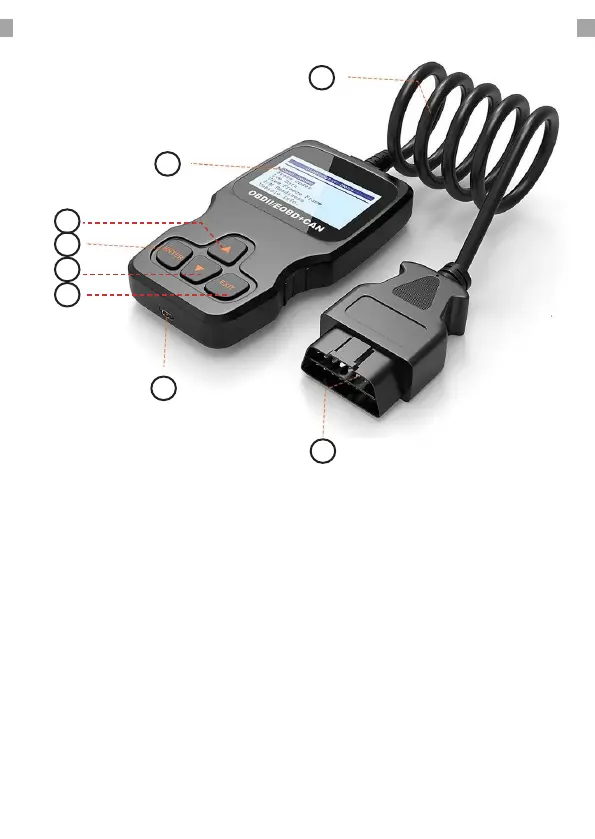
1. CABLE: Length 80 cm
2. LCD DISPLAY: Indicates test results (Backlit,
128x64 pixels with contrast adjustment).
3. UP SCROLL BUTTON: Move up through
the menu and submenu items in menu
mode. When more than one screen of data
is retrieved, move up through the current
screen to the previous screen for additional
data.
4. ENTER BUTTON: Conrms a selection (or
action) from a menu.
5. DOWN SCROLL BUTTON: Move down
through the menu and submenu items in
menu mode. When more than one screen
of data is retrieved, move down through
the current screen to the next screen for
additional data.
6. EXIT BUTTON: Cancels a selection (or action)
from a menu or returns to the menu.
7. Mini-B USB PORT: Connects the pc and the
device with a USB cable.
8. OBD2 CONNECTOR: Connects the scanner to
the vehicle’s Data Link Connector (DLC).


 To Next Page