10
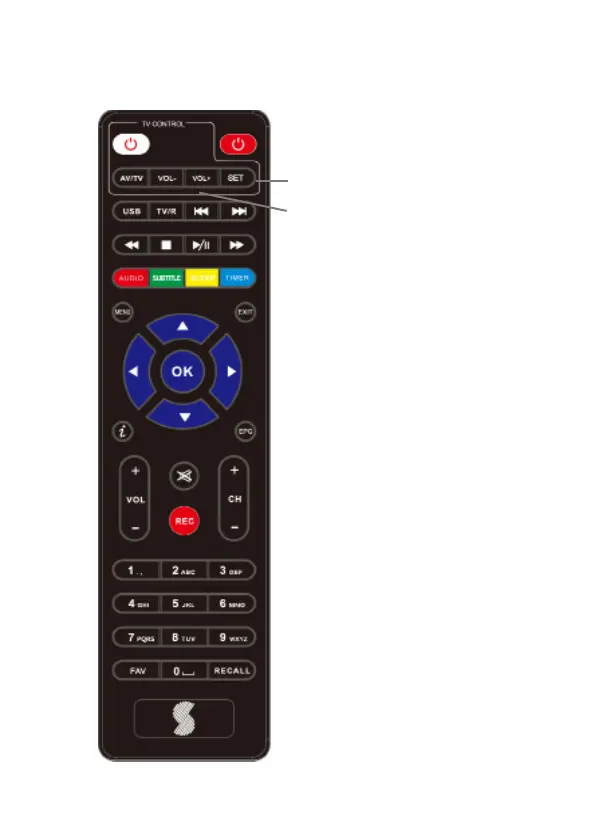
2.4 Activate the learning remote function
1. Press and hold SET button
(1) in TV CONTROL area for
3 seconds. The red LED light
on the TV CONTROL POWER
button will glow brighter,
conrming remote is in
learning mode.
2. Then press any one of the
learning buttons, within 10
seconds, on this remote (2)
(AV/TV, Vol+ VOl- or Power),
the LED light will icker,
conrming readiness to accept
codes from the TV remote.
3. Aim the TV remote (top end)
against this remote, as close as
possible, and press and hold
the corresponding button on
the TV remote. (AV/TV, Vol+,
Vol- or Power).
4. If copy is successful, the LED
light on TV control POWER
Button will ash three times
before staying lit.
5. Repeat 2,3 and 4 for every
other key you wish to copy,
(AV/TV, Vol+, Vol- or Power).
6. Once copying is complete,
press the SET key again, to exit
the learning mode. The LED
light will go out.
2
1



 To Next Page