7
2. Product Overview
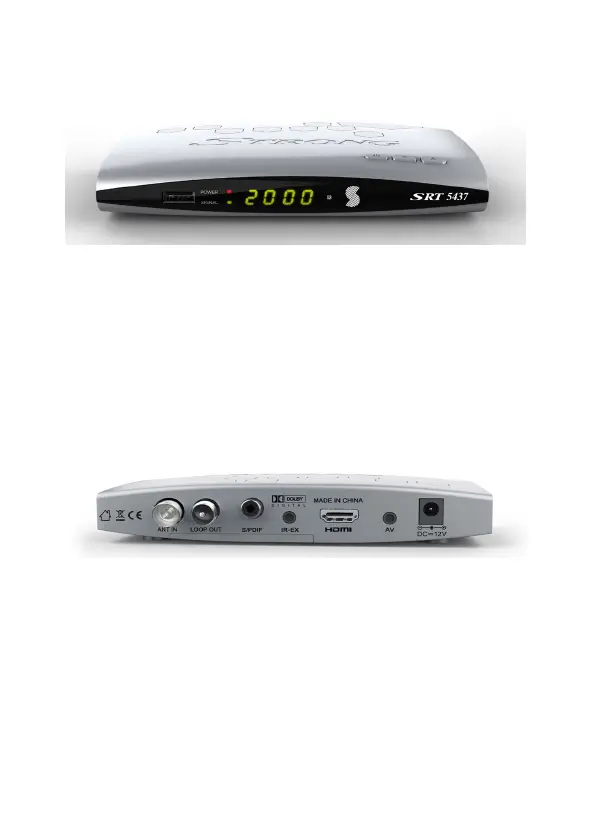
2.1 Front Panel
1. Power button: Switch between operation and standby modes.
2. Up & Down Channel: Change channel in viewing modes.
3. USB2.0: Single USB 2.0 Host Port.
4. Power / Signal light: Power / signal indicator.
5. Display: It displays channel information in normal mode and local
time in standby mode.
2.2 Rear Panel
1. ANT IN: Connect the antenna cable.
2. Loop Out: Antenna loop out
3. S/PDIF: COAXIAL: Digital Audio output (Optical).
4. IR Extender Plug: IR Cable (optional).
5. HDMI: Connect to the TV using an HDMI cable (supplied).
6. A/V- AUDIO R/L / VIDEO: Connect to the TV using RCA Jack cable
(not supplied).
7. DC-12V: Connect to the power using power adapter.
*Note: For best results, use HDMI cable and RG6 Quad Shielded antenna cabling
3 4 5
1 2 3 4 5 6 7
1 2



 To Next Page