4
PART 2 • English
2.0 YOUR RECEIVER
2.1 DEFAULT PIN-CODE: 0000
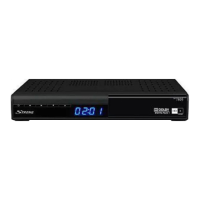
2.2 Front Panel
Fig.1
1. Standby/ON switch Turns the receiver ON or to Standby
2. Navigations buttons Menu navigation
3. 4 digit LED display Displays channel number or time
4. MENU Opens the OSD menu
5. EXIT Exit from menu
6. OK Confirm selection
7. Card reader Slot to insert HD+ card for access of HD+ channels*
2.3 Rear Panel
Fig 2.
1. SAT IN To connect to the LNB of your satellite dish for reception of satellite
broadcast signal
2. COMPONENT To connect to TV or Beemer for high video quality over Y/Pb/Pr
component output
3. VIDEO (RCA) To connect to the RCA video input of your TV or VCR using an
RCA cable
4. AUDIO (L/R) To connect to the audio input of TV, VCR or your HIFI using an
RCA cable
5. TV SCART To connect to TV using a SCART cable
6. HDMI To connect to the HDMI input of your TV using a good quality
HDMI cable.
7. S/PDIF (Opt.) To connect to a digital or home cinema audio amplifier using an
optical cable
8. USB Connect your USB storage device (stick, HDD, etc.) to this port
9. DC POWER To connect to the original included main power adapter (Input
110 – 240 V 50 ~ 60 Hz/ Output 12 V DC) there and connect main
power adapter to the original included power cord.
2.4 Remote Control Unit
Fig. 3.
1. q Turns the receiver ON/Standby
2.
Mutes the audio output of the receiver
3. 0~9 Channel number and numeric value input
4. FAV Opens the favourite group selection
5. OPT Opens the audio and subtitle selection menu
6. TXT Displays the current Teletext of this channel, if available
7. F.LIST Opens the playback list in viewing mode
8. MEDIA Opens the Multimedia menu in viewing mode
9. RECALL Toggles between the two last watched channels
10. GUIDE Displays the EPG (Electronic Program Guide)
11. VOL pq Increasing/decreasing of the volume level
12. PAGE CHpq Switches to next/previous channel in viewing mode or scrolls page
wise in lists
13. INFO Press once to display channel information. Press twice to call extended
program info.
14. RED For Teletext function, in OSD for specific functions.


 To Next Page