EasyManua.ls Logo

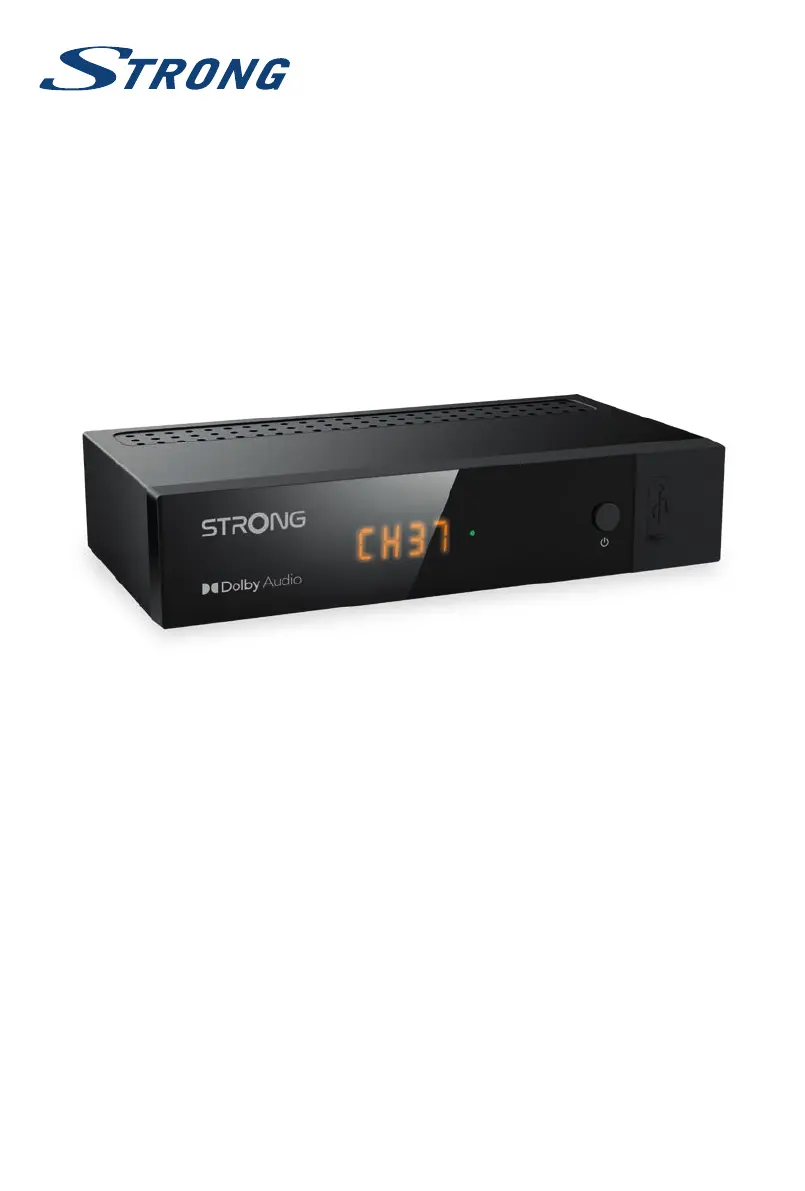
Strong SRT 8215 - User Manual

Strong SRT 8215
24 pages
Print Icon
To Next Page IconTo Next Page
Loading...
User Manual
Bedienungsanleitung
Manuel ulisateur
Manuale utente
Manual do Ulizador
Инструкции за употреба
Руководство пользователя
Посібник користувача
Användar Manual
Uživatelská příručka
Navodila za uporabo
Korisnički priručnik
Uputsvo za rukovanje
Používateľská príručka
Használa útmutató
Käyöohje
Brukermanual
Manual del Usuario
Gebruiksaanwijzing
Brugervejledning
Manual de Ulizare
Instrukcja obsługi
Digital Terrestrial HD Receiver
SRT 8216

Other manuals for Strong SRT 8215

Questions and Answers

  • K
    Kevin MatthewsAug 20, 2025
    What to do if my Strong SRT 8215 shows 'No signal found'?
    • S
      Shaun PetersonAug 20, 2025
      If your Strong TV Receiver displays 'No signal found', here's what you can do: Check the antenna cable connection, inspect the antenna for damage or misalignment, and if you are in an area with weak digital signal, consult your dealer. If you're using an active antenna, ensure the antenna power is switched ON or connect an external power source.
  • W
    wleAug 22, 2025
    Why is there no picture or sound on my TV or amplifier with Strong SRT 8215 TV Receiver?
    • R
      Renee HunterAug 22, 2025
      If you're not getting any picture or sound on your TV or amplifier when using your Strong TV Receiver, make sure the correct HDMI or SCART input is selected on your TV or amplifier. Also, verify that the receiver's resolution is supported by your TV. Ensure that both the TV/amplifier are switched on and check the S/PDIF connection if it's in use.
  • C
    christinahooverAug 25, 2025
    What to do if my Strong TV Receiver has no response to the remote control?
    • K
      Kathleen McbrideAug 25, 2025
      If your Strong TV Receiver isn't responding to the remote, ensure the receiver is plugged in and turned on. Aim the remote directly at the front panel, remove any obstructions, and replace the remote's batteries.
  • V
    Valerie YoungAug 26, 2025
    What to do if after moving Strong SRT 8215 to another room I am no longer able to receive digital reception?
    • R
      Ryan AndradeAug 27, 2025
      If you're experiencing digital reception issues after moving your Strong TV Receiver, it might be due to weak antenna signals. Press the INFO button twice on the remote to view the signal bars and adjust the antenna for the best reception. You can also rescan the channels. If using an active antenna, check that the antenna power is turned on. If problems persist, consider using an outdoor antenna.
  • P
    Peggy AllisonAug 28, 2025
    How to fix Strong TV Receiver when playback of video causes picture freeze?
    • V
      Victoria RiveraAug 28, 2025
      If video playback on your Strong TV Receiver causes picture freezing or distortion, it could be due to a slow USB device. Use a USB storage device with sufficient speed and space. Note that pen drives may not provide sufficient speed.
  • H
    Hannah JonesAug 29, 2025
    Why does my Strong SRT 8215 switch off automatically?
    • D
      Daniel BrownAug 30, 2025
      Your Strong TV Receiver might be switching off automatically because the Auto Standby function is enabled. Disable the Auto Standby function.
  • S
    shelly69Aug 31, 2025
    How to troubleshoot Strong SRT 8215 TV Receiver when LED indicator and LED display are not switching on?
    • D
      Derek SnyderAug 31, 2025
      If the LED indicator and display on your Strong TV Receiver aren't turning on, check that the mains lead is properly plugged in and that the power adapter is connected to a working outlet. Also, make sure the 12Volt connector is correctly inserted into the receiver.
  • M
    Megan WilliamsSep 2, 2025
    What to do if I have forgotten PIN code of my Strong TV Receiver?
    • N
      nicoleeatonSep 2, 2025
      The default PIN for your Strong TV Receiver is 0000.
  • G
    Gary WagnerSep 4, 2025
    What to do if my Strong TV Receiver says no signal?
    • A
      Amanda WalshSep 4, 2025
      If your Strong TV Receiver displays a 'No signal found' message, first check the antenna connection to ensure it's properly connected. Inspect the antenna for any damage or misalignment. If you are in an area with weak digital signal, consult your dealer. If using an active antenna, ensure the antenna power is switched on or connect an external power source.
  • K
    Kyle LoweSep 6, 2025
    Why isn't my Strong SRT 8215 TV Receiver remote working?
    • M
      Maria CooperSep 6, 2025
      If your Strong TV Receiver isn't responding to the remote control, first ensure the receiver is plugged in and turned on. Aim the remote control directly at the front panel, ensuring nothing is obstructing the signal. Finally, replace the batteries in the remote control.

Summary

1.0 INTRODUCTION

1.1 Safety Instructions

Important safety guidelines for using the receiver, including installation and operational precautions.

2.0 YOUR RECEIVER

2.1 DEFAULT PIN: 0000

Details the default PIN code for accessing receiver functions.

2.2 Front Panel

Description of the components and indicators on the receiver's front panel.

2.3 Rear Panel

Description of the connectors and ports on the receiver's rear panel.

2.4 Remote control

Overview of the remote control, its buttons, and functions.

3.0 CONNECTION

3.1 Connecting to a terrestrial antenna

Steps for connecting a terrestrial antenna for signal reception.

3.2 Connecting to TV with HDMI cable

Instructions for connecting the receiver to a TV via an HDMI cable.

3.3 Connecting to TV with SCART cable

Instructions for connecting the receiver to a TV via a SCART cable.

3.4 Connecting a USB storage device

Guide on how to connect and use USB storage devices.

4.0 STARTING UP FOR THE FIRST TIME

5.0 QUICK GUIDE TO USING YOUR RECEIVER

6.0 OPERATION

6.1 Changing channels

Methods for switching between different TV channels.

6.1.1 Direct access via 0~9 buttons

Using numerical buttons for immediate channel selection.

6.6 EPG (Electronic Programme Guide)

Using the EPG to view program schedules and set timers.

6.7 Record, Timeshift and Format*

Functions for recording, timeshifting, and formatting USB devices.

6.7.1 Instant recording*

How to start recording a program immediately.

6.7.2 Timeshift*

Using the Timeshift feature to pause live television.

6.7.3 Timer recording*

Setting up timed recordings for programs.

6.7.4 Playback*

Playing back recorded content from USB storage.

7.0 MAIN MENU

7.1 Installation of channels

Procedures for installing and scanning for TV channels.

7.1.1 Auto Search

Automatically searching for all available channels in a region.

7.1.2 Manual Search

Manually searching for channels by frequency or channel number.

7.3.5 Timers Setting

Setting up timed events for recording or waking the receiver.

7.4.2 Storage Device Setup

Managing connected USB storage devices, including formatting.

7.5.2 Factory Setting

Resetting the receiver to its original factory default settings.

7.6 Upgrade by USB

Updating the receiver's software using a USB storage device.

8.0 TROUBLESHOOTING

9.0 TECHNICAL SPECIFICATIONS

Strong SRT 8215 Specifications

General IconGeneral
Form factorExtended
Audio systemDolby Digital Plus
TV tuner typeDVB-T2
Number of tuners1 tuner(s)
Channels quantity700 channels
Free-to-air accessYes
Maximum resolution1920 x 1080 pixels
Cables includedPower
USB 2.0 ports quantity1
Connectivity technologyWired
Input voltage100 -240 V
Input frequency50/60 Hz
Power source typeAC
Power consumption (standby)1 W
Product colorBlack
Weight and Dimensions IconWeight and Dimensions
Depth100 mm
Width168 mm
Height40 mm
Weight250 g

Related product manuals