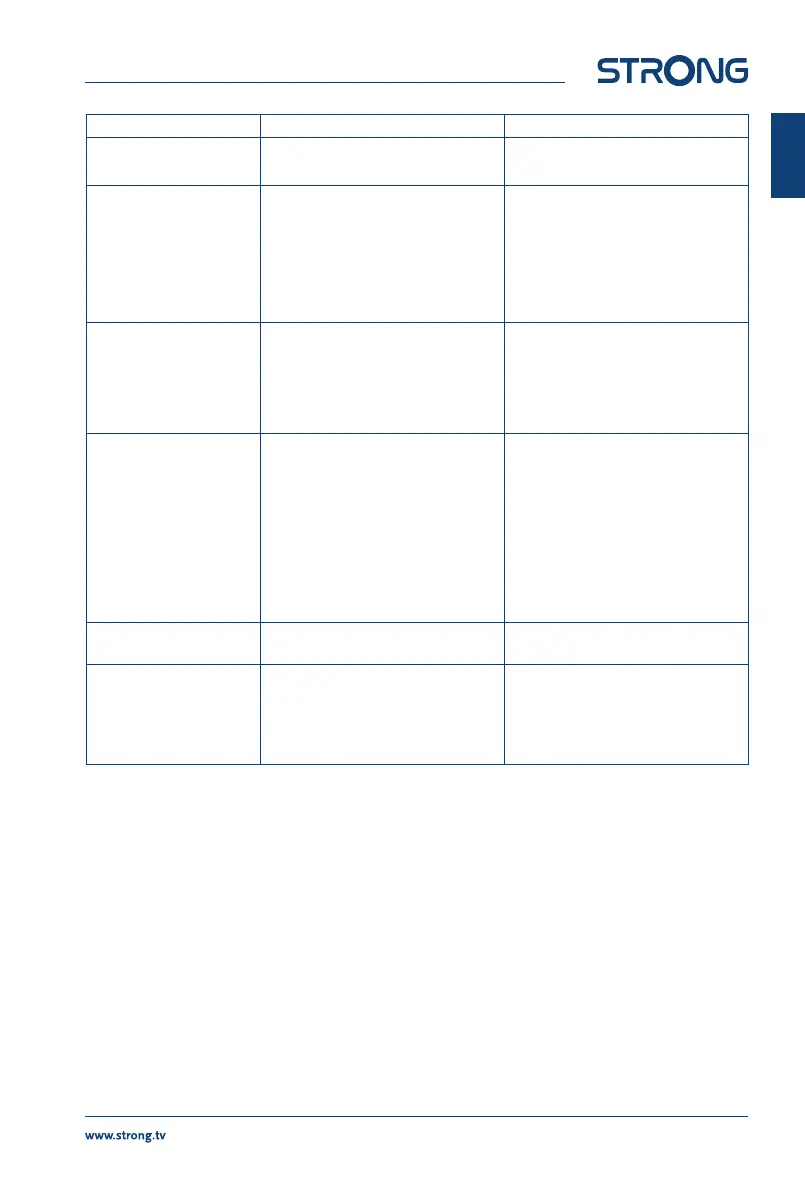
Problem Possible cause What to do
Scrambled channel
message
Channel is scrambled Select an alternative channel
No response to the
remote control
The receiver is o
The remote control is not aimed
correctly
The front panel is obstructed
The batteries of the remote control
are exhausted
Plug in and turn on the plug
Aim the remote control at the front
panel
Avoid obstructions
Replace the batteries of the remote
control
Forgotten PIN code
Forgotten channel lock
code
Default PIN is 0000
Contact your local Service Hotline
or send an email to our Support via
www.strong.tv
After moving the receiver
to another room/area
you are no longer able to
receive digital reception
The antenna signals are too weak
The signal strength/quality might be
less than before, if using an indoor
antenna
Press 2 x INFO on the remote
control to keep the signal bars on
screen and adjust the antenna for
(maximum) reception. Alternatively,
do a rescan of the channels.
When using an active antenna,
check if the antenna power setting
is On
Try using an outdoor antenna
The receiver switches o
automatically
The Auto Standby function is
enabled
Disable Auto Standby. See section
7.3.9 for details.
Playback of video
causes picture freeze/
macro blocks or similar
distortion, especially on
HD content
The read speed of your USB device
could be too low
Make sure to use a USB storage
device with sucient speed and
space. Pen drives (‘USB sticks') may
not support sucient speed.
9.0 TECHNICAL SPECIFICATIONS
Tuner
Input connector: IEC60169-2, female, 75 Ohm nominal
Input frequency range: VHF: 174 ~ 230 MHz
UHF: 474 ~ 790 MHz
Input signal level: DVB-T2: -70 dBm ~ -25 dBm
Antenna power: 5 V DC, max. 50 mA, short cut protected
Demodulator
Demodulator: DVB-T QPSK,16/64QAM (EN 300 744)
DVB-T2 QPSK, 16/64/128/256 QAM (EN 302 755)
Transmission mode: normal and extended
Guard intervals: DVB-T = 1/32, 1/16, 1/8, 1/4
DVB-T2 = 1/128, 1/32, 1/16, 19/256, 1/8, 19/128, 1/4
19
English



 To Next Page