INTERCONNECT SECTION
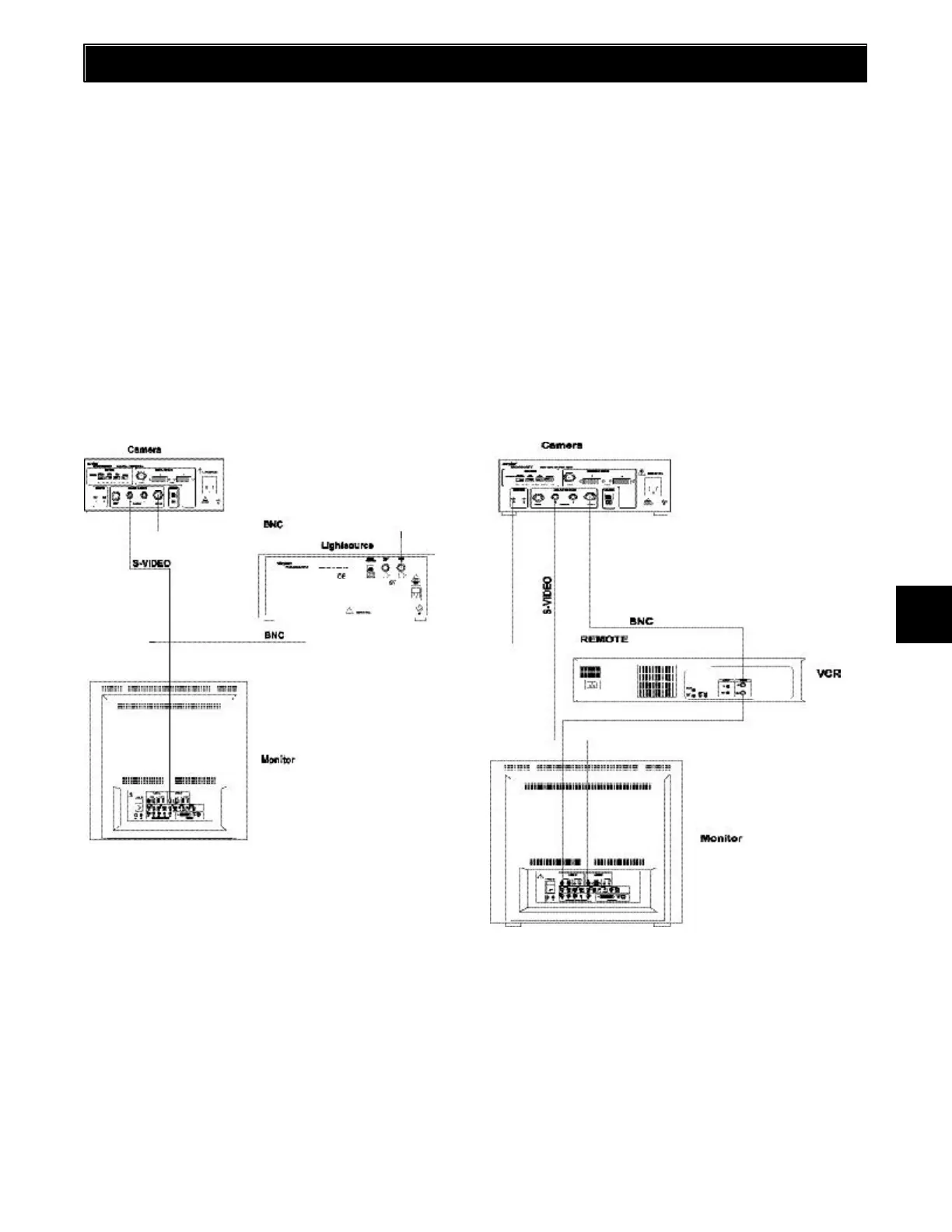
SYSTEM 1
Equipment Used: Camera, Light Source and Monitor
NOTES:
• If you are using a non-Stryker light source with an
unterminated input, you must connect a NTSC cable
from the VIDEO OUT of the light source to the VIDEO
IN on the monitor.
• An additional monitor may be connected using any open
camera output.
• You may also connect an S-VHS or BNC cable between
the camera and monitor and select the appropriate
video source.
Two types of cables are used in wiring the 988 Video Output:
• NTSC cables which have a BNC connector
• S-VHS cables which have a 4 pin Mini-Din connector
BNC connectors are push and turn type connectors while S-
VHS cables are push only type connectors. On some
monitors, S-VHS inputs may be labeled Y/C, S-VHS and
describe the same input. Described in this section are three
typical set-ups. Match your equipment and wire them
according to the appropriate diagram.
SYSTEM 2
Equipment Used: Camera, Light Source, Video Peripheral
and Monitor. The video peripheral may be a video printer,
digital capture, Hermes or VCR.
9











 To Next Page