Description of Functions continued
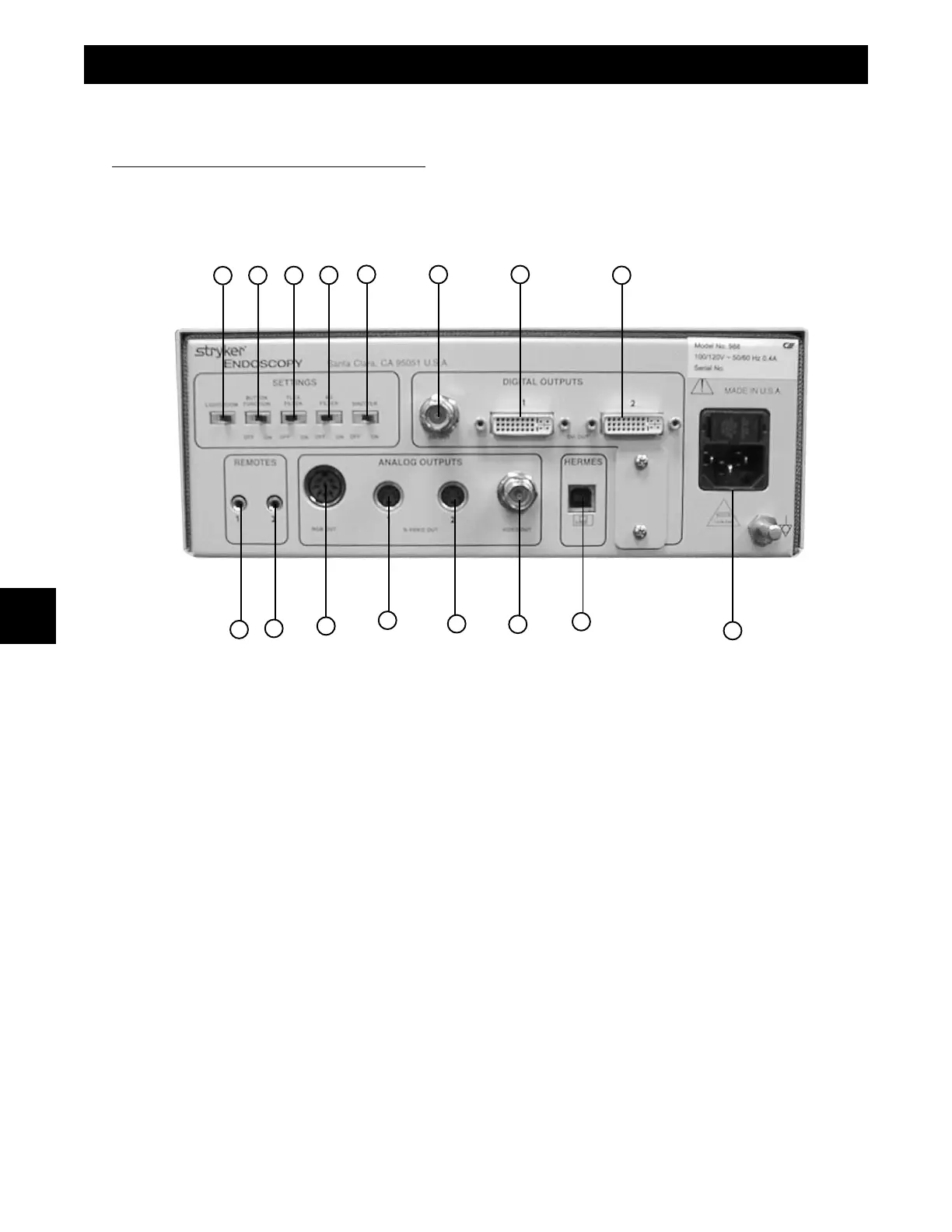
8. LIGHT/ZOOM- Selects either LIGHT or ZOOM function for the arrow buttons on camera head.
9. Button Function - Enables/Disables functions on camera head right (‘W’) button.
10. Flex Filter - Enables/Disables Flexible Scope Filter.
11. AG Filter - Enables/Disables Anti-Glistening Filter.
12. Shutter - Enables/Disables Auto Shutter.
13. SDI Out - Serial Digital Interface (SDI) Video Output.
14. DVI Out 1 - Digital Video Interface (DVI) Video Output.
15. DVI Out 2 - Digital Video Interface (DVI) Video Output.
16. AC Power Input/Fuse - Input for AC Power and Fuse
17. Remote Out 1 - Output to Video Accessory Remote Switch.
18. Remote Out 2 - Output to Video Accessory Remote Switch.
19. RGB Out - RGB/Component Video Output.
20. S-VIDEO Out 1 - S-VIDEO Component Video Output.
21. S-VIDEO Out 2 - S-VIDEO Component Video Output.
22. Video Out - NTSC Composite Video Output.
23. Hermes - Hermes Operating Room Control Center Interface Connection.
PRODUCT DESCRIPTION & USE
2
8
9 10 11
12
13 14
16
17
19
18
15
20
21
22
23











 To Next Page