24 Introduction
Before Use
NOTE
:
Perform the Bluetooth settings. (See Page 24.)
(Settings):
Perform the unit settings. (See Page 25 - 34.)
(Software Version):
View information such as the map data that is stored on the unit or version
information for the audio application. (See Page 36.)
(DivX(R) VOD):
Display DivX VOD code. (See Page 244.)
(System Check):
Check the sensitivity of the GPS signal reception, or the connection of the
parking and reverse signals. (See Page 174.)
(Language):
Perform the language setting (See Page 35.)
(SD Eject):
Touch to remove the map SD card or the SD memory card that contains the
picture data. (See Page 16.)
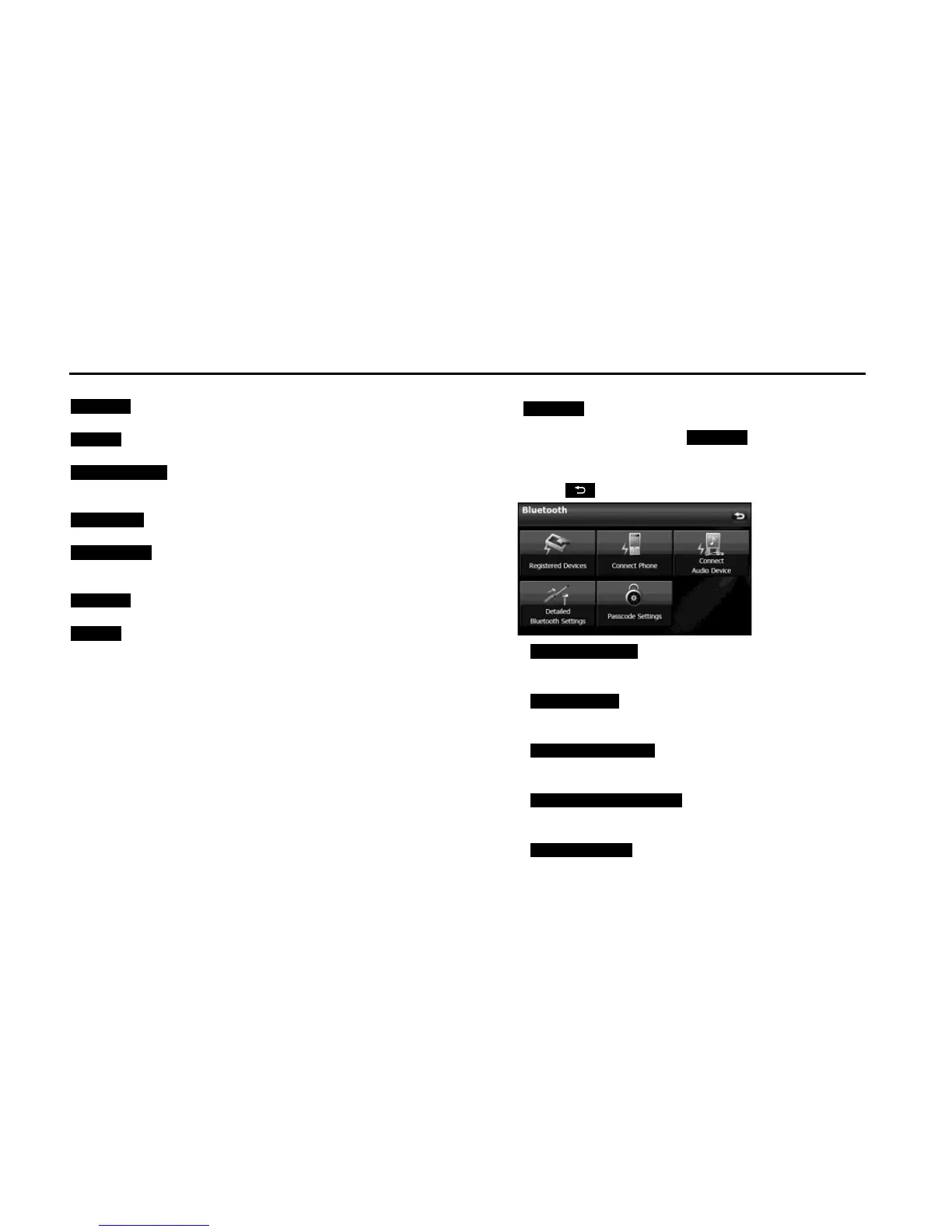
■ Bluetooth setting
Touch to perform the various Bluetooth settings.
1 On the Setup screen, touch .
2 Touch the button that you want to set.
• Touch to return to the previous screen.
• (Registered Devices):
Register or delete a Bluetooth device, or display information for
connected devices. (See pages 42, 256.)
(Connect Phone):
Register a cell phone or perform the connection settings. (See
Page 44.)
(Connect Audio Device):
Register a Bluetooth audio device or perform the connection
settings. (See Page 258.)
(Detailed Bluetooth Settings):
Display or set the detailed Bluetooth information for this unit.
(See Page 64.)
(Passcode Settings):
Set the passcode (passkey). (See Page 65.)
Bluetooth
Settings















 To Next Page