32 Introduction
Before Use
■ Aha Setting
You can check whether the smartphones with the Aha application
installed are connected. When iPhone and iPod touch and Android
devices are connected at the same time, you can select the smartphone
to use Aha in the Aha Radio Setting.
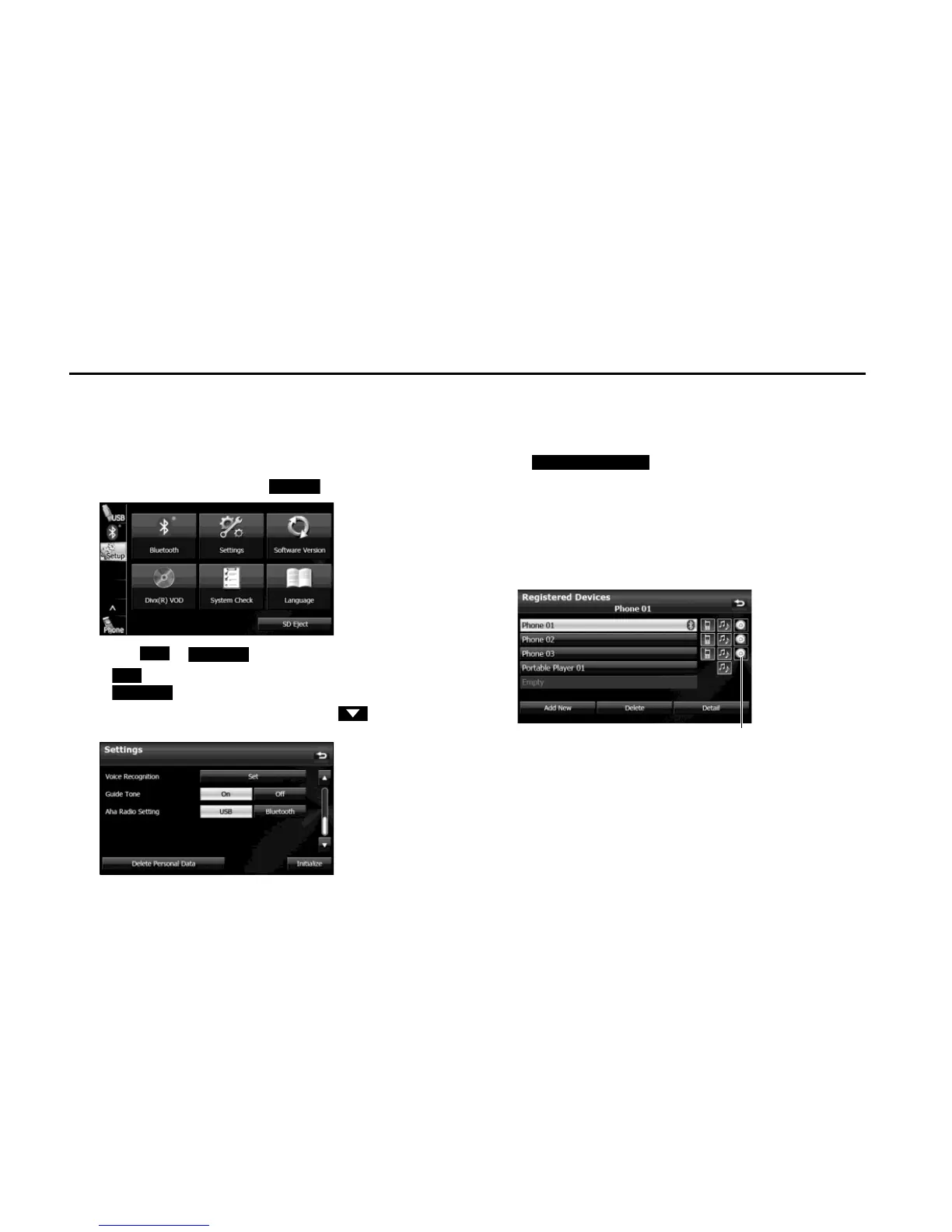
1 On the Setup screen, touch (Settings).
2 Touch or in Aha Radio Setting.
• J iPhone and iPod touch
J Android device
• If Aha Radio Setting is not displayed, touch to change the
page.
NOTE
• When iPhone and iPod touch and Android devices are connected at the same
time, select the smartphone which you want to use on this Settings screen.
• When the Aha application is installed on the smartphone, the Aha icon
becomes brighter.
• Touch (Delete Personal Data) to initialize your
personal data and all settings. (See Page 33.)
• When Aha Radio Setting is set to “Bluetooth”, you need to register an Android
device with the Aha application installed.
For details on registering a Bluetooth device, see “Using Bluetooth Audio” on
Page 255.
- When the Android device with the Aha application installed is registered,
the following icon is displayed on the Registered Devices List screen.
<Registered Devices List screen>















 To Next Page