Cyclone MKV 2 Multimedia Enclosure
Page 19.
Version 1.2
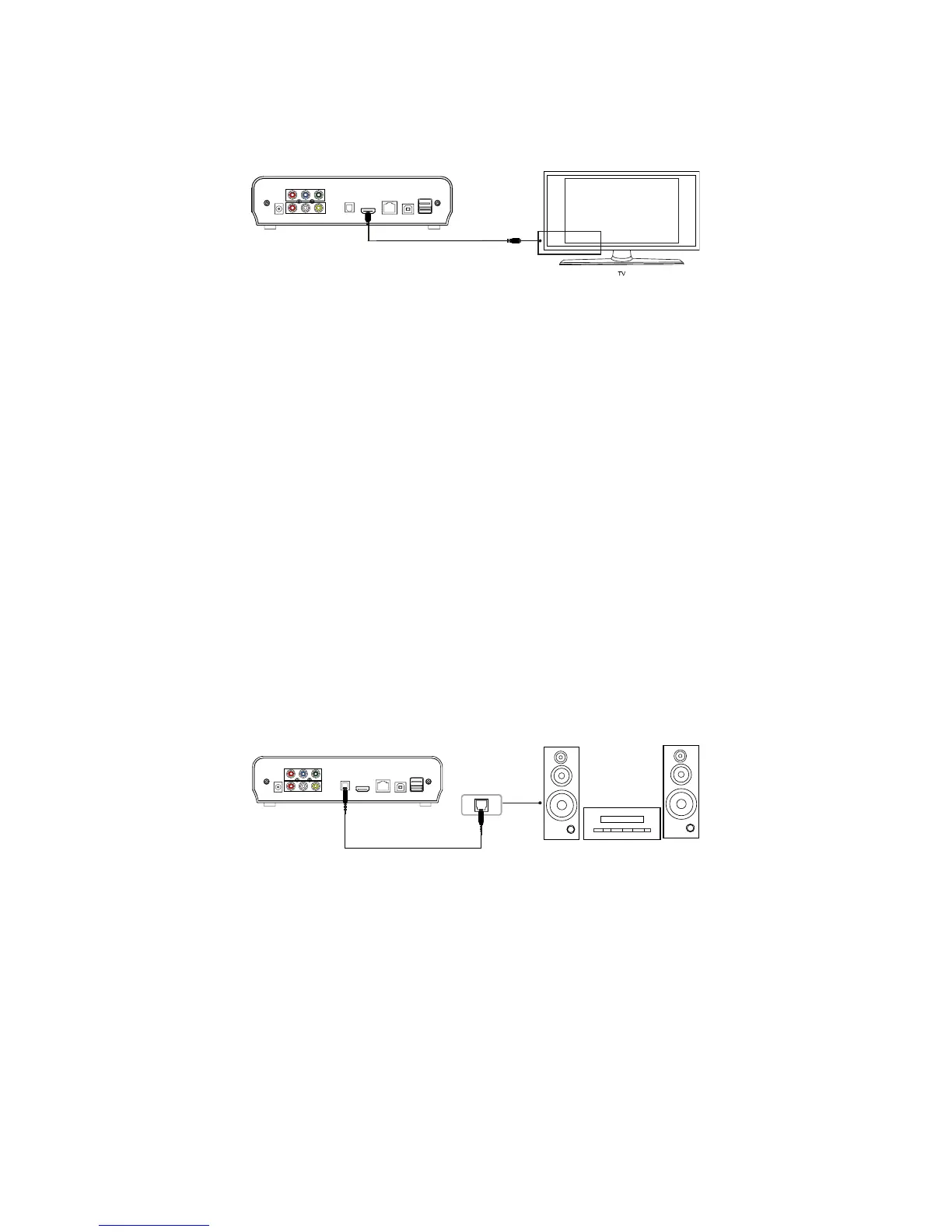
HDMI Cable:
Connecting your Cyclone MKV 2 to your TV via HDMI provides the highest
quality of visual output and high quality audio in a single cable. HDMI output
can provide video resolutions of up to 1080p**.
Connect the HDMI cable* to the HDMI output interface on the back of the
Cyclone MKV 2. Connect the other end of the cable to your TV HDMI input
port.
Switch on your TV and select HDMI mode, if required.
Press the standby button on the remote control to switch on the Cyclone MKV
2.
* Please note HDMI cable is not included with this product.
** Please note that the device can display 570p / 720p / 1080i and 1080p
resolutions, however not all HDTVs are able to display higher resolutions.
Please consult TV user manual.
Optical Cable (Audio Only):
Connecting your Cyclone MKV 2 to your surround sound system via optical
cable provides high quality digital audio output. Digital audio signals through
optical cable are less susceptible to interference from nearby electrical
devices giving better quality.
Connect the optical cable* to the port labelled optical on the back of the
Cyclone MKV. Connect the other end of the cable to an identically shaped
port in your surround sound system.
Enter the Cyclone MKV 2 audio setup and select “SPDIF Output.” Once
selected, choose one of the digital audio options “LPCM DUAL CH” or “RAW”.
This should now enable sound to your surround sound system.


 To Next Page