EM6910 Café Series Espresso Machine Issue: A Page 22 of 48
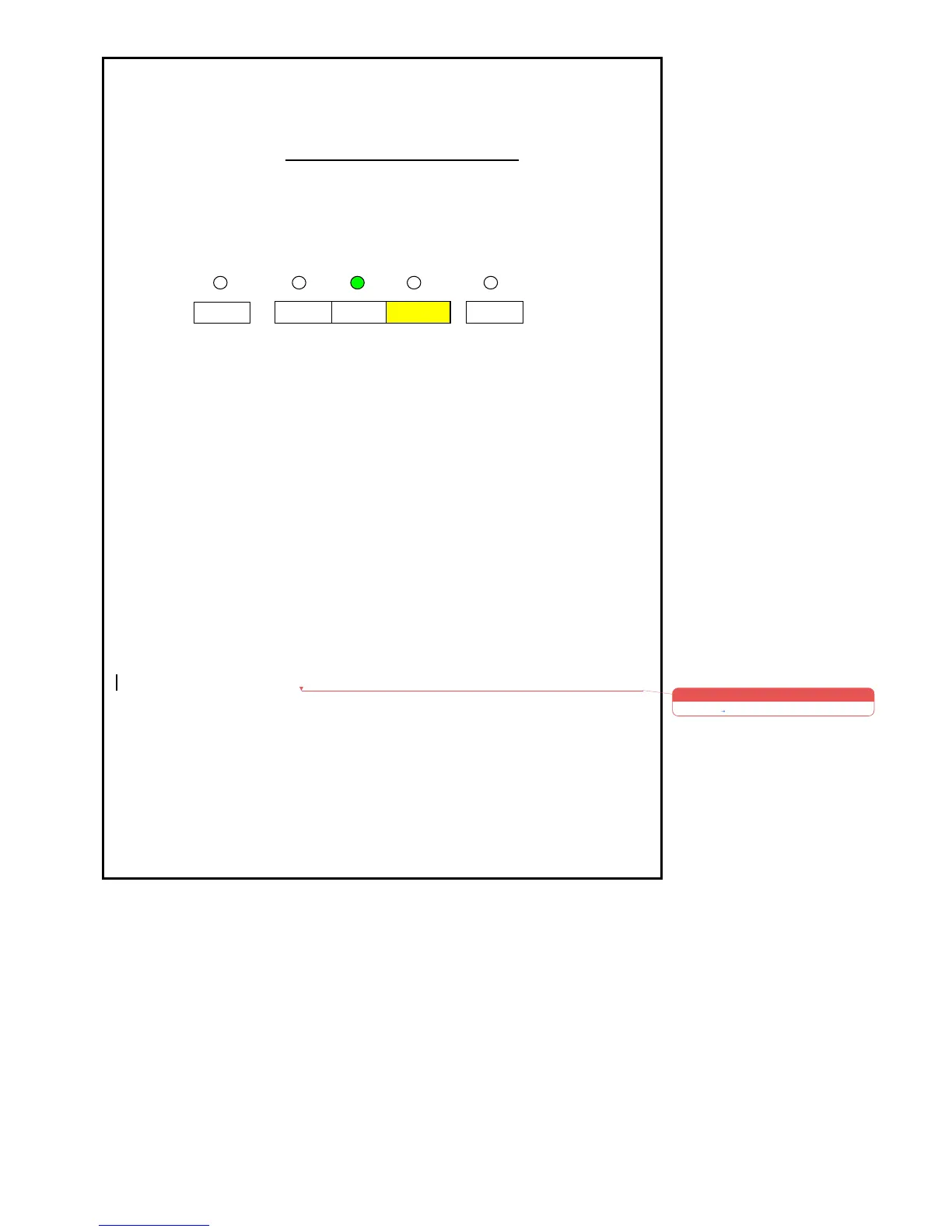
Steam Block Temperature Adjusting
1. Switch off the Coffee Maker.
2. Activate and hold “Two Cup” button.
3. Activate and release the “Power” button.
• The “Two Cup Light” shall remain “ON”.
4. Then release the “Two Cup” button.
• The “Two Cup Light” shall remain “ON” for 0.2 seconds after the
“Two Cup” button is released).
• After the “Two Cup Light” goes out as above after 0.2 Seconds
the previous setting will be displayed by one of the 5 Lights, this
will be indicated up to 5 seconds before automatically returning
to the Factory Setting if no action is taken.
5. Within 5 seconds press and release the required button by referring to
the sketch above to increase or decrease the Steam Block
Temperature.
• The new setting will now be indicated by the LED being
illuminated on the pre-activated button.
• To indicate that the setting has been changed correctly the Light
will flash and 2 beeps sound.
• The Coffee Maker will now go to start mode.
• If no push button is pressed within 5 seconds, the setting shall
return to the factory setting.











 To Next Page