6 LCD Menu Operation Operation Manual
20
Main Menu First sub-menu Second sub-menu Third sub-menu
Start/Stop Start - -
Stop - -
Home - - -
Function Run-information Real Time Data -
Power curve -
E-histogram -
History-information His-event
His-fault -
His-data -
His-alarn
Start/Stop Start -
Stop -
Set-parameter Sys-parameter Language & Firmware
Ver.
Time
E-total adjust
Remote/Local control
Load default
Run-parameter -
Pro-parameter -
Com-parameter Serial-port param.
Ethernet param.
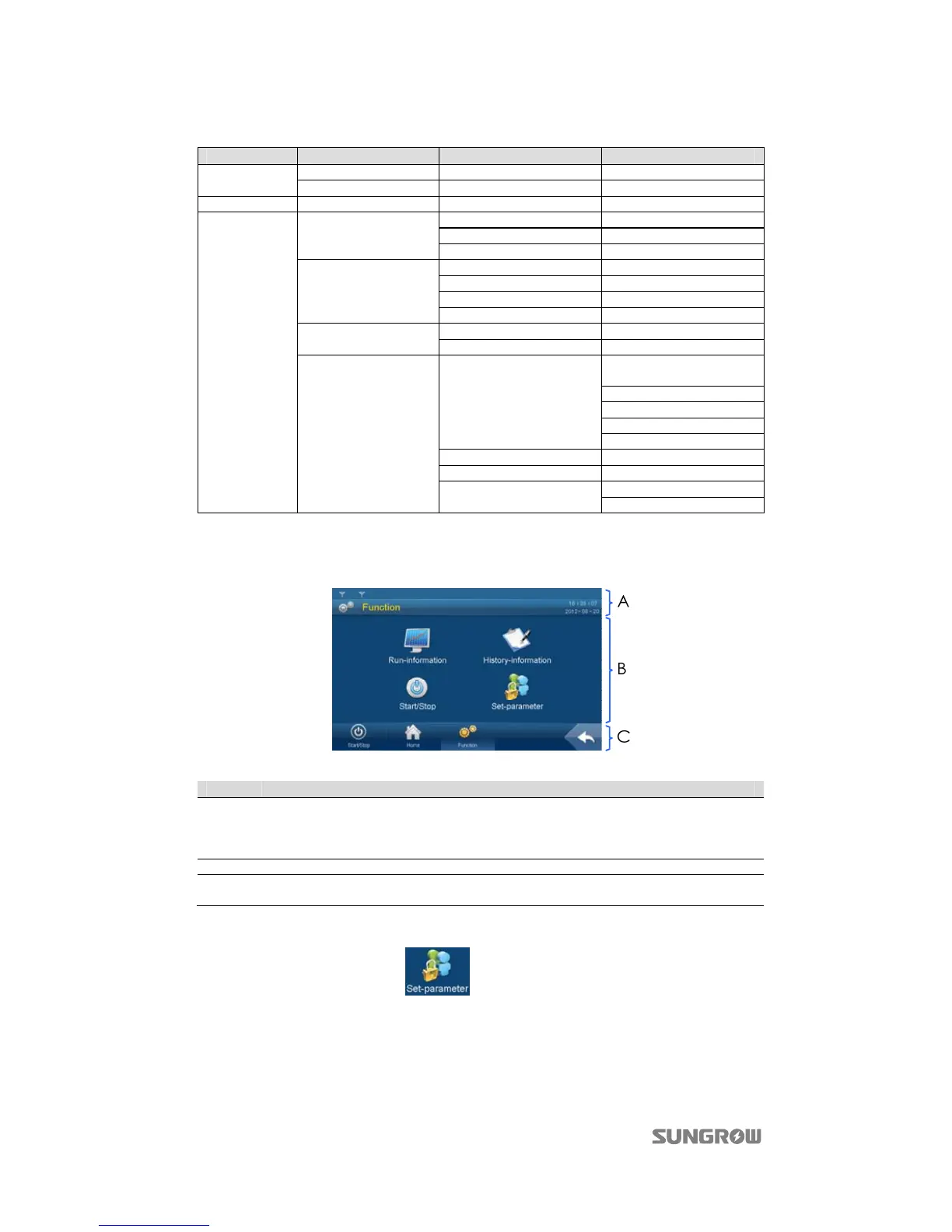
6.3.2 Layout of the submenus
The layout of submenus is the same as that shown below except for the default menu.
Item Description
A
Title bar
The first line from the top is the present success rate of communication.
The left side of the second line is the name of the present page, while the right side is
the present date and time.
B Data display or parameter configuration.
C
From left to right: the three main icons; the return button to return to the previous
menu by tapping it.
For convenience’s sake, the operations on the menus are referred to as the menu name with
quotation marks. For example, the
menu will be referred to as “Set-parameter”.
6.4 Entering Password
Inverter is protected by password. User can enter into the “Set-parameter” sub-menu only after
entering the correct password. Proceed as follows to enter the password:


 To Next Page