2. Working state of the suction motor: when the suction motor is
working, it flashes when it is ready, and it does not show when it is
not working.
3. Water gear: The number of drops ranges from 0 to 3
respectively represent different water gear; By the water gear
button control.
4. ECO switch: The ECO mode is displayed when the ECO mode is
enabled, but is not displayed when the ECO mode is disabled.
5. Walking direction: When the device is powered on, the forward
direction is displayed by default, and the downward arrow is
displayed when the device is powered back.
6. Battery voltage: Displays the current battery voltage.
7. Battery power: Displays the current battery power.
8. Fault code: When there is a fault, the current fault will be
displayed reincarnation, and when there is no fault, it will not
be displayed.
9. Working time: Display the operating time of walking
motor,brushing motor, suction motor and startup in turn.
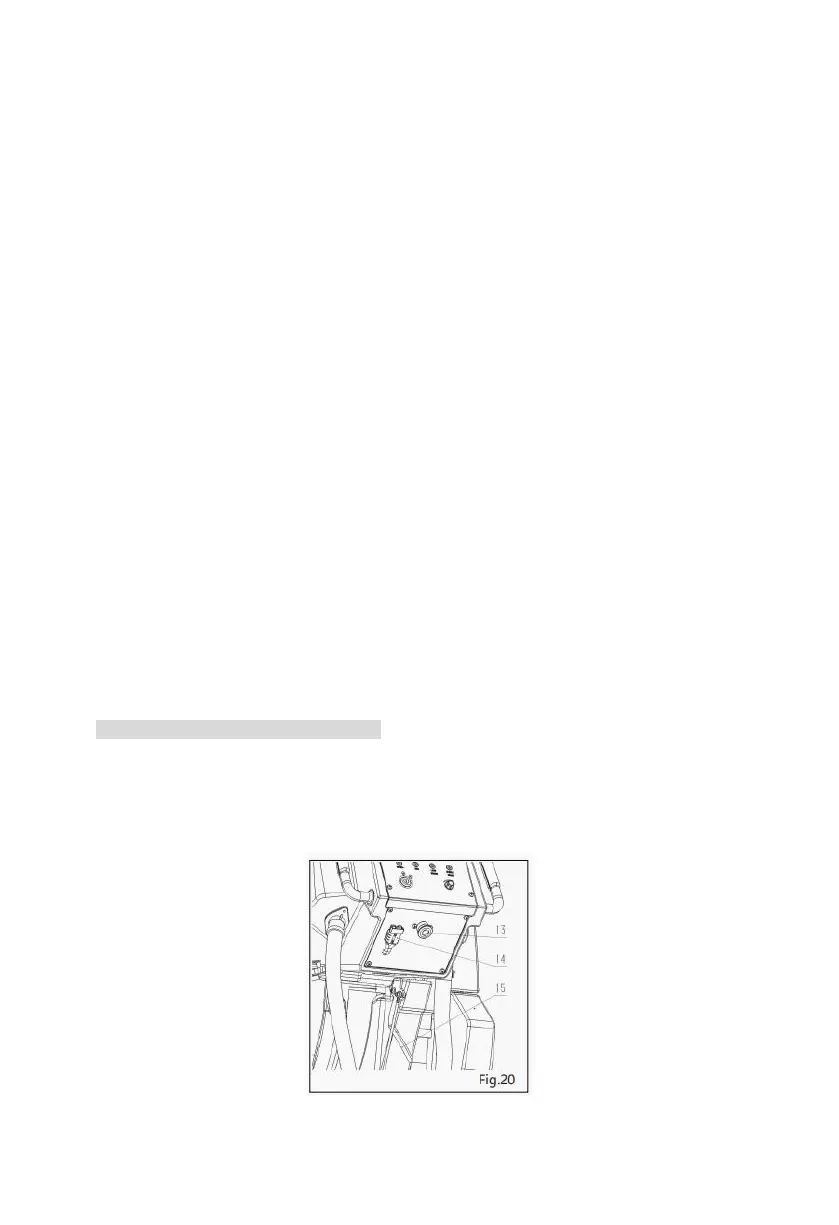
20. Emergency Button Machine (Fig. 20)
If the machine encounters any emergency problems during operation, you can press the
emergency button switch (13), which will cut off the circuit between the batteries and the
machine system and stop the machine. If you want to resume operation, you can just pull up the
emergency button switch.


 To Next Page