23
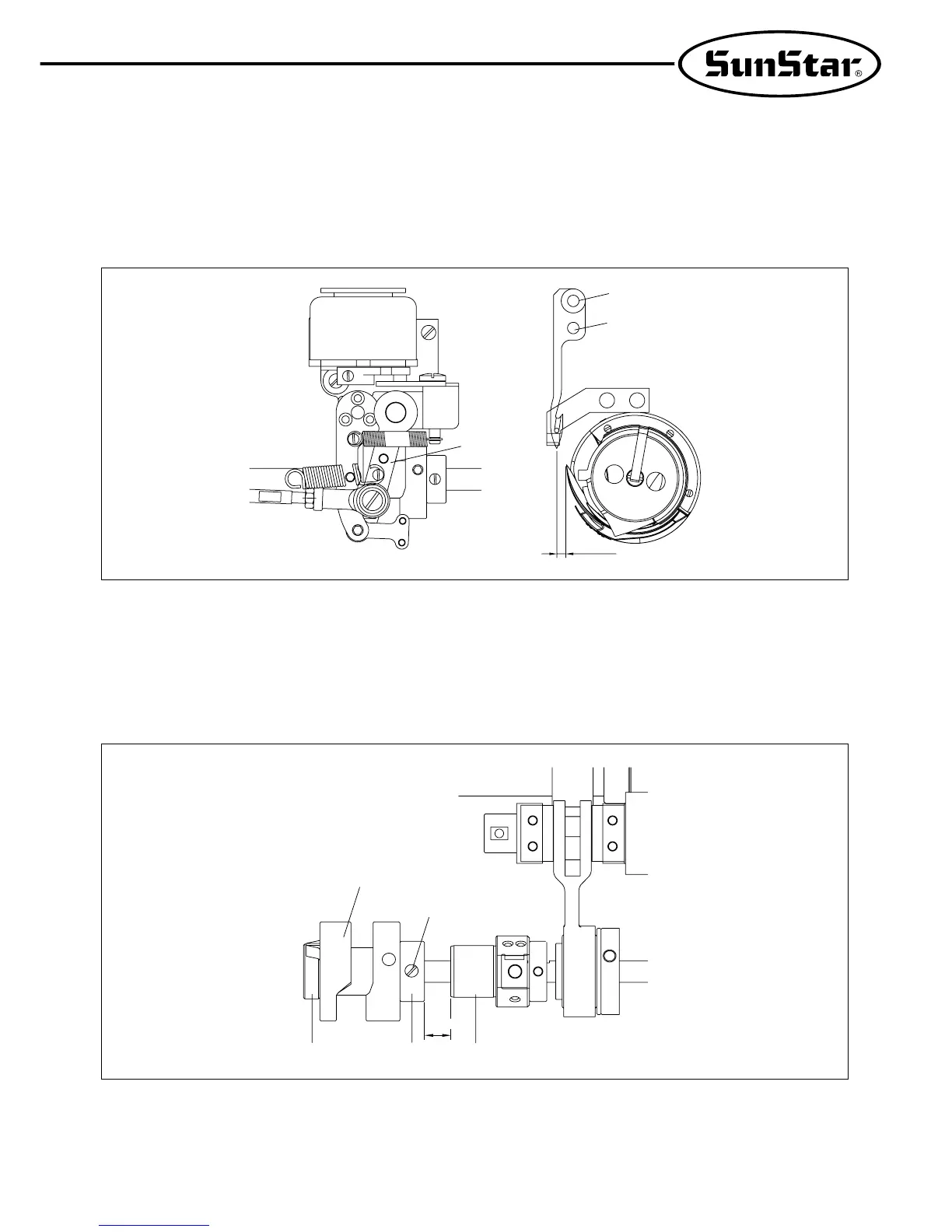
(2) Distance Adjustment Between Moving Blade and Hook Stopper
A) Turn the pulley by hand to place the needle bar at the lowest position.
B) Press the trimmer driving link① with the needle at the lowest position. Turn the pulley until the moving blade②
reaches to the end.
C) Loosen the screws ③, ④ to set the distance between the moving blade and the hook stopper at 0.5mm.
[Figure 36]
(3) Adjustment of Trimmer Cam
A) Set the distance between the oil pump① and the trimmer cam bushing② at 34mm, and then fasten the tightening
screw③.
B) Place the trimmer cam④ to closely contact the end of the bushing. Place the thread release cam⑤ to closely contact
the end of the trimmer cam, and then fasten the screw.
[Figure 37]
①
③
②
④
0.5mm
①
34mm
②⑤
④
③


 To Next Page