Page | 37
System self-check: Allows the user to conduct a system diagnosis.
Test mode (only for engineers): For engineers to conduct tests.
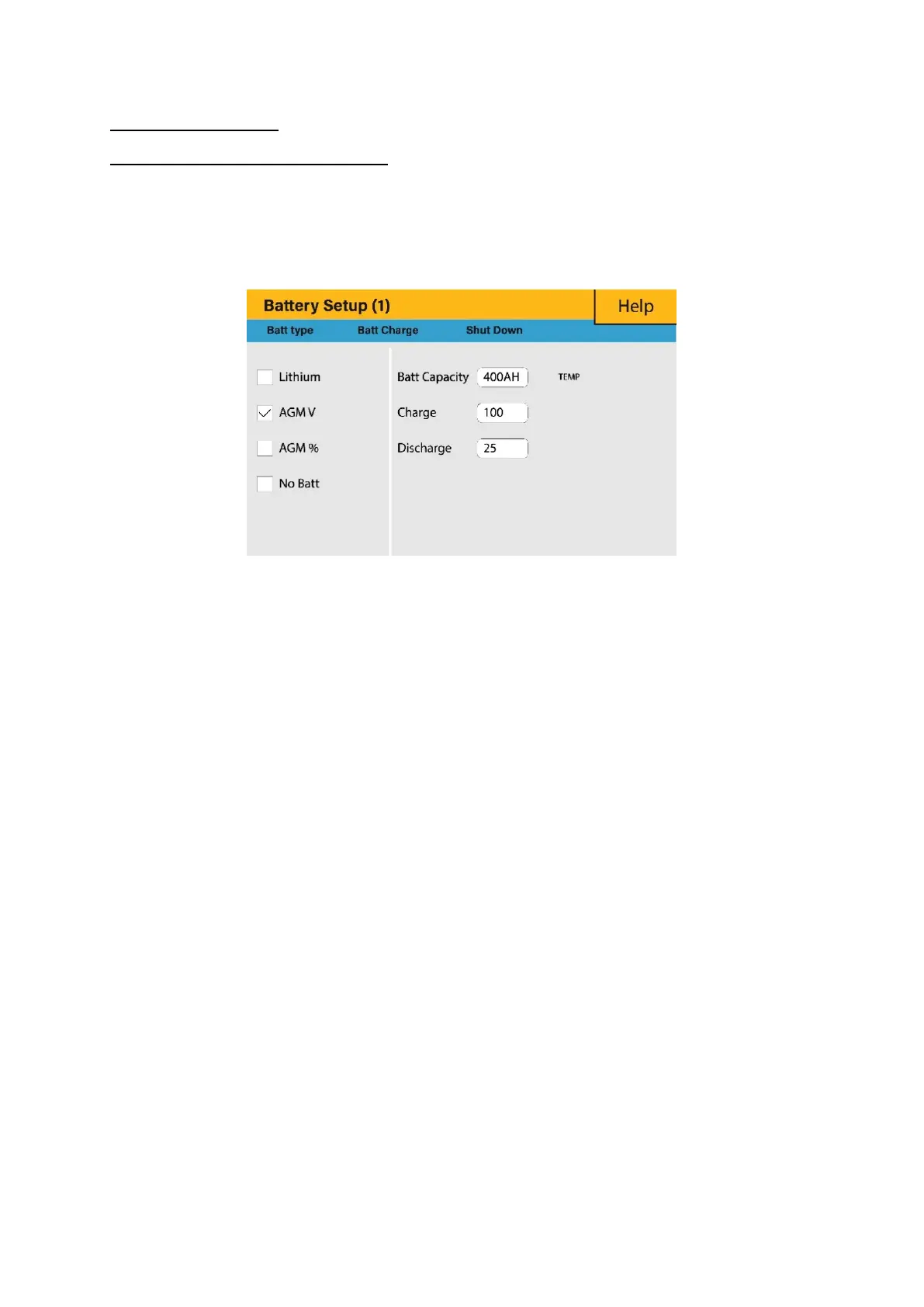
5.10. Battery Setup Page
To configure battery settings, click on the BATTERY icon and then on ‘Batt type’.
What this page displays:
Battery capacity in (Ah) – For non-BMS-batteries the range allowed is 0-2000Ah,
while for lithium-ion the inverter will user the capacity value of the BMS.
Max battery charge current (Amps).
Max battery discharge current (Amps), which should be 20% of the Ah rating for
AGM only. For Lithium, please refer to the battery manufacturer documentation.
Note: This is a global max. discharge current for both ‘grid-tied’ and ‘backup’ modes
of operation and if the current exceeds this value inverter will shut down with an
overload fault.
TEMPCO settings - Temperature coefficient is the error introduced by a change in
temperature.
What you can do from this page:
Use battery voltage for all settings (V).
Use battery SOC for all settings (%).
No battery: tick this box if no battery is connected to the system.
BMS setting.
Active battery - This feature will help recover a battery that is 100% discharged by
slowly changing from the solar array. Until the battery reaches a point where it can
change normally.








 To Next Page