EasyManua.ls Logo

Super Star 3900 OLED - 2.5 Bleep Operation; 2.5.1 Operation Overview

Super Star 3900 OLED
13 pages
Print Icon
To Next Page IconTo Next Page
To Previous Page IconTo Previous Page
Loading...
2.5 BLEEP operation
The roger bleep is enabled by sliding the BLEEP switch to the UP position. There are 3 bleep
‘slots’ that can be set to any available bleep which allows the sequencing of up to 3 roger bleeps
one after another.
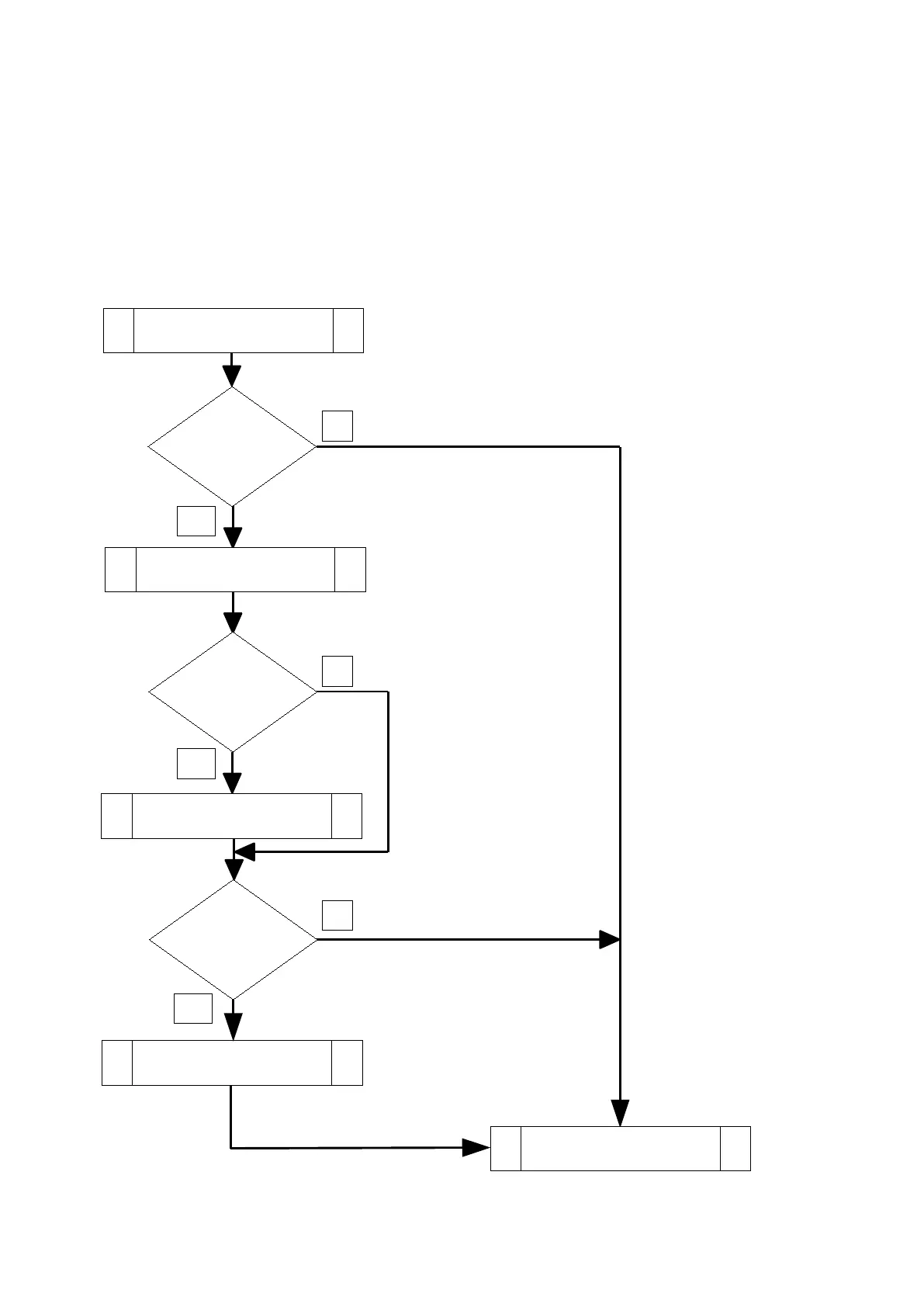
2.5.1 Operation overview
When the PTT button is released, the processor will check to see if the bleep switch is on and if
so will check each bleep ‘slot’ from 1 to 3 and play if selected in that order.
Page 7 / 13
PTT RELASED
BEEP
SWITCHED
ON
SLOT 2
VALUE > 0
NO
YES
NO
PLAY BLEEP
IN SLOT 1
PLAY BLEEP
IN SLOT 2
SLOT 3
VALUE > 0
PLAY BLEEP
IN SLOT 3
YES
YES
NO
TRANSMIT RELEASED

Related product manuals