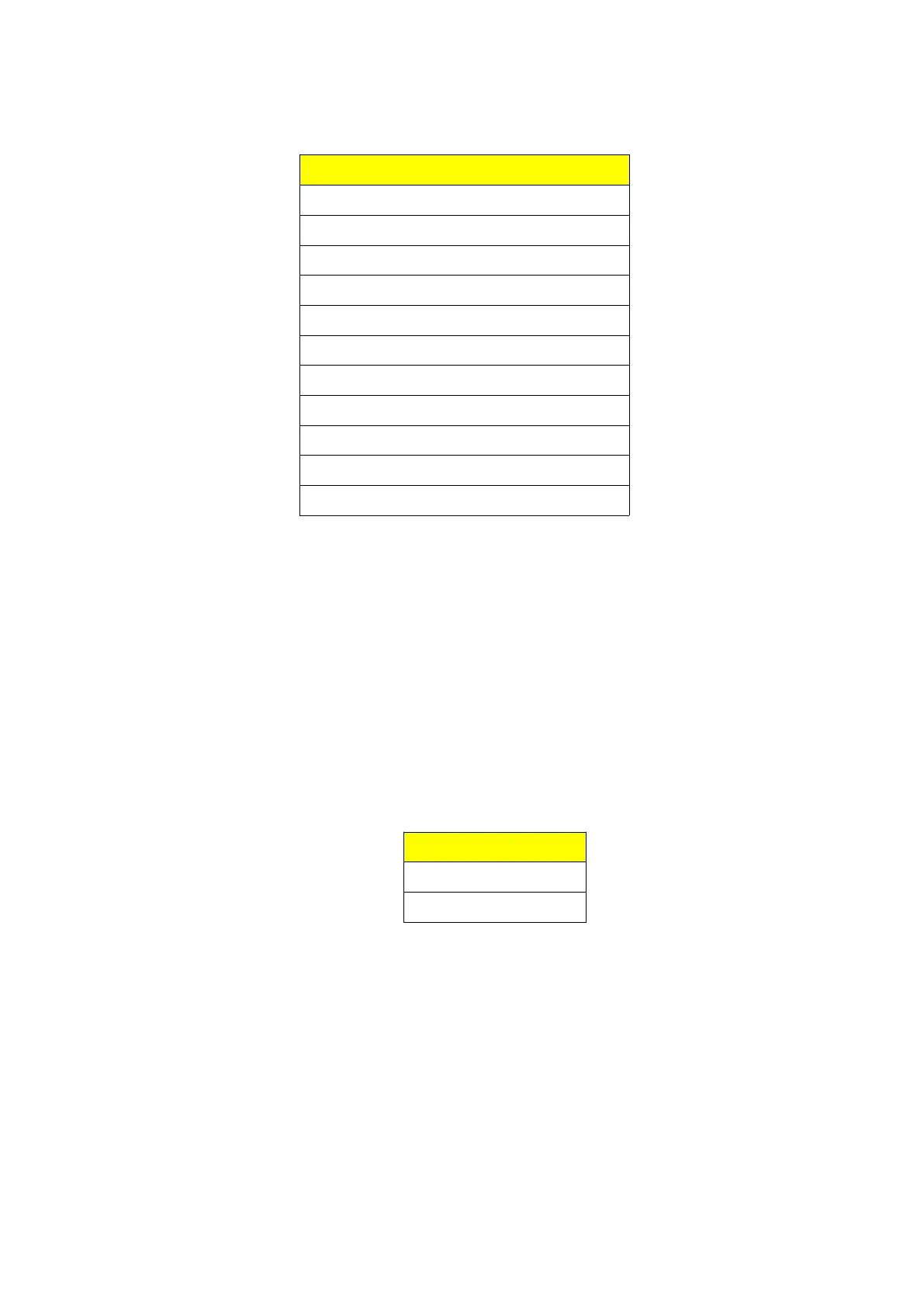
2.5.3 Bleeps available
Bleep available
None
Cobra 148
Sadelta Echo Master Plus
K-Tone (adjustable)
Ham International
President Lincoln
Popeye
Close Encounters
Dixie
That’s it
Jingle Bells
2.5.4 K-Tone adjustments
The k-tone bleep can be adjusted to suit the operators preference. Both frequency (pitch) and
time (speed) can be adjusted to replicate the sound of k-tone bleeps of the past.
Altering the K-Tone bleep is done within the quick settings menu.
To enter the menu, press and hold the channel selector for around 3 seconds. Once the display
changes you can release the control.
Turn the channel selector / encoder to function you want to change.
Menu
K-TONE FREQ
K-TONE TIME
Press and release the channel selector. The last decimal point in the frequency display will light
and you can adjust the value by rotating the channel selector with the current value shown in
the frequency display. Once you are happy with the value, press the channel selector to save the
setting.
To exit the quick settings menu, press and hold the channel selector for around 3 seconds.
Again once the display blanks you can release the control.
Page 9 / 13


 To Next Page