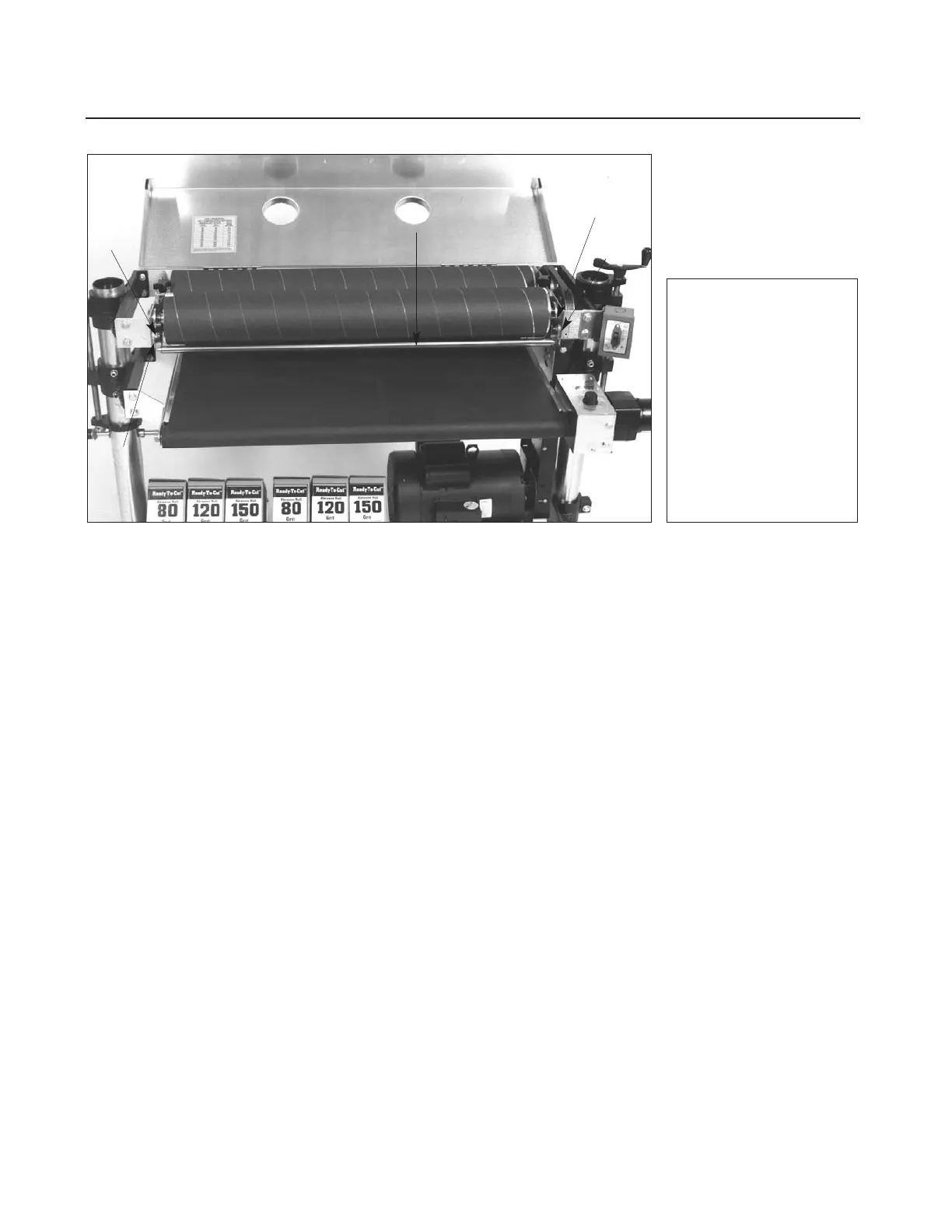
Fig. 28. Tension roller
adjustment.
1. Tension Roller
Suspension Bolts.
2. Tension Roller
3.
Spring Retaining
Screws.
28 SUPERMAX OWNER’S MANUAL
shaft collar below the bracket, then loosen the
screw. Making sure the adjustment knob is tightly
seated on top of the bracket, raise the shaft collar
up against the bracket from below and tighten the
set screw. Note: The nut of the rear bolt on the
rear (secondary) drum bearing bracket should be
backed off a quarter-turn from being fully tight-
ened. This allows the lock washer under the rear
bolt on the rear bracket to be depressed slightly,
but not completely. After alignment is completed,
lower the motor mount to re-establish V-belt ten-
sion. Tighten two screws in belt guard.
ADJUSTING TENSION ROLLERS
With the sanding drums properly aligned, raise the
table to the bottom of the sanding drums. Loosen
all four tension roller suspension bolts (see 1, Fig.
28). Lower the table by one full turn of the height
adjustment handle. At this position the tension
roller assembly should be resting on the table with
the drums suspended slightly above the table.
Then retighten the tension roller suspension bolts.
Note: Too much tension roller pressure can cause
snipe marks which are identified as a visible line
running across the width of the board approxi-
mately 2 1/4" from the end of the board. If a snipe
mark occurs on the trailing end of the board,
adjust the infeed tension roller. Tension roller pres-
sure can be adjusted two ways, either by loosening
the tension roller spring retaining screws (see 3,
Fig. 28) or by raising the height of the tension
rollers. To adjust the tension rollers to eliminate
snipe marks, use this two-step procedure:
Step 1. With the sanding drums properly aligned,
loosen all four tension roller suspension bolts.
Raise the table to the bottom of the sanding
drum(s). The tension rollers should be resting
firmly on the conveyor bed. Tighten only the two
rear (outfeed) tension roller suspension bolts.
Step 2. Lower the conveyor table by one full turn
of the height adjustment handle. At this point,
press down on the front (infeed) tension roller so
it is resting on the table. Now tighten the front
(infeed) tension roller suspension bolts. If there
still is a snipe mark left on pieces being sanded,
repeat Step 1 and Step 2, but in Step 2 lower the
conveyor bed a half turn instead of a full turn.
Warning: Improperly adjusted tension rollers (i.e.,
those set too high, rendering them non-functional)
could allow kick-back/slippage of pieces being
sanded.



 To Next Page