ABOUT THE SUPERMAX SYSTEM
5
UNPACKING YOUR SUPERMAX
Your SUPERMAX sander has been shipped com-
pletely assembled from the factory in a cardboard
shroud on a pallet and shrink-wrapped in plastic.
If any damage has occurred as a result of shipment,
notify the transportation company as soon as pos-
sible and ask them to make an immediate inspec-
tion. Ask for a damage or loss report. Also notify
your dealer of any loss or damage during ship-
ment. See enclosed Warranty Statement.
Important: To avoid problems and potential
damage to the machine, please read through the
unpacking instructions below before proceeding to
set up the machine in your shop.
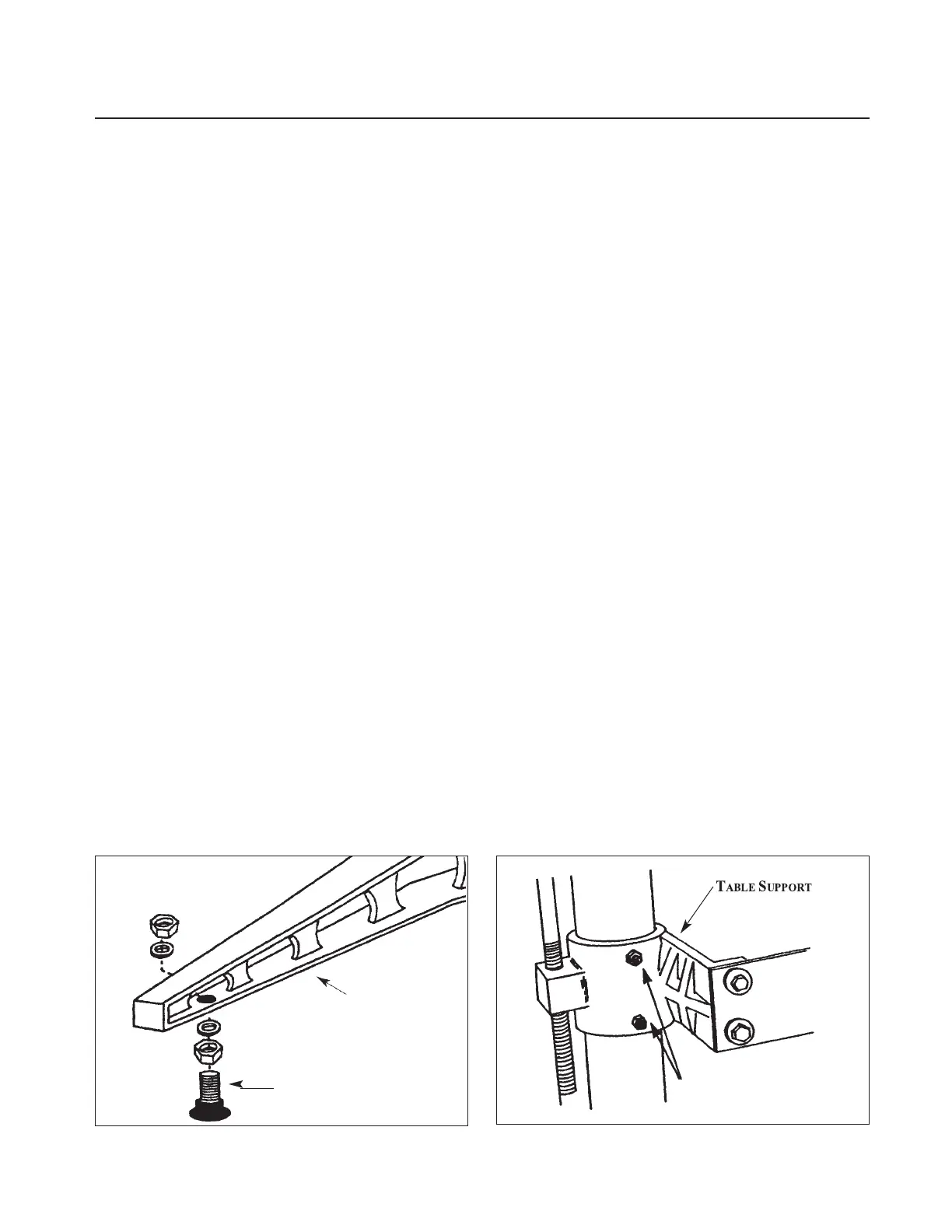
1. Unbolt the machine legs from the shipping
pallet. Install the rubber-based leveling feet or cast-
ers on legs (Fig. 2). The feet and mounting hard-
ware are in the STOP bag packed with your
machine.
2. Loosen the hex nut and set screws on the table
support castings (Fig. 3). The set screws on the
table support castings have been tightened at the
factory to eliminate free-play between the table
support casting and the column tube during ship-
ment. There are two table support castings on the
SUPERMAX, one each for the right and left column
tubes. Important: These set screws are tightened
for shipping and must be loosened and readjusted
before operating either the height adjustment
mechanism or the conveyor drive.
To properly adjust for operation, loosen each set
screw by first loosening its hex nut with an open-
end wrench and then the set screw with an Allen
wrench. Then retighten each set screw with your
fingers so it only lightly touches the column tube.
Hold each set screw in position with an Allen
wrench and retighten the hex nut. Failure to fol-
low these procedures may result in misalignment
of the drum(s) and/or the conveyor table.
Caution: On the SUPERMAX models do not
loosen the set screws on the upper drum support
castings.
3. Install the power feed gear motor. Rotate the
drive roller on the conveyor system so the flat part
of the shaft is down. If necessary, plug the gear
motor into an appropriate 220V AC outlet to
rotate the motor output shaft coupling so the set
screws face downward. Unplug the gear motor.
Slide the power feed motor assembly onto the
drive roller shaft, aligning the shaft coupling and
four mounting holes. Start the four 5/16" hex
head bolts on the power feed motor mounting
bracket, but do not tighten yet.
Next, tighten the set screws in the coupling on
the drive roller shaft, making sure they are on the
flat of the shaft. Rock the drive roller while tight-
ening the set screws to make sure they are centered
properly on the flat. Install the safety shield on the
bottom of the assembly with two screws. Then
plug in the cord and turn conveyor on full speed.
While it is running, tighten the four 5/16" bolts to
secure the motor assembly in place.
4. If necessary, adjust the tension of the V-belt
between the primary motor and driven pulleys. To
do this, loosen the two screws in lower belt guard
and loosen the pinch bolt located at the back of
the motor support casting. Slide the motor sup-
port casting down the column tube until the V-
belt is taut. Tighten the two screws in lower belt
guard. Retighten the motor support pinch bolt.
Fig. 2. Leveling feet and mounting hardware. Fig. 3. Table support casting and set screws.
EVELING
EET
CASTING
HEX NUT & SET SCREWS



 To Next Page