2-2
X7DB3 User's Manual
2-2 Processor and Heatsink Fan Installation
When handling the processor package, avoid placing
direct pressure on the label area of the fan.
Notes:
Always connect the power cord last and always remove it before adding, re-
•
moving or changing any hardware components. Make sure that you install the
processor into the CPU socket before you install the CPU heatsink.
Intel's boxed Xeon CPU package contains the CPU fan and heatsink assembly.
•
If you buy a CPU separately, make sure that you use only Intel-certifi ed multi-
directional heatsink and fan.
Make sure to install the motherboard into the chassis before you install the CPU
•
heatsink and fan.)
When purchasing an LGA 771 CPU or when receiving a motherboard with an
•
LGA 771 CPU pre-installed, make sure that the CPU plastic cap is in place and
none of the CPU pins are bent; otherwise, contact the retailer immediately.
Refer to the MB Features Section for more details on CPU support.
•
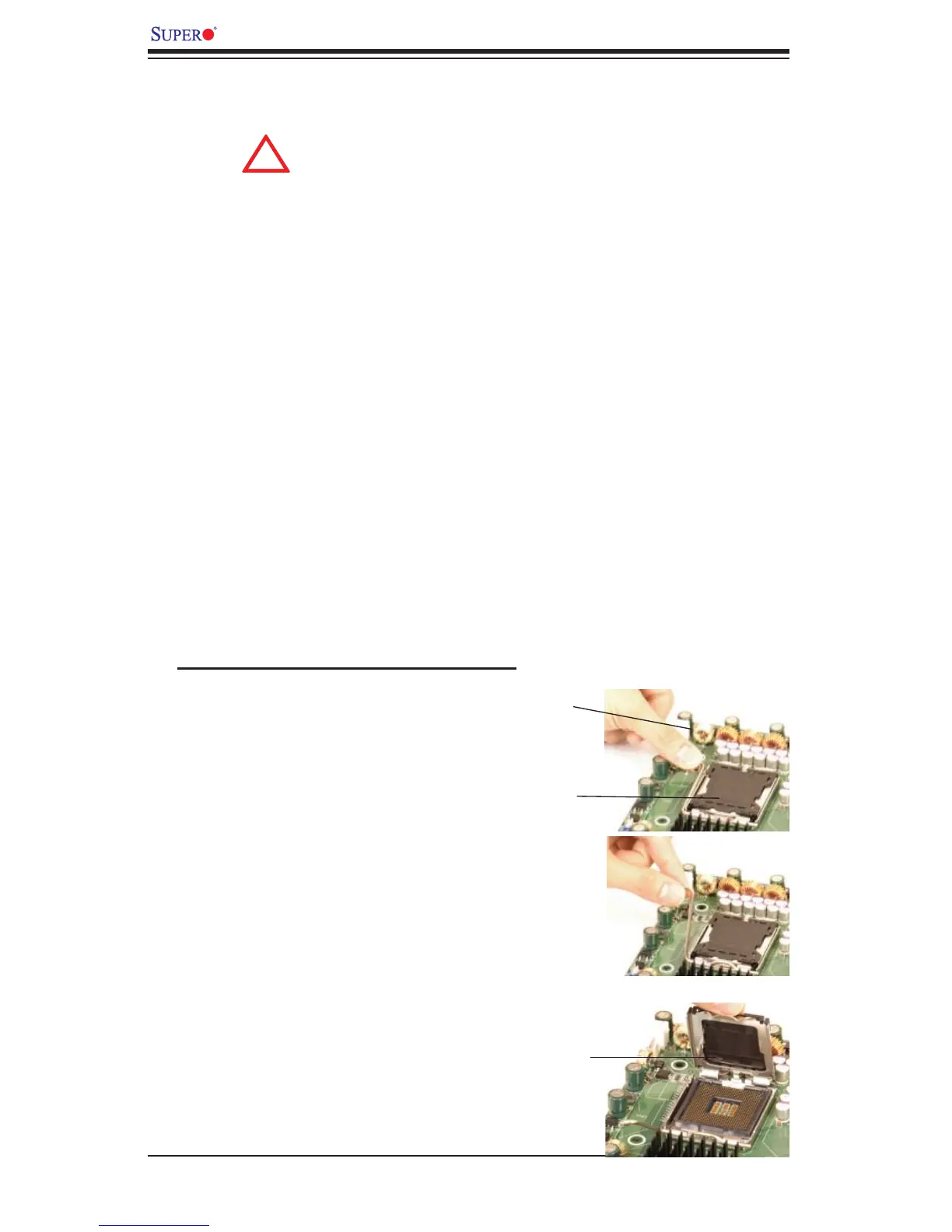
Installation of the LGA771 Processor
1. Press the socket clip to release
the load plate, which covers the CPU
socket, from its locking position.
Socket Clip
2. Gently lift the socket clip to open
the load plate.
Load Plate
Load Plate





 To Next Page