2-24
X7DB3 User's Manual
GLAN1
®
JLAN1
S
UPE R
GLAN2
F
a
n
1
8-pinPWR
FP C ontrol
SPK
PW LED
JOH1
Fa
n3
I
D
E
1
Fl
o
p
py
Fa
n4
S
ATA
1
S
ATA
0
USB2/
3
S
M
B
P
CI-
X
1
00
M
Hz
ZCR
P
C
I
-
X
1
3
3 M
H
z
J
W
D
Ba
ttery
V
GA
P
C
I-
Exp x8
N
orth Bridge
V
G
A
C
O
M1
USB0/1
KB
/
Mo
u
se
Fan
6
F
a
n
5
ATX PWR
4
-
P
in
PWR
J3P
Parrallel
Port
24-Pi
n
J
P
G
1
SAS CTRLR
Adaptec 9410W
C
PU
1
C
PU
2
P
X
H
DIMM 1
A (Ban
k
1
)
F
a
n
7
JAR
PSF
F
a
n
2
C
o
m
p
act F
l
as
h
LE1
F
an
8
J
CF1
JWF
1
S
AT
A3
S
AT
A2
S
ATA
4
S
ATA
5
J
L
1
J
K1
S
lot1
S
lo
t
2
S
lo
t
3
P
C
I
-
X
13
3 M
H
z
S
lot4
J
P
L1
J
P
L2
S
lot5
PCI-Exp x4
S
lot6
PCI-Exp x8
SEPC
SIMLP IPMI
S
lot7
DIMM 1
B (Bank 1
)
D
IMM
2
A (Ba
n
k
2)
DIMM
2
B (Bank
2
)
DIMM 3
A
(
B
a
n
k
3)
DIMM 3
B
(
B
ank 3)
DIMM 4
A (Ban
k
4)
DIMM 4
B (Bank 4)
J
7
J
B
T
1
U
SB
4
JW
O
R
J
C
O
M
2
WOL
S
I
/
O
JP1
L
A
N
CTR
L
R
J27
J28
SGP
I
O
2
SMBPS
CTRLR
Inte
l
50
00P
S
o
u
t
h
Bridge
Xeon Dual Core
X
eo
n
D
u
al
C
ore
J
S
A
3
SAS0-
3
SA
S
4-7
JPS1
I
nte
l E S B 2
SGP
I
O
1
B
PLED
C
o
n
X7D
B3
B
IOS
Buzzer
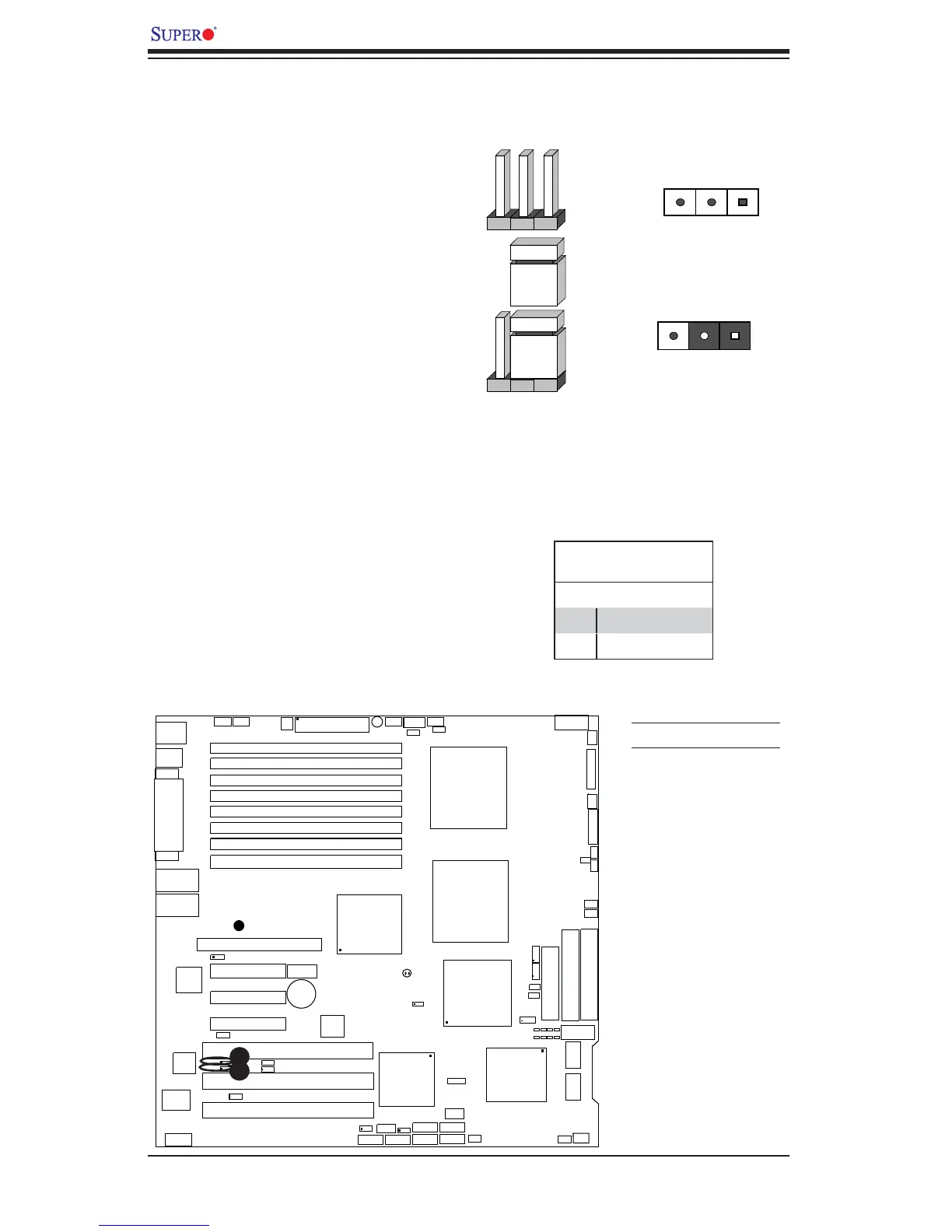
2-6 Jumper Settings
Explanation of Jumpers
To modify the operation of the mother-
board, jumpers can be used to choose
between optional settings. Jumpers
create shorts between two pins to
change the function of the connector.
Pin 1 is identifi ed with a square solder
pad on the printed circuit board. See
the motherboard layout pages for
jumper locations.
Note: On two pin jumpers, "Closed"
means the jumper is on and "Open"
means the jumper is off the pins.
Connector
Pins
Jumper
Cap
Setting
Pin 1-2 short
3 2 1
3 2 1
GLAN Enable/Disable
JPL1/JPL2 enable or disable the
GLAN Port1/GLAN Port2 on the moth-
erboard. See the table on the right for
jumper settings. The default setting
is enabled.
GLAN Enable
Pin# Defi nition
1-2 Enabled (*default)
2-3 Disabled
A
A. GLAN Port1 Enable
B. GLAN Port2 Enable
B





 To Next Page