SureCall Flare 3.0 | Before Installation
7
1-888-365-6283 | support@surecall.com | www.surecall.com
1-888-365-6283 | support@surecall.com | www.surecall.com
Measuring signal will be helpful to (1) identify the location outside with the strongest signal for placement of your outside
antenna and (2) to measure indoor signal strength during installation and testing of your system.
During installation and testing, always take multiple readings several minutes apart. Also, take note of the band number
related to each reading for accurate comparisons.
NOTE, signal measurements are displayed alongside their measurement scale. RSRP is one scale commonly used, as is RSSI. For more
information, see “Signal measurement scales” on page 8.
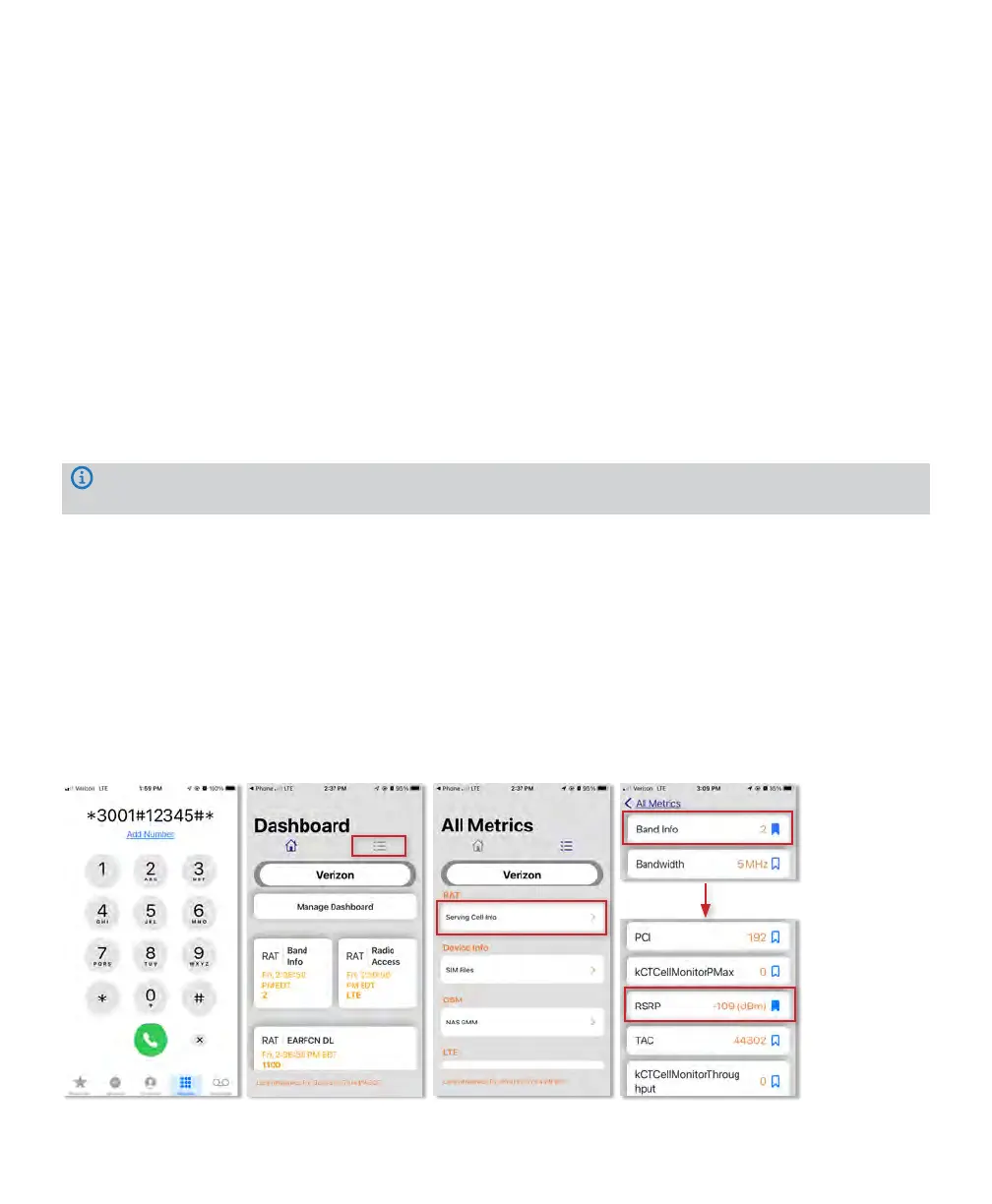
FOR IPHONE dBm signal measurements, use the methods below.
1. First turn off your Wi-Fi
2. Dial *3001#12345#* then press the call button.
3. The field test screen will appear. Once open, the menu navigation varies depending on the iOS version.
4. Navigate to “Cell Info” in the menu
5. The measurement that reads “RSRP” is your cellular signal strength in decibel-milliwatts.
6. Note Band number
If you’re using an earlier version of iOS or looking for more detailed information, we have more instructions available
here: www.surecall.com/support
Taking signal measurements with your phone
Cell phone bars are an approximation of your signal that varies by phone and carrier. Viewing measurements in decibel[1]
milliwatts provides a more accurate reading. In most cases the units are reported in RSRP (LTE & 5G signals) and will
generally fall between -80 dBm (strong) and -130 dBm (very weak). If you are connected over 3G or HSPA the decibels
units are reported in RSSI and the units will generally fall between -50 dBm (strong) and -100 dBm (very weak).
PLEASE NOTE, To achieve optimal performance for your booster, it is vital to take care choosing antenna placement
and antenna alignment The coverage area that the booster provides is directly related to the strength of incoming signal
received by the outdoor antenna. Mounting the outside antenna where the signal is the strongest provides the best
results. If signal is extremely weak where the outside antenna is installed, indoor coverage will be limited.
See the instructions to measure decibels on your phone.
iPhone test mode











 To Next Page