21
Manual locking modes
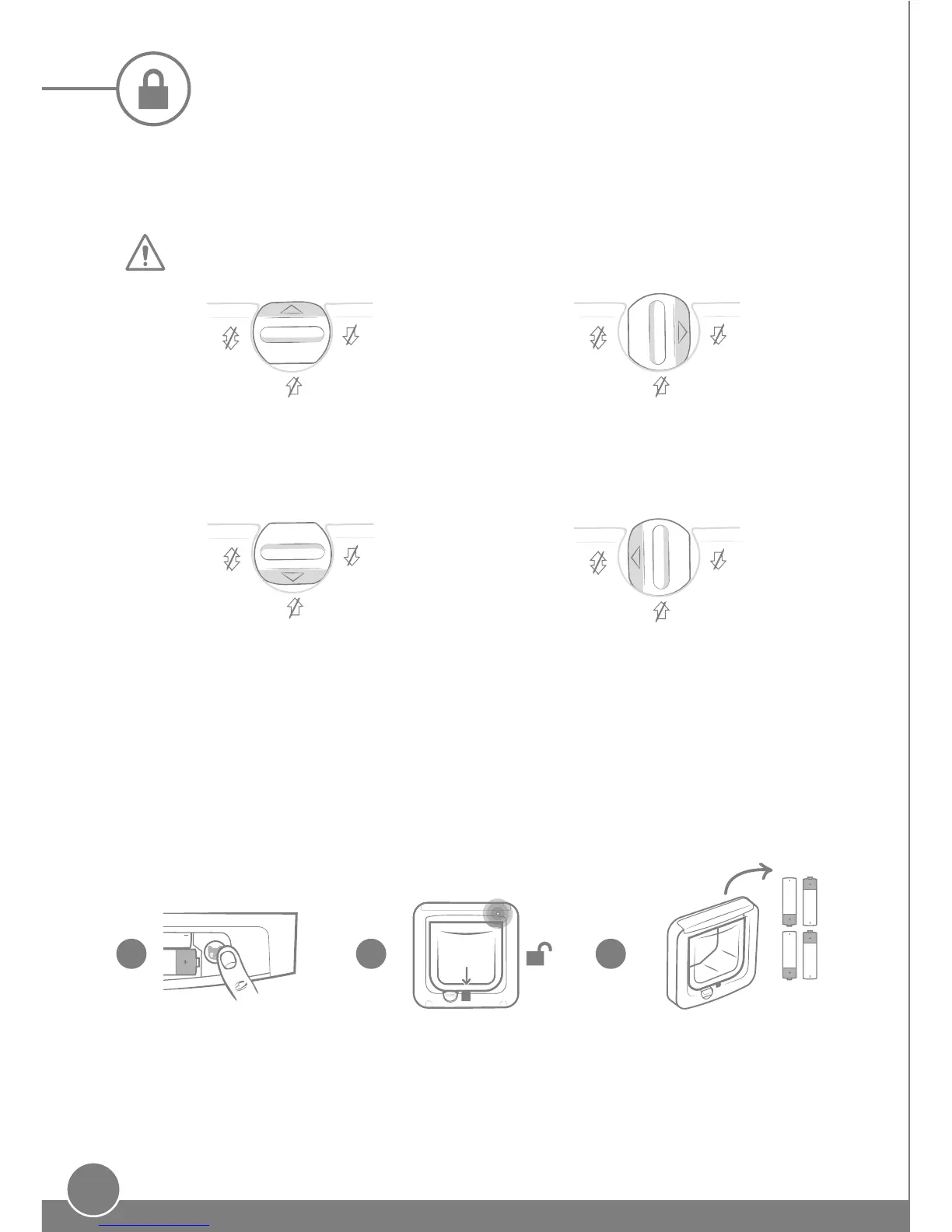
4-way manual lock
The manual lock has 4 positions which control the opening of the flap in both directions,
allowing you to control the entry and exit of your cats.
The flap must be vertical before changing the rotary lock position.
Position 1 – Enter and exit
Standard operation position. Authorised
cats
are allowed to enter and all cats can exit.
Position 2 – Exit
only
All cats are allowed to exit the house, and all cats
are prevented from entering the house.
Position 3 – Enter only
Your authorised cats are allowed to enter, but are
prevented from exiting the house. This is useful if
you need to keep your cat inside eg. for a vet trip.
Position 4 – Fully locked
All cats are prevented from entering and exiting
the house.
Turning o the microchip reader
In the event that you want to turn o the microchip reader in your cat flap and revert to
using it as a standard cat flap, follow the three steps below:
Remove the battery
compartment cover
and press the 'Add
a Pet' button once.
The catch will open
and the indicator light
will flash, as the cat flap
starts Add a Pet mode.
Remove the batteries and replace
the cover. The catch will stay open
and your cat flap can now be used
as a standard cat flap.
1 2 3


 To Next Page