SP91 User Manual
[Format] ASCII ESC c 4 n
Hex 1B 63 34 n
Decimal 27 99 52 n
[Range] 0 ≤ n ≤ 255
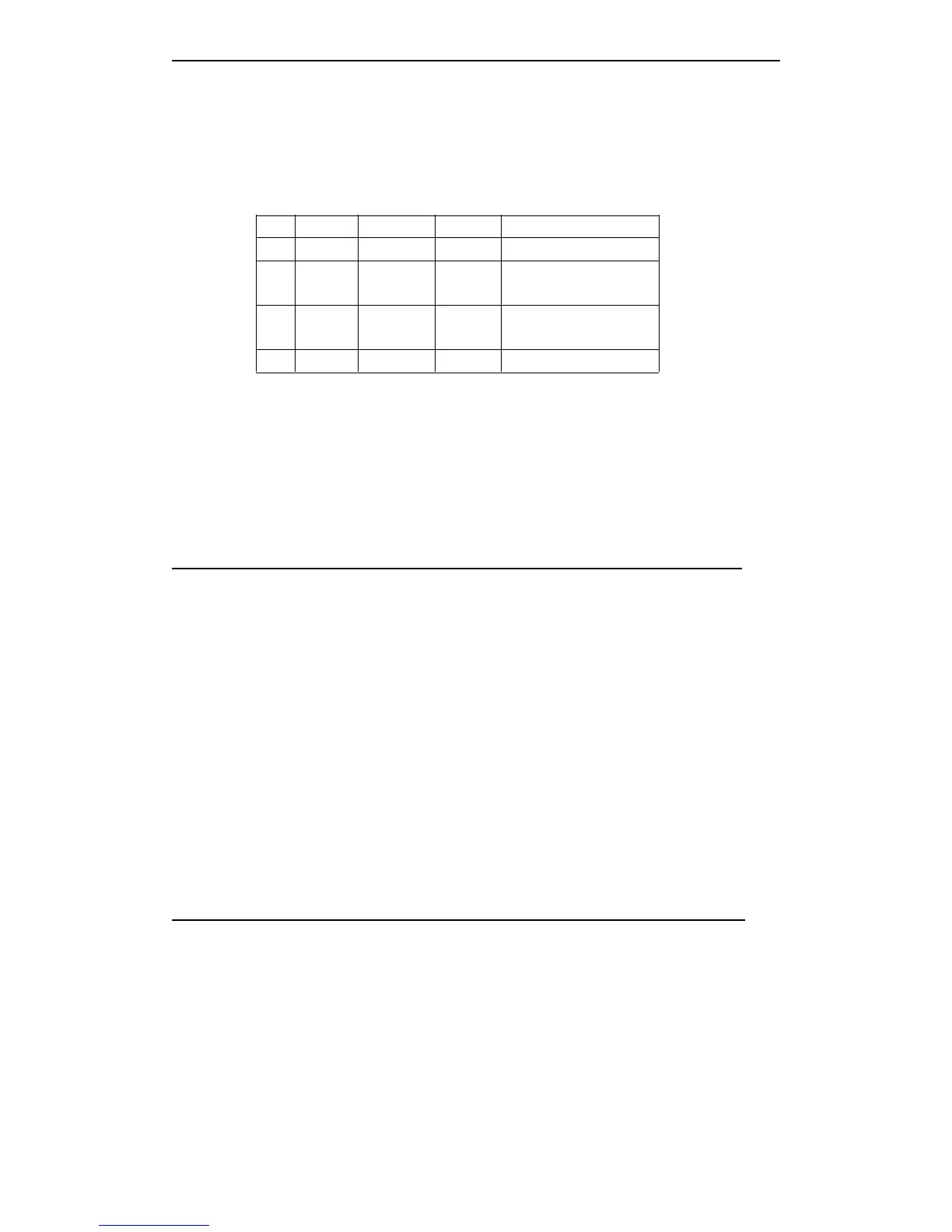
[Description] Selects the paper sensor to stop printing when paper end detected:
Bit Off/On Hex Decimal Fuction
0 Off - - Undefinded.
1 On 00 0
Roll paper near end
sensor disabled.
Off 02 2
Roll paper near end
sensor enabled.
2-7 - - - Undefined.
[Notes] · When this command enables one roll paper sensor, only uses the related roll paper,
the printer will be stopped.
· When paper end sensor detects the end of paper, the printer stops printing and
enters to offline condition.
· When bit 1 is on, the printer selects paper near end sensor and stops printing.
[Default] n = 0
ESC
ESC
ESC
ESC c
c
c
c 5
5
5
5 n
n
n
n
[Name] Enable/disable panel buttons
[Format] ASCII ESC c 5 n
Hex 1B 63 35 n
Decimal 27 99 53 n
[Range] 0
≤
n
≤
255
[Description] Enable/disable panel buttons.
· When the LSB of n is 0, the panel buttons are enabled.
· When the LSB of n is 1, the panel buttons are disabled.
[Notes] · Only uses the LSB of n.
·
If
disable the panel buttons, so close the printer cover, all buttons are disable.
· For this printer, the only one panel button is feed paper button.
· When locates in macro executing conditions, however how to set this command,
feed paper button are enable. But can not feed paper.
[Default] n = 0
ESC
ESC
ESC
ESC d
d
d
d n
n
n
n
[Name] Print and feed n lines
[Format] ASCII ESC d n
Hex 1B 64 n
Decimal 27 100 n
[Range] 0 ≤ n ≤ 255
[Description] Prints the data in the right buffer and feeds the paper n.
[Notes] · This command set the print starting position to line starting position.
· This command can not effect the line spacing which set by ESC 2 or ESC 3.
· The max feed paper measure is 1016 mm{40inch}.
If
the specified feed paper



 To Next Page