EasyManua.ls Logo

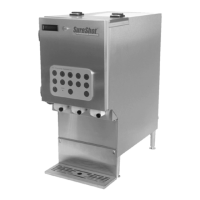
SureShot AC-20 - User Manual

Default Icon
28 pages
Print Icon
To Next Page IconTo Next Page
Loading...
SureTouch
Refrigerated Liquid Dispensers
Operations Manual
D-19-032RevD

Questions and Answers

  • P
    Patrick BentonSep 14, 2025
    Why is the red light in a product selection button remaining on on my SureShot AC-20?
    • D
      davidbowmanSep 14, 2025
      An LED embedded in each product selection button illuminates on SureShot Dispenser indicating the product is empty or is locked out for cleaning.
  • T
    timothygibsonDec 1, 2025
    Why is the product temperature incorrect (too warm or freezing) in my SureShot Dispenser?
    • J
      Jessica WilliamsDec 1, 2025
      If the product temperature in your SureShot Dispenser is incorrect (too warm or freezing), first ensure the product temperature is between 32 ºF/0 ºC to 40 ºF/4.4 ºC prior to loading it into the dispenser. Ensure a 1" (2.5 cm) air space exists on all sides of the dispenser. Check that the vents at the back of the dispenser are not blocked, and that the dispenser is not too close to a heat-generating machine, such as a coffee maker. Make sure the dispenser is level on the countertop. Check if the right “period” digit is flashing on the side console display. If the defrost cycle time extends past twenty two (22) minutes and the dispenser is not cool, reset the defrost cycle by turning OFF the dispenser; it should become cold after approximately twelve (12) minutes. Check that the condenser i...

Summary

Unpacking and Setup

Inspect for Damage

Inspect packaging material and dispenser for damage immediately upon receipt.

Unpacking the Dispenser

Step-by-step instructions for removing the dispenser from its packaging.

Safety Precautions

Essential safety guidelines for operating and handling the dispenser.

Electrical Requirements

Details on power source, grounding, and cord specifications.

Loading Product

Steps for preparing and loading product into the dispenser.

Load Product

Dispensing Product

Button Panel

LCD Display

Program Features

Program Mode - IntelliShot (Portion Controlled) Dispensers with LCD Display

How to use program mode functions on IntelliShot dispensers.

Side Console Functions

Side Console Display Window

Explains the information shown in the side console display.

Temperature Adjustments

Steps for adjusting the dispenser's temperature settings.

Cleaning and Maintenance

Troubleshooting

Power and Display Issues

Addresses problems with the dispenser not turning on or the LCD display being blank.

Dispensing and Product Flow Problems

Solutions for dispensers not dispensing, incorrect amounts, or leaks.

Operational Issues

Covers leaks, exterior warmth, product temp, leveling, and ice/frost.

Wiring Diagram

Service and Warranty

USA and Canada Warranty

SureShot AC-20 Specifications

General IconGeneral
BrandSureShot
ModelAC-20
CategoryDispenser
LanguageEnglish

Related product manuals