59
3
3-1. Basic operation
Audio/visual system
COROLLA_HV(TMUK)_OEM_MM_(EE)
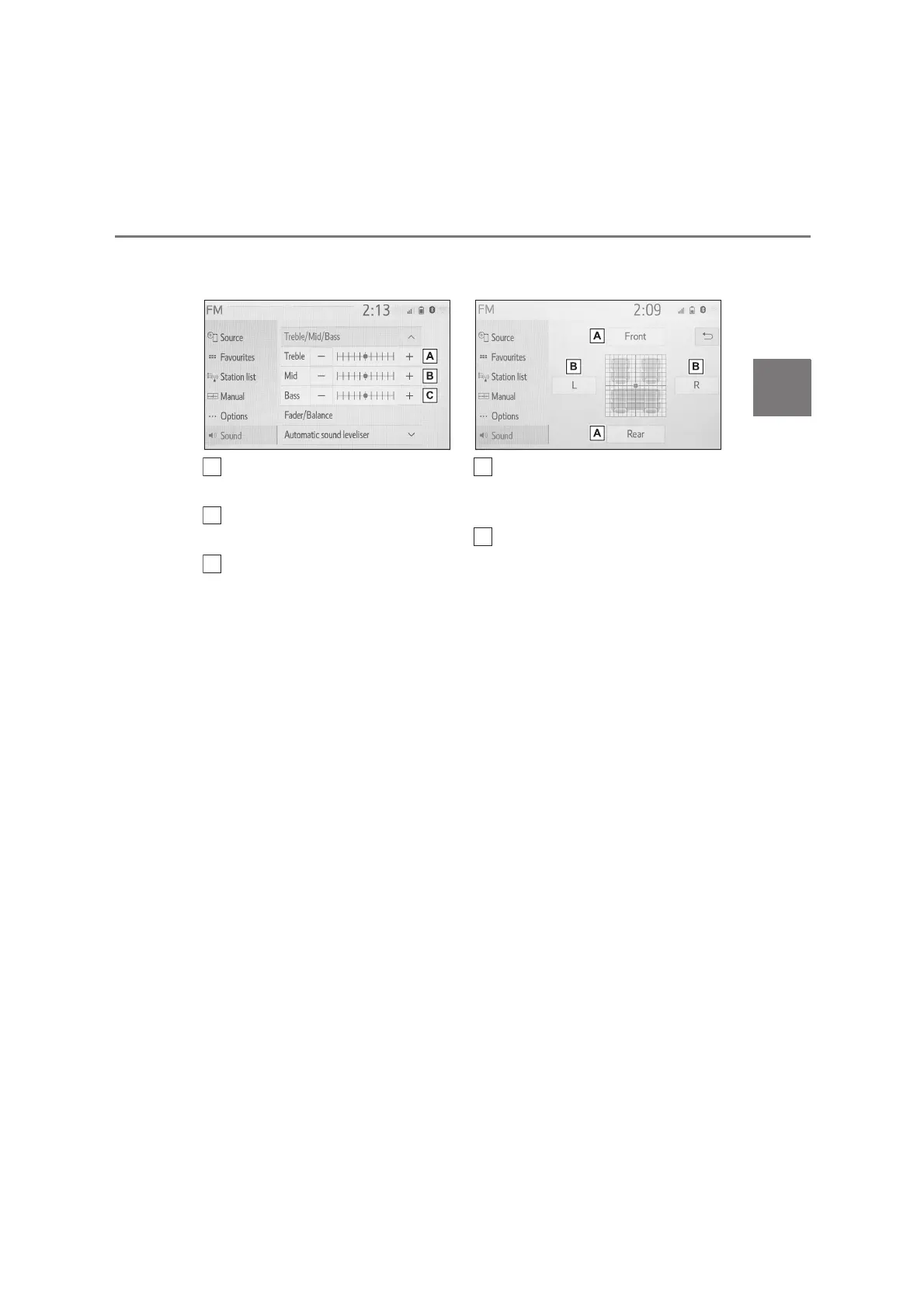
2 Select the desired screen but-
ton.
Select “+” or “-” to adjust
high-pitched tones.
Select “+” or “-” to adjust
mid-pitched tones.
Select “+” or “-” to adjust
low-pitched tones.
■
Fader/Balance
A good balance of the left and right
stereo channels and of the front
and rear sound levels is also impor-
tant.
Keep in mind that when listening to
a stereo recording or broadcast,
changing the right/left balance will
increase the volume of 1 group of
sounds while decreasing the vol-
ume of another.
1 Select “Fader/Balance”.
2 Select the desired screen but-
ton.
Select to adjust the sound bal-
ance between the front and rear
speakers.
Select to adjust the sound bal-
ance between the left and right
speakers.
■
Automatic sound levelizer
(ASL)
The system adjusts to the optimum
volume and tone quality according
to vehicle speed to compensate for
increased road noise, wind noise,
or other noises while driving.
1 Select “Automatic sound level-
iser”.
2 Select “High”, “Mid”, “Low” or
“Off”.
B
C


 To Next Page