77
3
3-3. Media operation
Audio/visual system
COROLLA_HV(TMUK)_OEM_MM_(EE)
Miracast
®
is available when the
Wi-Fi
®
function is enabled. (P. 3 9 )
1 Turn the Miracast
®
function of
your smartphone on.
2 Select “Miracast™” on the audio
source selection screen.
(P.57)
The system will automatically
start searching for a Miracast
®
compatible device.
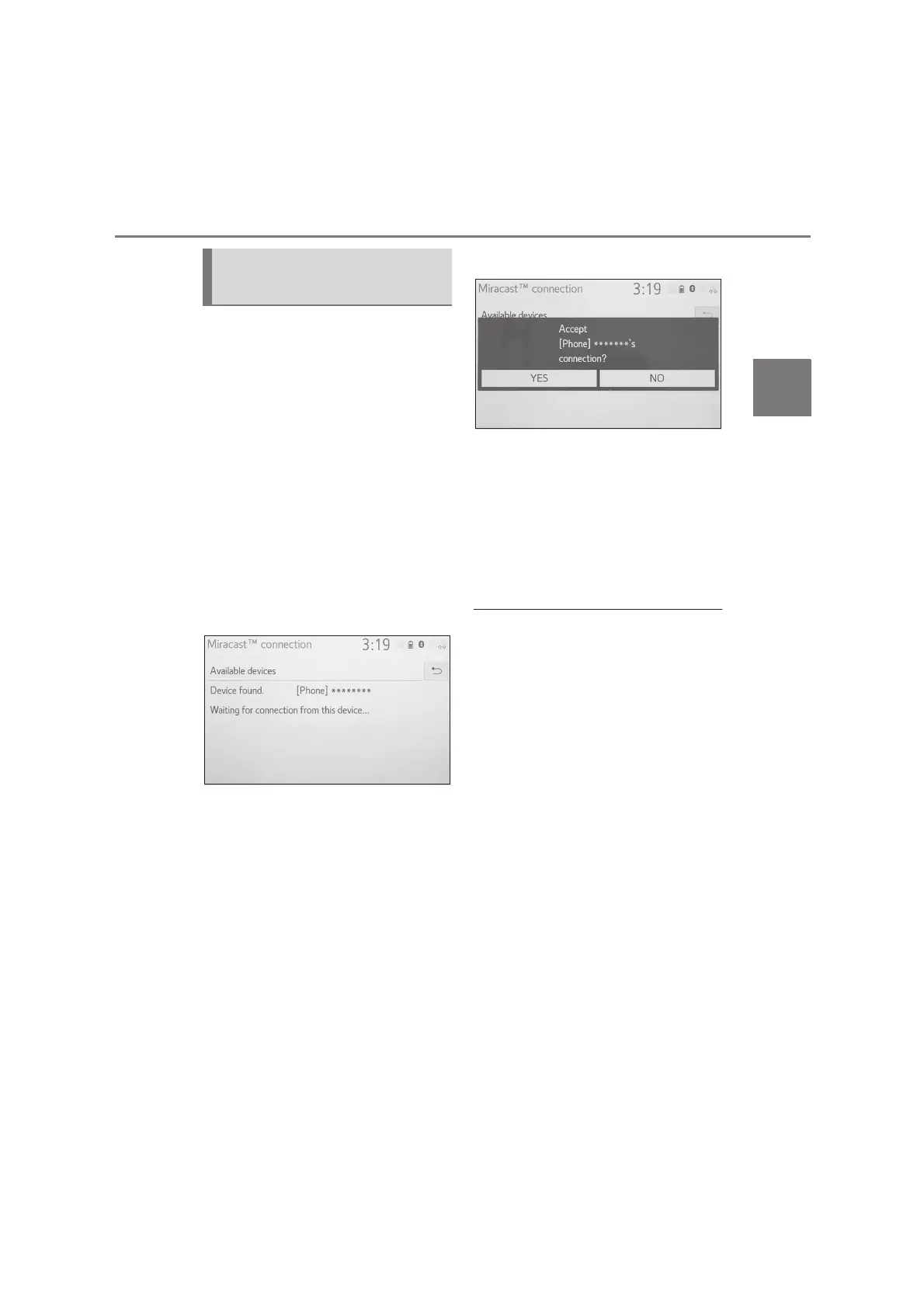
3 Check that the following screen
is displayed when the device is
found.
If the device has been connected
to the system before, this screen
may not be displayed and the
Miracast
®
connection may start
immediately.
4 Select the system name on the
smartphone.
5 Select “YES”.
6 Check that Miracast
®
operation
screen is displayed.
Depending on the device con-
nected, it may take approxi-
mately 5 to 15 seconds before
the Miracast
®
operation screen
is displayed.
●
The signal strength/status of the
Wi-Fi
®
connection (P2P mode) is dis-
played on the upper right side of the
screen. (P. 11 )
●
To check the Miracast
®
setting on the
Wi-Fi
®
setting screen (P.39 )
●
Miracast
®
will not be available at the
same time using Wi-Fi
®
connection
(P2P mode).
Connecting a Miracast
®
device


 To Next Page