Back to top
35
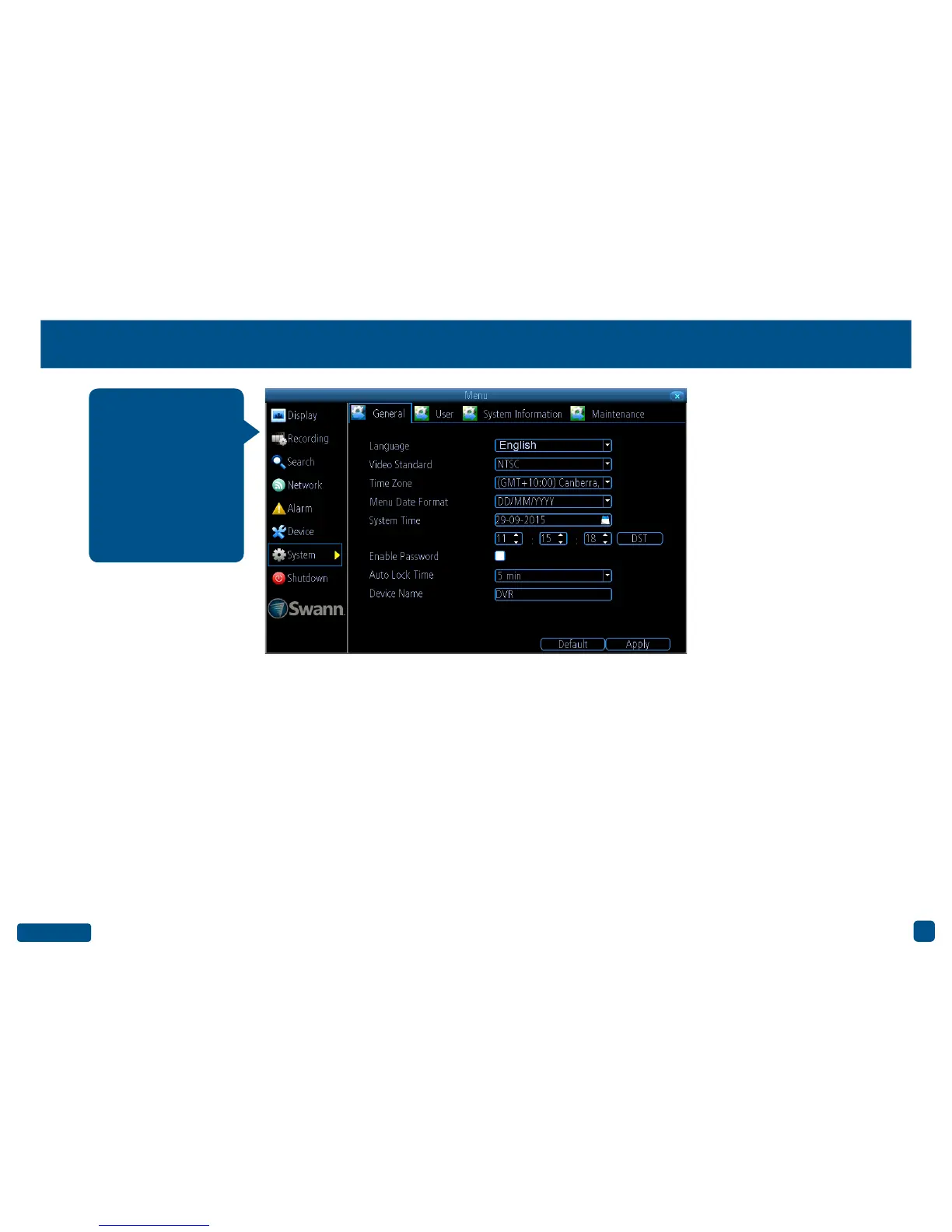
System: General
Language: Choose a language for the system menu.
Video Standard: Select the correct video standard for your country. USA,
Canada and some Latin American countries is NTSC. UK and Australia
is PAL.
Time Zone: Select the correct time zone relevant to your region.
Menu Date Format: Select a preferred display format.
System Time: Change the system time and date if required.
Enable Password: Enable this for added security when accessing the
Menu.
Auto Lock Time: You can change this to alter the time your DVR will exit
the Menu when idle.
Device Name: Give your DVR a relevant name.
• Click the “Default” button to revert back to default settings.
• Don’t forget to click “Apply” to save settings.
• Right-click the mouse to exit the Menu.
The settings for Lan-
guage, Video Standard,
Time Zone, Menu Date
Format, System Time,
enabling a password
and renaming your
device are configured
during the Setup Wiz-
ard.


 To Next Page