22
sWaP Nova user guide
www.s-w-a-p.co.uk
Contents
USB link to your computer
Your sWaP Nova uses an industry- standard USB port to
allow it to be linked to any similarly equipped personal
computer. Using the USB link, you can do two main
things:
•Transferlesofalltypes:Photos,videoclips,sound
recordings, music tracks, etc. between the two devices.
•ChargeyoursWaPNovabatteryatthesametime.
Note: Your sWaP Nova can be switched on or off when
linking or unlinking with the computer.
To link your sWaP Nova and computer
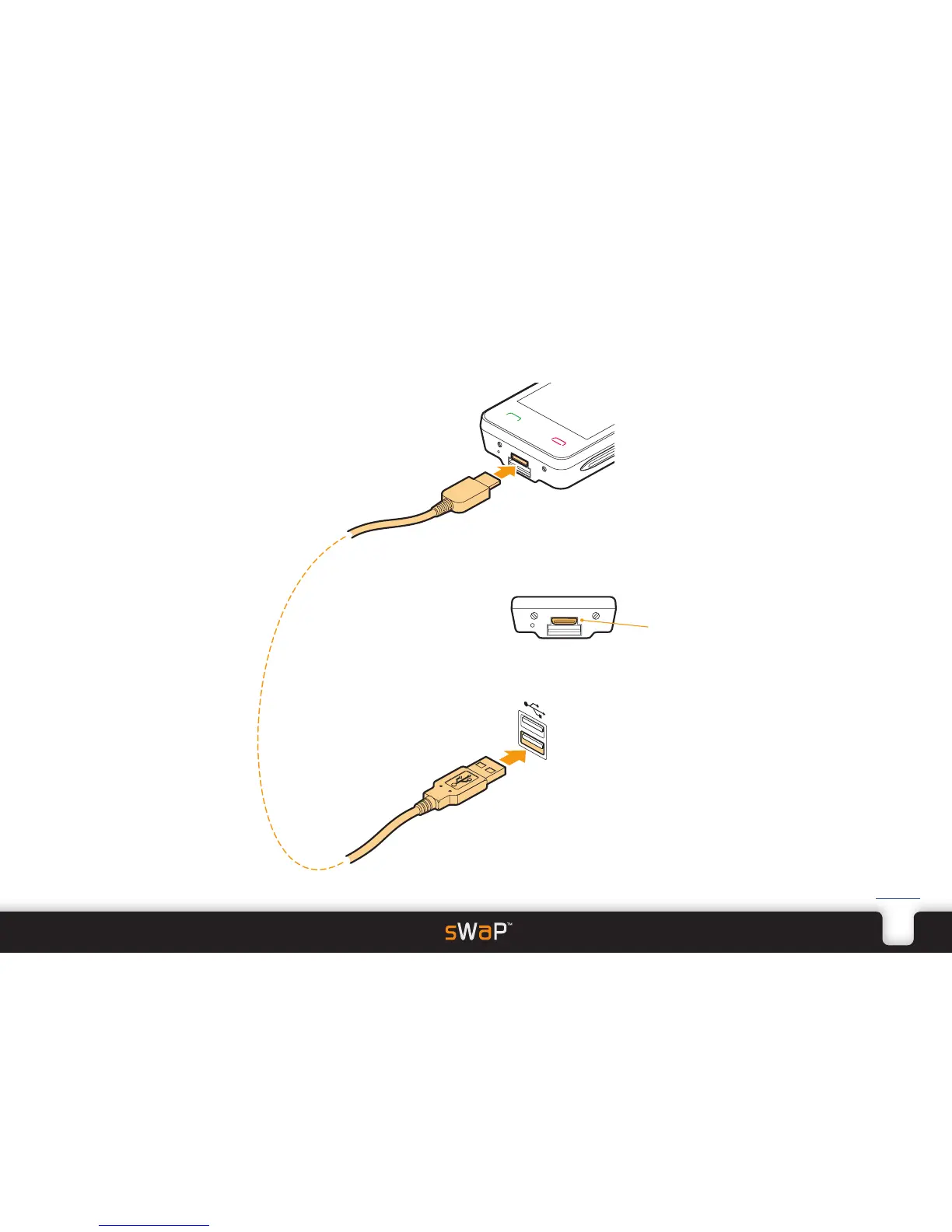
1 Carefully insert the small plug of the supplied USB cable
into the Options port at the base of your sWaP Nova.
Options
port
Note: Be sure to insert the plug into the correct socket
and in the correct orientation. The Options port is the
smaller socket, just above the
slide USB port. It has rounded
corners on its lower side
corresponding to similar corners
on the plug.
2 Insert the larger plug at the other end of the cable into
a vacant USB port on your computer.
3 Your computer should respond to the new link and,
once it has configured its drivers will respond in the
same way as if any other USB storage device had been
attached.
4 Use your computer’s file manager application to access
the folders within your sWaP Nova and transfer files
across.
PC


 To Next Page