Procedure
1 – Connect the D70 to
the computer with the cable
USB/RS232.
2 – Switch on the D70.
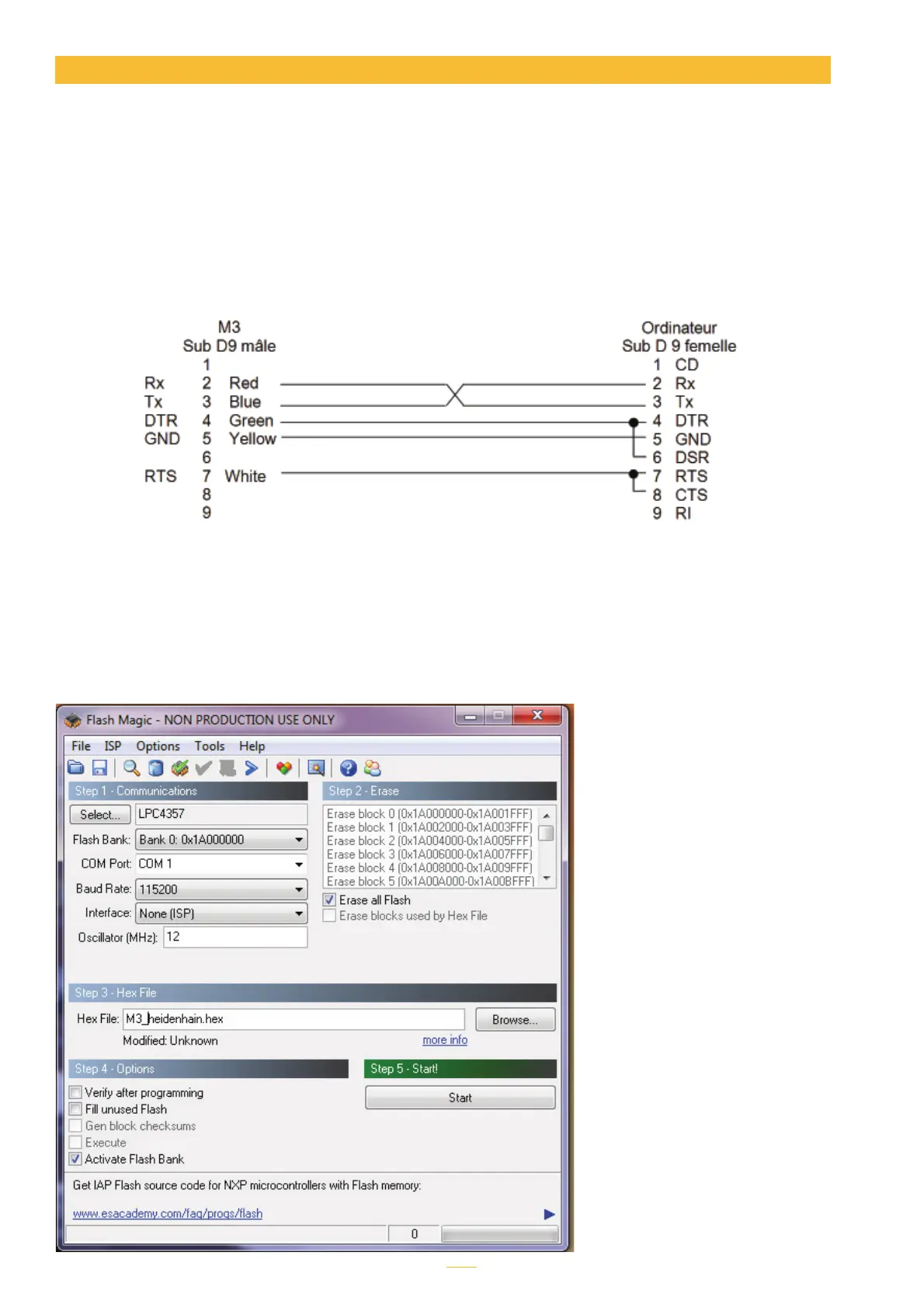
3 – Configure the flash
magic software according to
the image above.
4 – Click on “Start”.
Updating will take between 2
and 5 minutes depending on
the speed chosen. During up-
dating the screen is locked.
5- The D70 restarts auto-
matically when the procedure
is completed.
6- Reinitialise the D70 by
following the procedure des-
cribed before.
The D70 internal software can be updated.
Updating requires an RS232 cable. It is possible to use an RS232/USB converter if your PC is not
equipped with a serial port.
If you do not have an RS232 cable, you can connect it as in this diagram:
Updating the firmware requires the «flash magic» software, which can be downloaded free of
charge from this address: www.flashmagictools.com
After installation, configure the software as follows :
Firmware update



 To Next Page