EasyManua.ls Logo

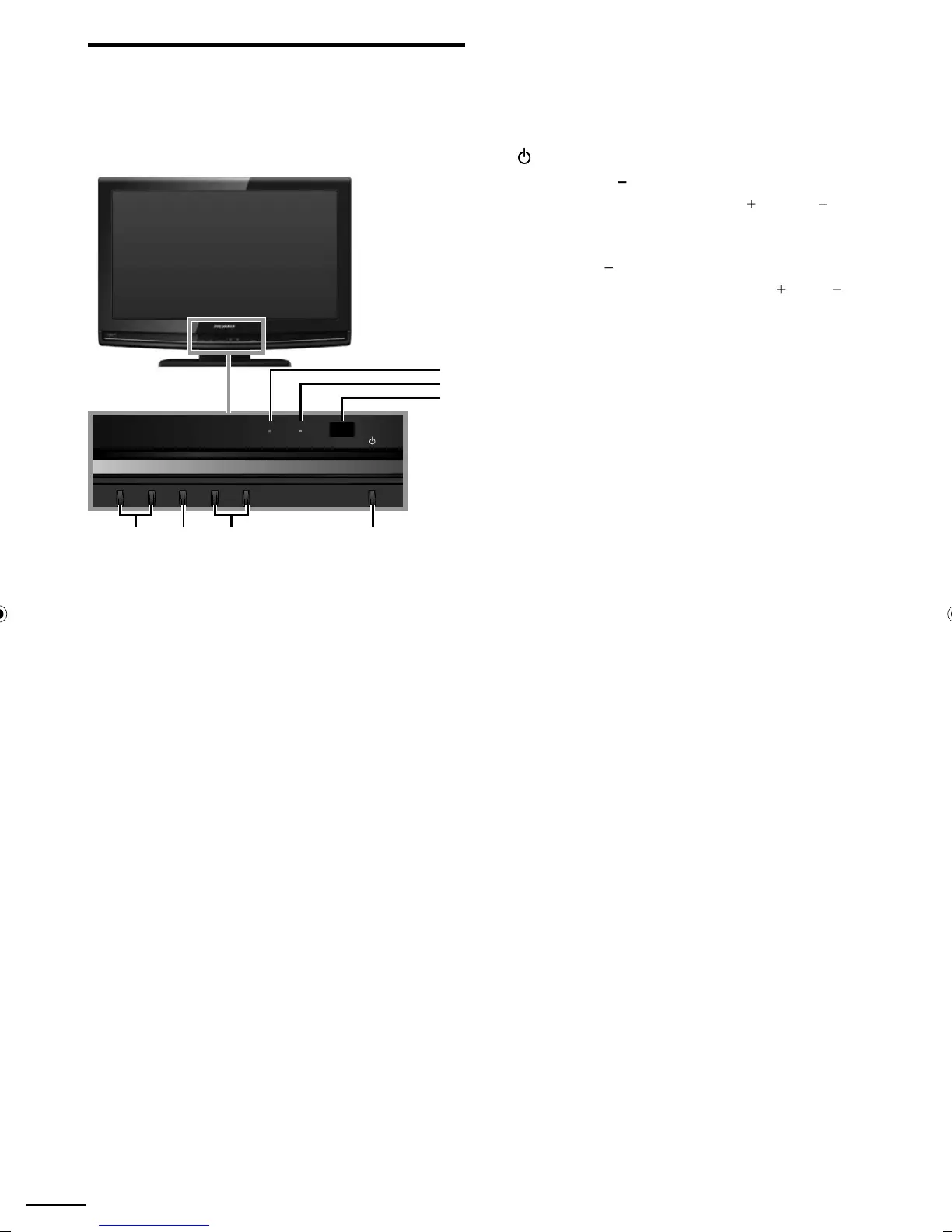
Sylvania A0171 - Control Panel; POWER on Indicator; STAND by Indicator

Sylvania A0171
120 pages
Print Icon
To Next Page IconTo Next Page
To Previous Page IconTo Previous Page
Loading...
6
EN
1
POWER
p. 1
5
2
C
HANNEL +/
-
p. 1
7
Press to select channels or move up
(
+
)
/ down
(
)
th
roug
h
t
h
e ma
i
n menu
i
tems
.
3
MENU
p. 19
4
VOLUME +/
-
p. 16
Press to adjust the volume or move right
(
+
)
/ left
(
)
th
roug
h
t
h
e ma
i
n menu
i
tems
.
5
Infrared sensor windo
w
Receives in
f
rared rays transmitted
f
rom the remote
c
ontro
l.
6
P
OWER ON indicato
r
Ligh
ts u
p
g
reen w
h
en
p
ower
i
s on
.
7
STAND BY indicato
r
Lights up red when power is off
.
Control Panel
MENU
CHANNEL POWER
STAND BY POWER ON
VOLUME
42 13
-
+
-
+
7
5
6
A0171N1UHmasterdraftENv1.indd6A0171N1UHmasterdraftENv1.indd6 2010/01/2922:55:322010/01/2922:55:32

Table of Contents

Related product manuals