2
No supplied cables are used with these connections:
Please purchase the necessary cables at your local store.
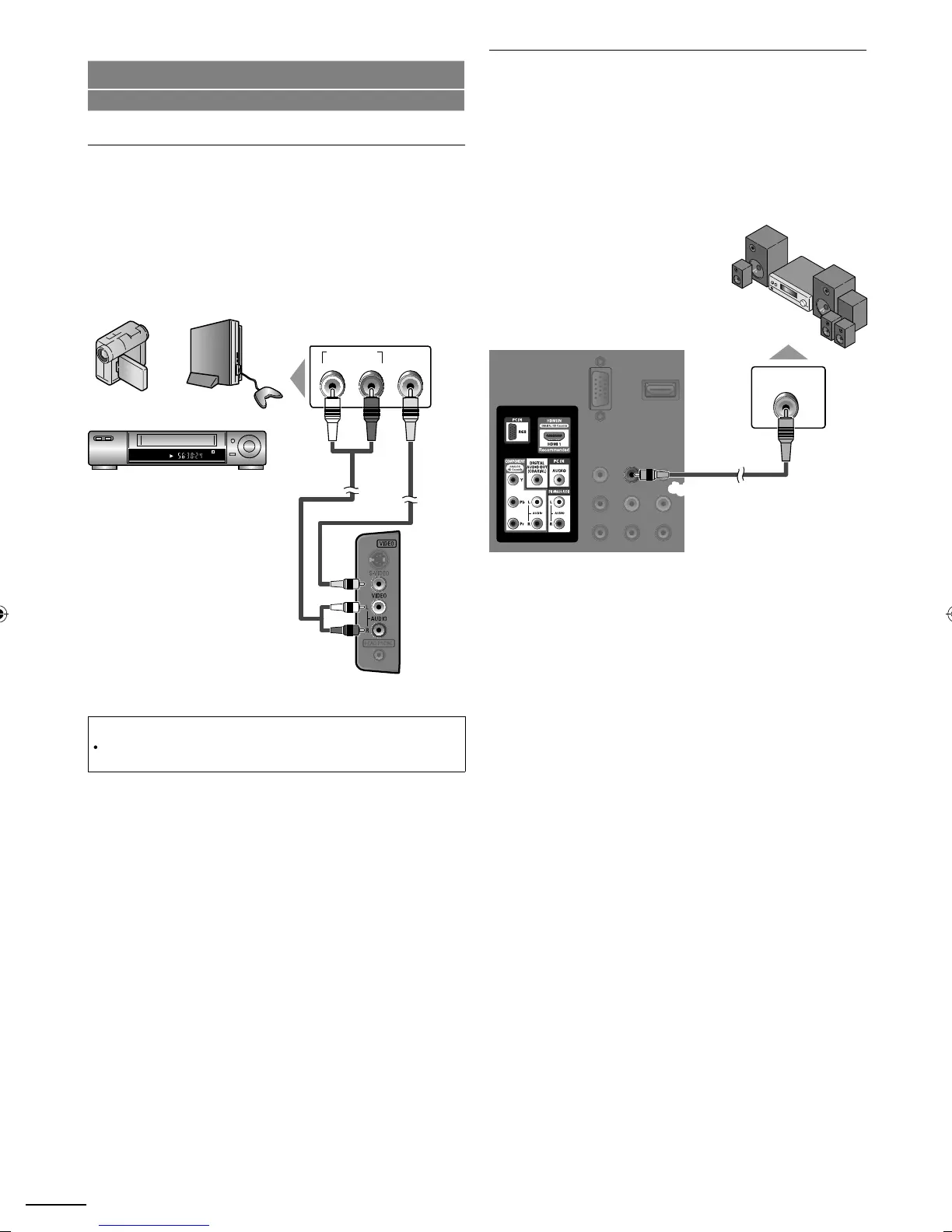
Composite Video Connection
om
osite Video connection offers standard
icture
ualit
for video devices connected to the unit. If
ou connect to
he unit’s Composite Video Input jack, connect audio cables
o the Audio L/R In
ut
acks ri
ht beside the Com
osite
ideo connector. When the audio
ack of the video device is
monaural, connect an audio cable to the Audio L In
ut
ack
e.g.)
STEREO
STAND-BY
AUDIO OUT
RL
VIDEO
OUT
u
io ca
e
i
eo ca
e
camcor
er
i
eo game
VCR
side of this uni
Note
If
ou connect to the S-Video In
ut
ack and the Com
osite Video In
ut
jack at the same time, the S-Video connection will have priority
Digital Audio Output Connection
(for digital broadcasting only)
If you connect this unit to an external digital audio device, you
an en
o
multi-channel audio like 5.1ch di
ital broadcastin
soun
se a
g
ta
au
o coax
a
ca
e to connect t
e un
t to externa
g
ta
au
o
ev
ces
e.g.)
o
y
igita
eco
er
digital audio coaxial cable
ear of this unit
A0171N1UHmasterdraftENv1.indd12A0171N1UHmasterdraftENv1.indd12 2010/01/2922:55:432010/01/2922:55:43


 To Next Page