ng
s
3
INTRODUCTION
PREPARATION
WATCHING TV
OPTIONAL SETTING
TROUBLESHOOTING
INFORMATION
PC Connection
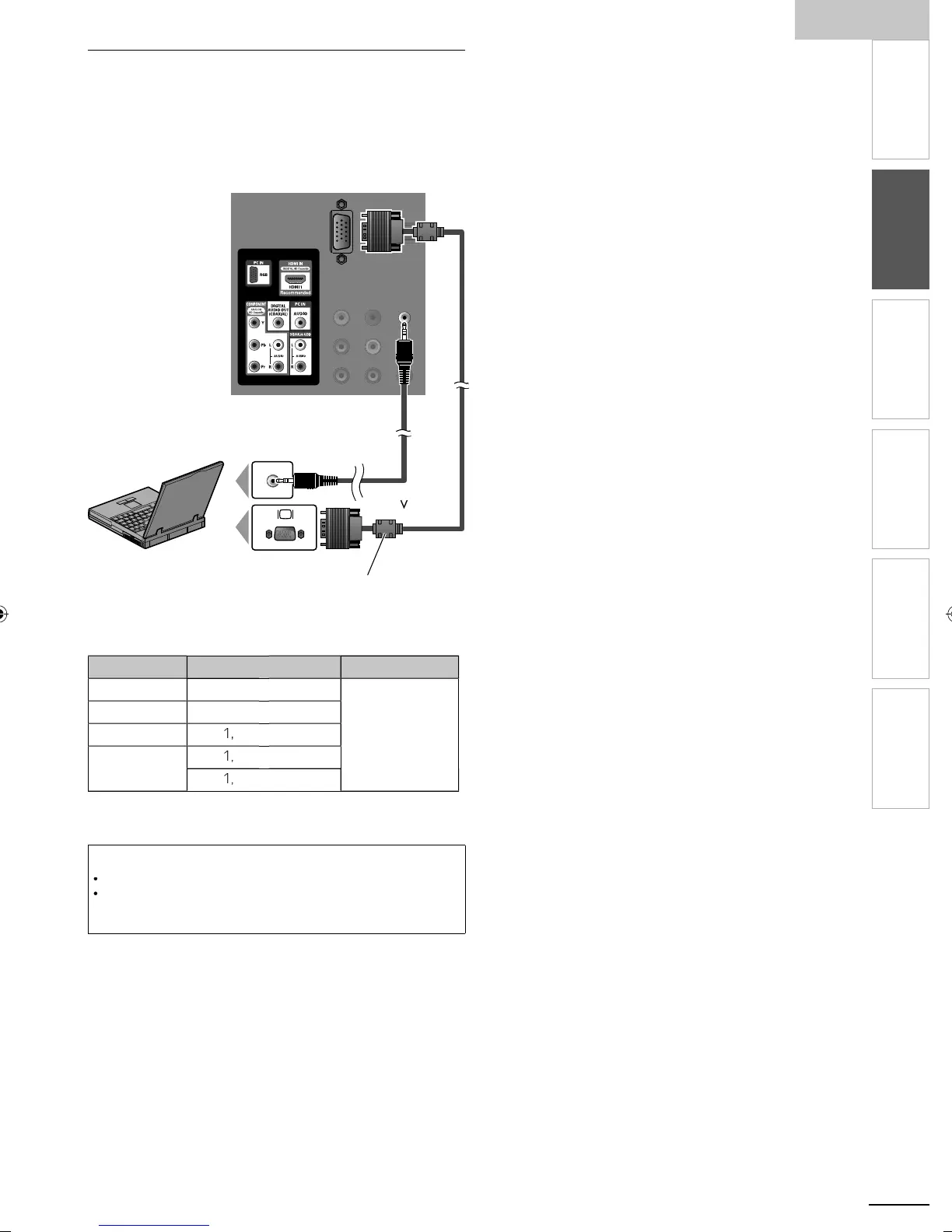
his unit is equipped with a PC input jack. If you connect thi
unit to your PC, you can use this unit as a PC monito
.
se an VGA cable for this connection and it requires stereo
m
n
u
au
o ca
e as we
.g.)
ear of this uni
tereo mini p
ug
ca
e
GA cable should be
ith ferrite core.
persona
computer
he
ollowing video signals can be displayed
orma
eso
ution Refresh rate
G
640
480
60Hz
VG
800
600
G
02
68
WXG
280
68
360
68
ther formats or non-standard si
nals will not be dis
la
ed
correct
Note
ease purc
ase t
e
G
cable that has a ferrite core
The following operations may reduce noise
- Attach a ferrite core to the AC power cord of your PC
- Unplug the AC power cord and use the built-in battery of your PC
A0171N1UHmasterdraftENv1.indd13A0171N1UHmasterdraftENv1.indd13 2010/01/2922:55:452010/01/2922:55:45


 To Next Page