8
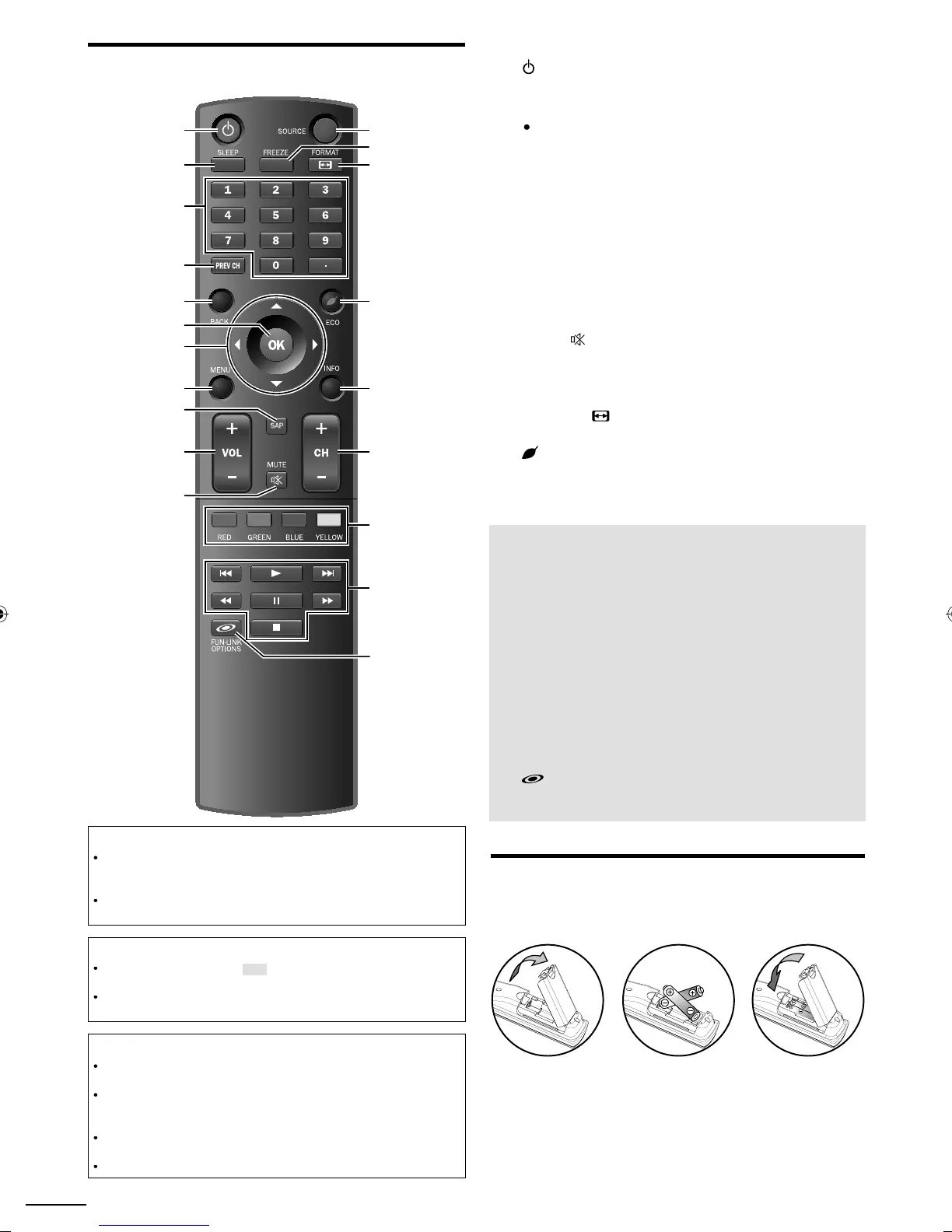
Remote Control Function
1
5
7
6
3
11
9
10
2
4
8
15
17
16
14
12
13
18
19
20
When using a universal remote control to operate this unit.
a
e sure t
e com
onent co
e on
our un
versa
remote contro
s set
o our brand. Refer to the manual accompanying your remote control fo
more
eta
s
We do not
uarantee 100% intero
erabilit
with all universal remote
ontro
s
Note
Buttons in
ra
back
round
are not available unless
ou are
onnected to devices that are com
atible with Fun-Link function
We do not guarantee 100% interoperability with other brands of HDMI link
om
ant
ev
ces
Battery Precautions:
Be sure to follow the correct
olarit
as indicated in the batter
om
artment.
everse
atter
es ma
cause
ama
e to t
e
ev
ce
Do not mix different t
es of batteries to
ether
e.
. Alkaline and
arbon-Zinc, or rechargeable batteries like ni-cad, ni-mh, etc) or old
atteries with fresh ones
If the device is not to be used for a lon
eriod of time, remove the
atteries to
revent dama
e or in
ur
from
ossible batter
leaka
e
o not tr
to rec
ar
e
atter
es; t
e
can over
eat an
ru
ture
(power)
➠
p. 1
SLEEP
p. 16
um
er
uttons
➠
p. 1
(dot)
Press to shift the subchannel from the main channel
4 PREV CH
➠
p. 1
ress to return to
rev
ous
v
ewe
c
anne
BACK
➠
p. 18
ress to return to t
e
rev
ous menu o
erat
on
O
➠
p. 1
▲/
/
/►
cursor)
➠
p. 1
8
➠
p. 19
9 SAP
p. 16
0 VOL +/−
p. 16
1
p. 16
2 SOURCE
p. 1
3
p. 16
Press to freeze screen image
4 FORMAT
p. 1
Press to select aspect ratio available for the TV screen
5 ECO
p. 18
ress to re
uce power consumpt
on
6 INFO
➠
p. 18
7
H +/−
p. 1
8 RED / GREEN / BLUE / YELLOW
p. 3
unctionall
useful for FUN-LINK
9
/
➠
p. 3
ress to ski
backward or forward cha
ters, titles or tracks of
e
sc
B
p. 3
ress to
eg
n t
e
sc p
ay
ac
/
p. 3
ress to search backward or forward through the disc
p. 3
ress to pause t
e
sc p
ay
ac
p. 3
ress to stop t
e
sc p
ay
ac
20 FUN-LINK OPTIONS
p. 18, 3
Press to call up various menu from your HDMI device
connect
ng t
roug
an
ca
e
Installing the Batteries
Install the batteries (AAA, 1.5V x 2) matching the polarity
ndicated inside battery compartment of the remote control
A0171N1UHmasterdraftENv1.indd8A0171N1UHmasterdraftENv1.indd8 2010/01/2922:55:362010/01/2922:55:36


 To Next Page