22
Picture Adjustment
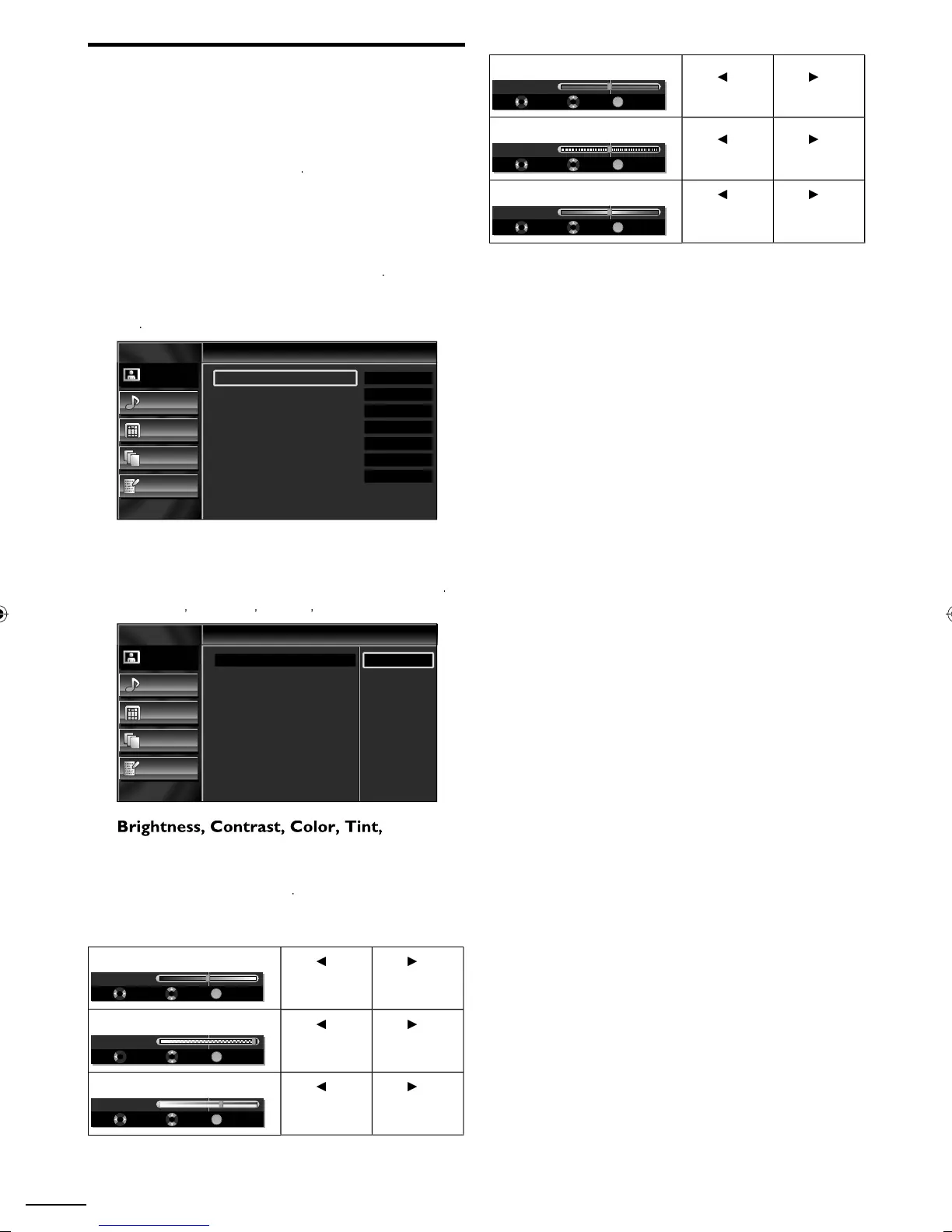
You can adjust picture mode, or customize the picture quality
as your preference.
Before you begin:
ou must set
ome
n
ocation
p. 3
therwise, the settings you adjusted will not be memorized
after you turn off the unit
1
ress
to
sp
ay t
e ma
n menu
2
se ▲/
to se
ect
icture
, t
en
ress
3
se ▲/
to se
ect t
e
tem
ou want to a
ust, t
en
ress
Picture
Sound
Setup
Features
Language
Picture
Picture Mode
Brightness
Contrast
Color
Tint
Sharpness
Color Temperature
Personal
30
60
36
0
0
Normal
4
d
ust the followin
items
Pictur
o
se ▲/
to se
ect t
e
es
re
sett
ng, t
en press
ersona
Standard
Sports
ovie
an
Game
Picture
Sound
Setup
Features
Language
Picture
Picture Mode
Brightness
Contrast
Color
Tint
Sharpness
Color Temperature
Personal
Standard
Sports
Movie
Game
Shar
ness
Color Tem
eratur
ou can only adjust the following options when you set to
ersona
n
icture
o
e
se ▲/
to se
ect t
e
es
re
sett
ng, t
en use
/►
o
a
ust
ri
htness
OK
Brightness 30
Adjust Move OK
ress
to
ecrease
r
g
tnes
ress
o
ncrease
r
g
tnes
ontras
OK
Contrast 60
Adjust Move OK
ress
to
ecrease
con
ras
ress
o
ncrease
on
ras
olor
OK
Color 36
Adjust Move OK
ress
to
ecrease
co
or
ntens
ty
ress
o
ncrease
o
or
ntens
ty
in
OK
Tint 0
Adjust Move OK
ress
to a
re
ress
to a
green
Sharpness
OK
Sharpness 0
Adjust Move OK
ress
to soften
ress
to s
arpen
olor Tem
eratur
OK
Color Temp. Normal
Adjust Move OK
ress
to a
warm
co
or
ress
to a
coo
co
or
5
res
o ex
t
A0171N1UHmasterdraftENv1.indd22A0171N1UHmasterdraftENv1.indd22 2010/01/2922:57:432010/01/2922:57:43


 To Next Page