ng
s
29
INTRODUCTION
PREPARATION
WATCHING TV
OPTIONAL SETTING
TROUBLESHOOTING
INFORMATION
PC Settings
his function lets
ou ad
ust the PC screen
osition, clock and
phase during PC input
1
ress
to
sp
ay t
e ma
n menu
2
se ▲/
to se
ect
eatures
, t
en press
se ▲/
to se
ect
C Setting
, t
en press
4
se ▲/
to se
ect t
e sett
ng you want to a
ust, t
en
press
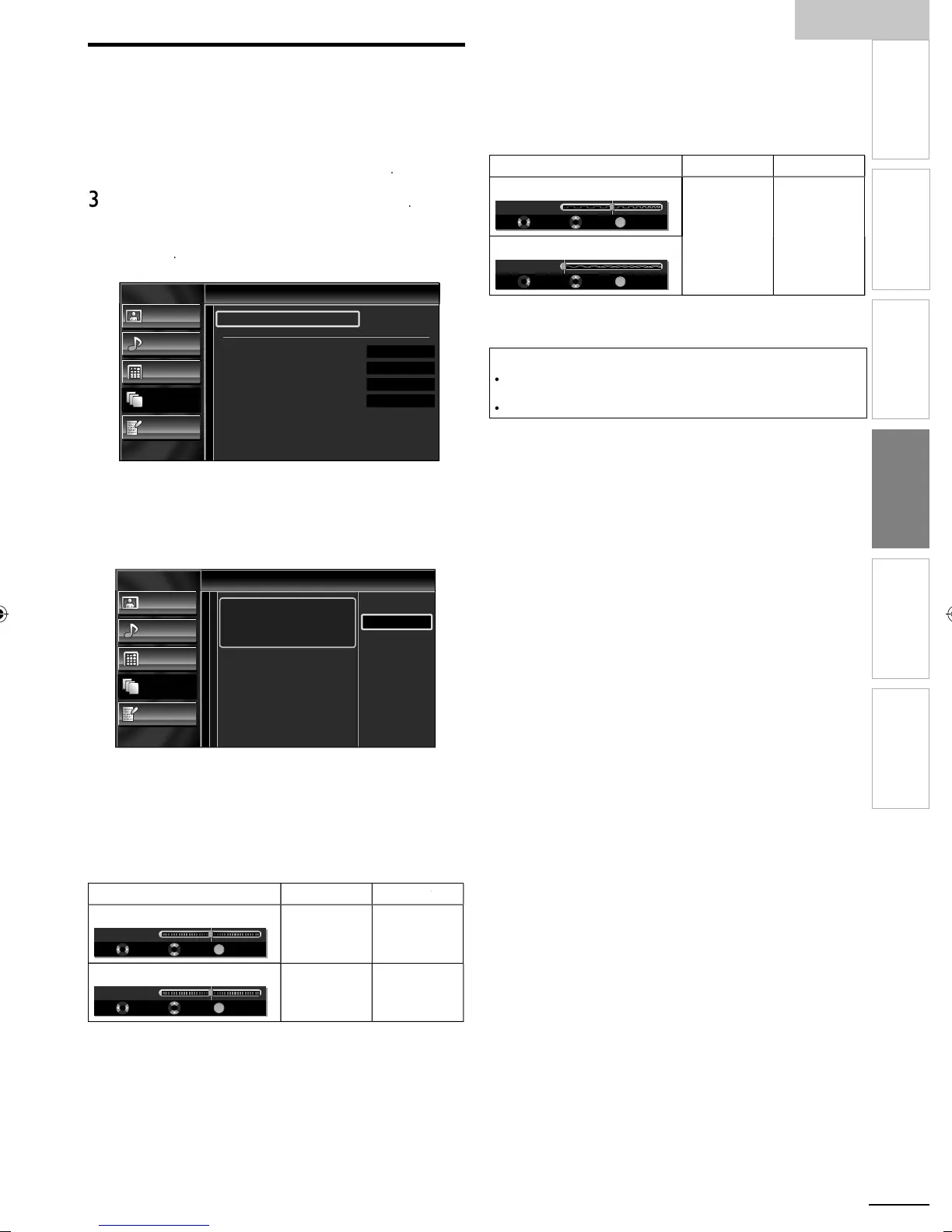
Picture
Sound
Setup
Features
Language
PC Settings
Auto Adjustment
Horizontal Position
Vertical Position
Clock
Phase
0
0
0
0
Ad
ust the settin
uto Adjustmen
se ▲/
to se
ect
djust
, t
en press
K.
Picture
Sound
Setup
Features
Language
Auto Adjustment
To automatically synchronize the
phase and clock on the TV and PC.
Cancel
Adjust
he horizontal/vertical
osition, c
oc
an
ase of the
C screen are automaticall
ad
usted
Horizontal Position, Vertical Position
se
/► to a
ust
o
izontal Position
OK
-
+
H. Position 0
Adjust Move OK
o move PC
screen left
o move PC
screen r
t
Vertical
osition
OK
-
+
V. Position 0
Adjust Move OK
o move PC
screen
own
o move PC
screen up
lock, Phas
se
/► to a
ust
Clock
sett
ng to sta
ze
he PC screen and
ase
sett
ng to
mprove t
e c
ar
ty
of the PC screen
urso
ursor
loc
OK
Clock 0
Adjust Move OK
to
ecrease
sett
ng va
ue
o
ncrease
sett
ng va
ue
P
ase
OK
Phase 0
Adjust Move OK
ress
to ex
t
Note
ou may not o
ta
n an appropr
ate screen w
t
uto
djustmen
for some signals. In this case, adjust the settings manually
d
ust
ase
settin
afte
Clock
sett
n
as
een
ro
er
a
uste
A0171N1UHmasterdraftENv1.indd29A0171N1UHmasterdraftENv1.indd29 2010/01/2922:58:042010/01/2922:58:04


 To Next Page