2-6
LS 5700/LS 5800 Product Reference Guide
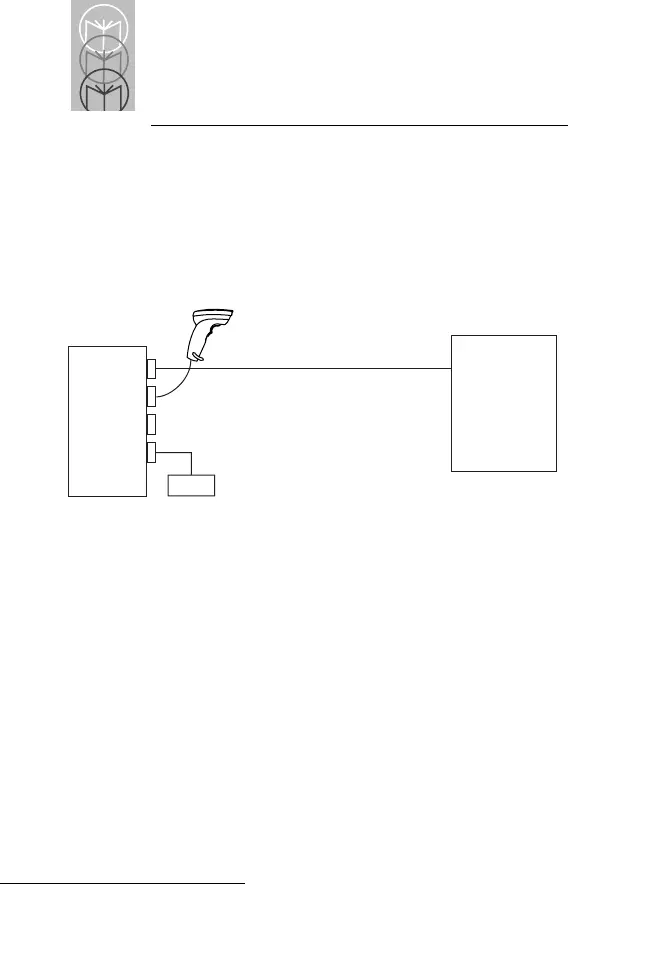
To an RS-232C Host Using the RS-232C Port
Connect one end of the RS-232C cable to the RS-232C port,
and the other to the host. Attach the power supply to the
Power port. If additional scanning versatility is desired,
plug a Synapse-compatible scanner into the Hand-Held
Laser Scanner port (Figure 2-5).
Figure 2-5. Connecting to an RS-232C Host
In this configuration, an external power supply is required.
LS 5700/
LS 5800
RS-232
Host
Power



 To Next Page