30
Rev. 12GB0712
SYSTEMA S.p.A.
AIRTIGHT GAS CONVECTORS
3.9 Starting and operation of pilot
flame devices (Mod. K21, K28,
K40, K55, K28V, K40V, K55V)
1) Set the dial (1) in the position () on the index (See
Draw 30).
2) Press the dial (1) and keep it pressed down for
approx. 10 seconds.
3) Press the piezoelectric button (12) to light the bur-
ner’s pilot flame.
4) After lighting the burner’s pilot flame, keep the dial
(1) pressed down for approx. 10 seconds, and then
release.
5) Turn the dial (1) counter-clockwise to fire the main
burner and set it on the index at values from 1 to 7
which correspond to 13 ° - 38 °C respectively.
6) In order to switch the main burner off, rotate the dial
(1) to the (î) position () on the index. In order to
switch the burner’s pilot flame off (and consequently
the unit itself), turn the dial (1) to the (l) position ()
on the index.
Wait 60 seconds before trying to start the device again.
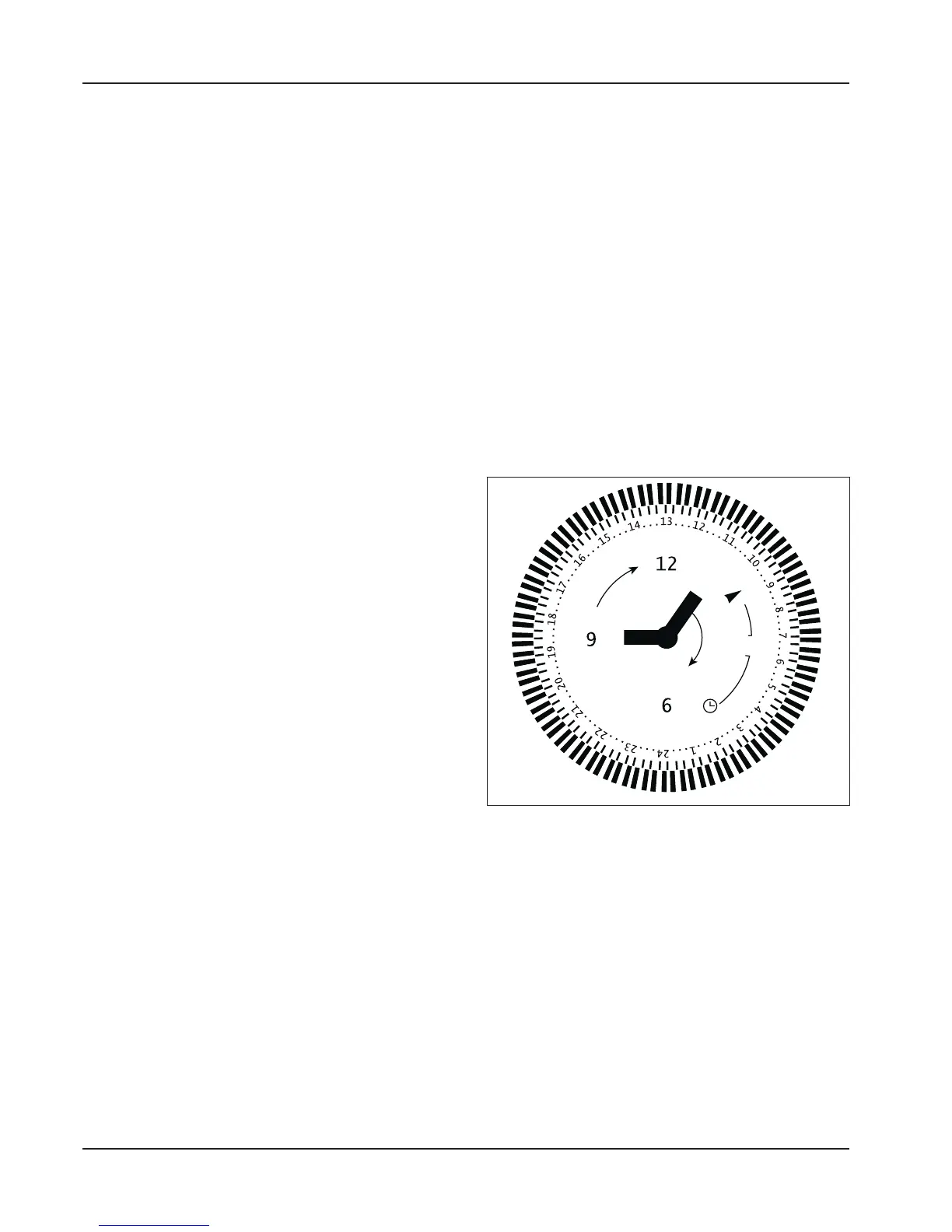
3.11 Utilization of the daily pro-
grammer (optional)
1) Set the right time using the white reference triangle
positioned above the programmer disk’s
starting/switch-off switch by rotating clockwise.
2) Pull the sectors on the programmer disk correspon-
ding to the period of operation desired outward (for
example, from 10.00 AM to 17.00 PM). These sec-
tors are used to set the period of operation.
3) Numerous intervals of operation throughout the day
can be programmed by selecting the sectors as
required.
4) When setting starting at 10.00 AM and switch-off at
17.00 PM, the device will always start and stop at
the same time, day after day, for the period of time
set.
3.10 Starting and operation of
electronic devices (Mod.
K21E, K28E, K40E, K55E,
K28VE, K40VE, K55VE,
K21FE, K28FE, K40FE,
K55FE)
1) Press the bipolar switch “ON - OFF” to connect vol-
tage to the circuit.
2) Position the 0-40 °C thermostat on the desired tem-
perature value. After these operations have been
performed, the “green operation” light will automati-
cally light up. Once the temperature set on the ther-
mostat has been reached, the “green operation”
light that indicates flame presence will switch off.
3) Press the bipolar switch to turn the device off.
ATTENTION! When using the daily program-
mer, the program set will be run when the
switch is set in the central position. When
set in the “I” position, the device will operate
continuously and the timer will be disabled.
When set in the “O” position, the device will
switch off and the timer will be disabled.
Draw 32


 To Next Page