15
English
USB XLR COAXIAL OPT
DIGITAL INPUT
XLR COAXIAL
12 V
TRIGGER
OUT
D4D1 D2 D3
BALANCED UNBALANCED
L LR R
AC IN
R L
2
1
3
INPUT R INPUT L
UNBALANCED BALANCEDUNBALANCEDBALANCED
SPEAKER R SPEAKER L
ON OFF
AUTO
POWER DOWN
12 V
TRIGGER IN
AC IN
BALANCED
UNBALANCED
BI-AMP
STEREO
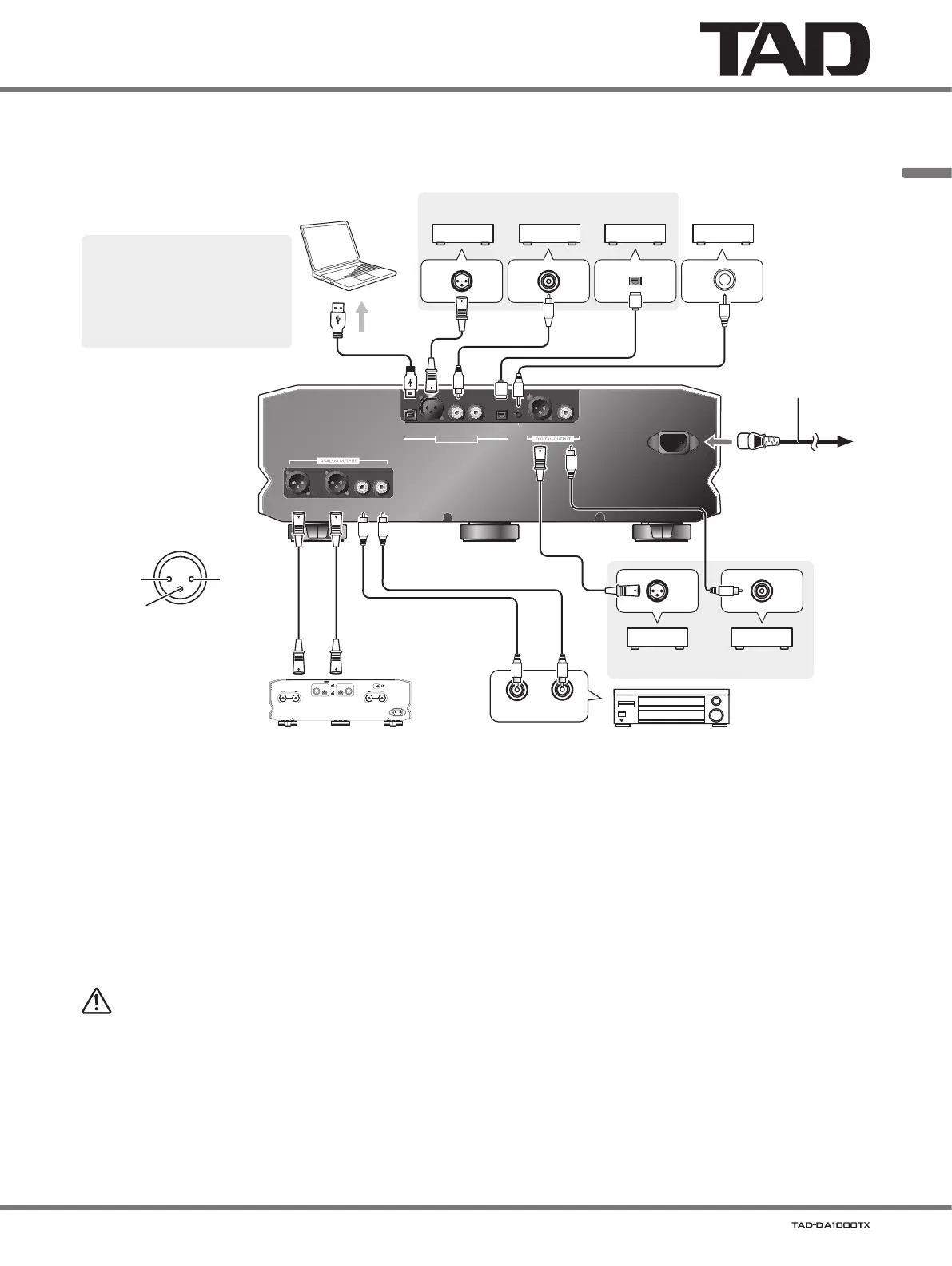
1. Turn on power to both the unit
and computer.
2. Switch the unit’s input to U1.
3. Using a USB cable, connect
the computer and unit; when
this is done the proper driver
will be automatically installed
(page 17).
Computer with USB port
Component with digital output connector
1: Ground
2: Hot
3: Cold
BALANCED
output connector
(XLR-3-31 equivalent)
Power amplifier with balanced input connectors Power amplifier with unbalanced input connectors
Power cord
(supplied)
To AC
Power outlet
Component with digital
input connector
When connecting with a power amplifier
Line output volume
As the line output volume is mounted, a simple system can be configured only by connecting a power amplifier.
About the balance/unbalance line output level
'
The initial value for the line output is set at 30. For details, refer to Adjust the sound volume on page 16.
WARNING
'
When using the volume function and connecting directly to a power amplifier (without using a pre-amplifier), be sure to
make the connection only after setting the volume to
“0” (zero)
. If the connection is made with the volume set to a large
value, an excessive sound volume is generated to damage the speaker or your hearing ability.
In case of a power amplifier with
a 12 V trigger input terminal.
Commercially available 3.5
Φ
monaural pin cable (without
resistance)


 To Next Page