- 41 -
9.2.3 Conditions depending on satellites
Among the other uses of satellites they can be used for defining conditions on their
status. Now remember that satellites can be attached to other outputs, so combining
the two features enables us actually to define conditions depending on the status of
any output. See the explanation about the CONDITIONS LIBRARY above.
9.3 Virtual Water Meters
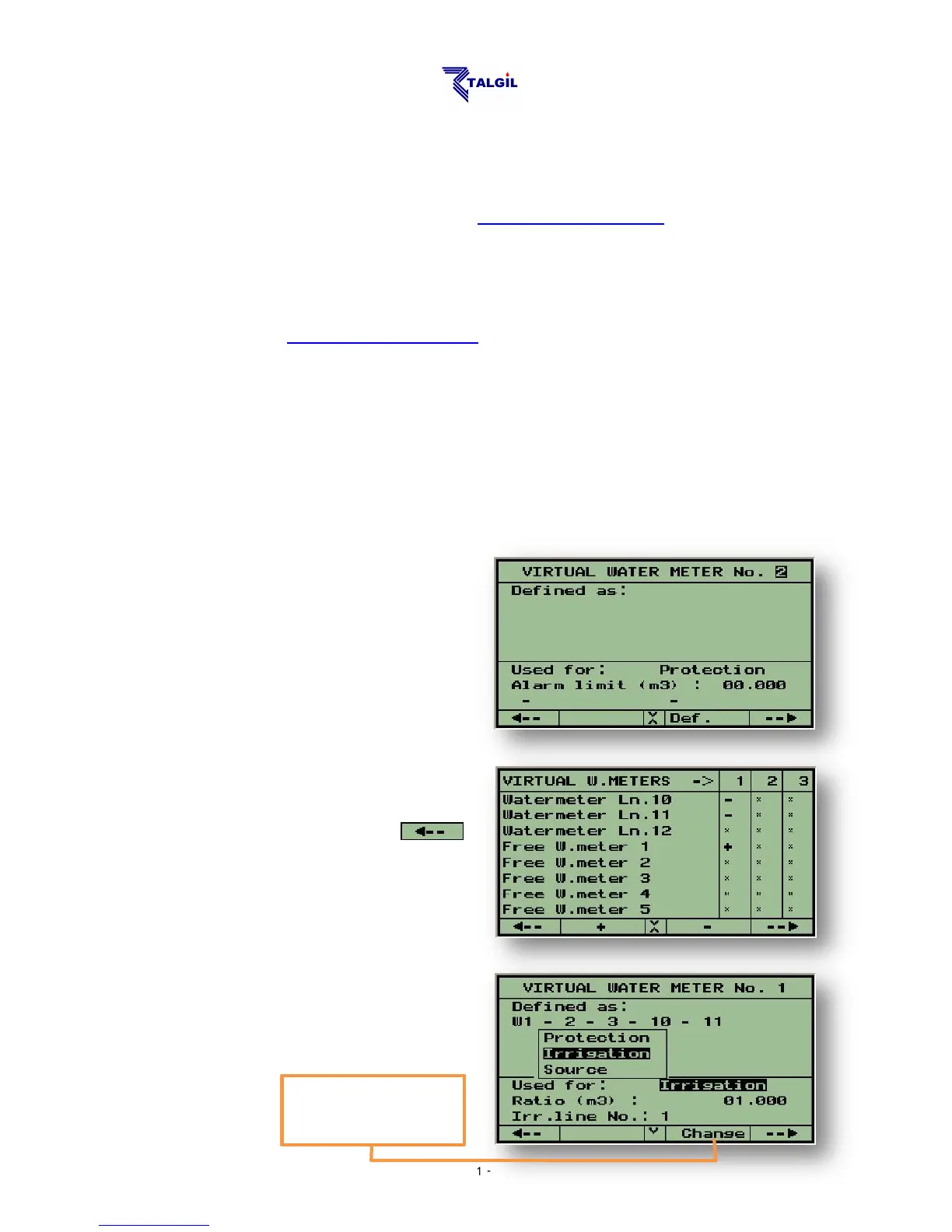
Virtual water meters are calculated water meters, which result from an arithmetic
combination of real water meters. Prior to using virtual water meters, they must be
allocated at the DEALERS DEFINITIONS.
The DREAM 2 recognizes three types of virtual water meters according to their
uses:
For irrigation – measuring the water used by an irrigation line.
For network protection – measuring the balance between the water going into
and exiting from a particular network.
For water sources – measuring the amount of water supplied by a water
source.
The first step in the definition of a
virtual water meter is the definition of
the arithmetic formula associated with
it. Use F3 = “Def.” for opening the
screen (see below) in which all the
water meters of the system are listed.
Any water meter can be included in the
formula by marking it positive (+) or
negative (-). After marking all the
required water meters use F1=
to return to the former screen in order
to complete the definition.
The next step will be the selection of the
type of the water meter according to its
use.



 To Next Page