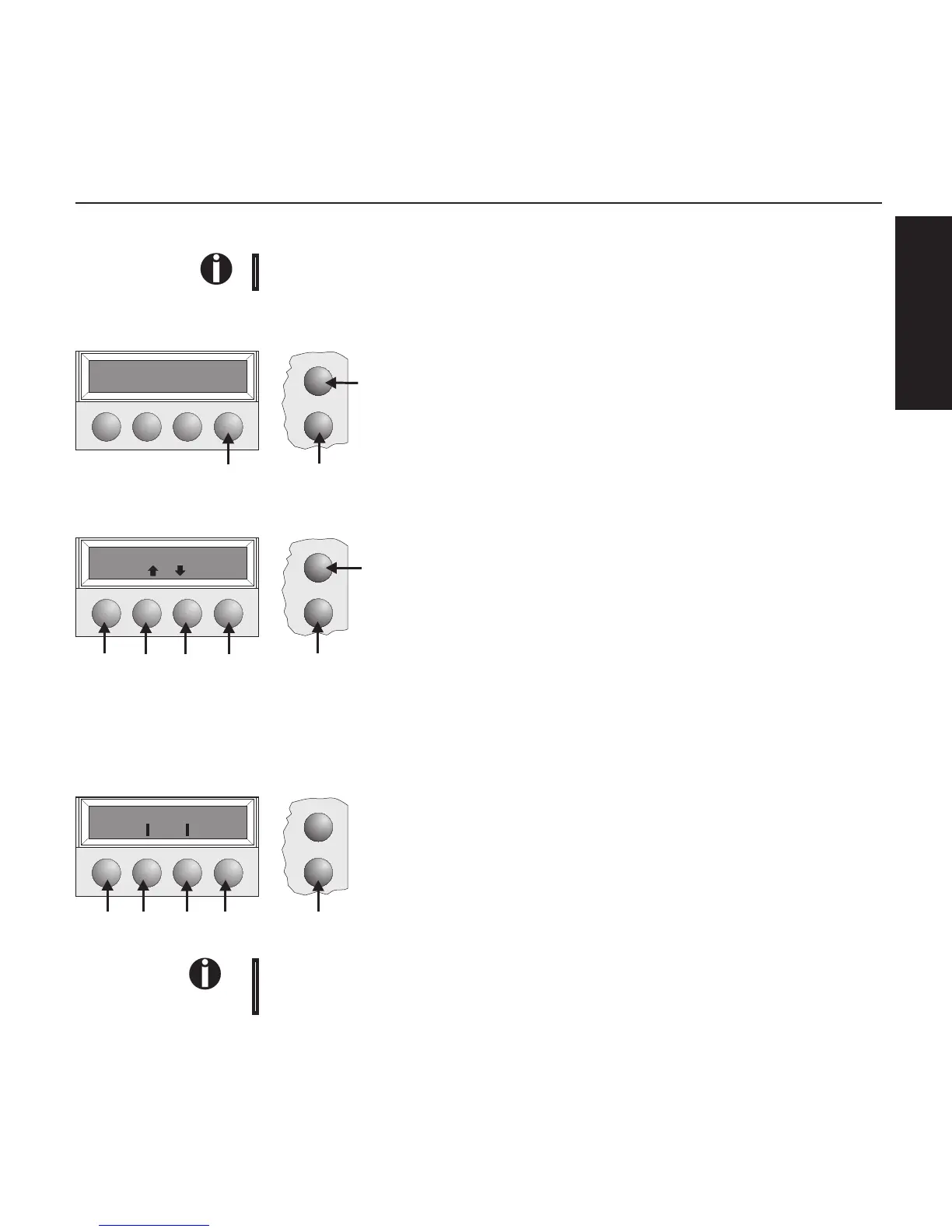
Controlpanel Youcancontrolprinteroperationusingthecontrolpanelandthekeys.
ThefirstlineofthedisplayinformsyouaboutwhethertheprinterisinOnlineorinOffline
modeandaboutthepaperpathselected(Trac.1orSingle).
➤Onlinemode Whenswitchingontheprinter,itautomaticallyselectsOnlinemode.Itcanreceivedatafromthe
computeronlyinthismode.
➀SetstheprintertoOfflinemode.
➁SetstheprintertoSetupmode.
➂Tearkey:Activatesthetearfunctionwhenfanfoldpaperisloaded
(seepage15).IfLoadisdisplayedabovethiskey,nopaperisloadedin
theprinter;pressthekeytofeedpapertotheprintingposition.
➤Offlinemode Stepfeeds,linefeedsandformfeedscanbeperformedviathecontrolpanelonlyinthismode
(seepage15).
➀SetstheprintertoOfflinemode.
➁SetstheprintertoSetupmode.
➂Ifnopaperisloaded:Loadkey(seeabove).Ifpaperisloaded:
Shortkeypress:Linefeed(LF)
Longkeypress:Formfeed(FF)
➃Shortkeypress:Micro-stepreturn
Longkeypress:Constantpaperfeedreturn
➄Shortkeypress:Micro-stepforward
Longkeypress:Constantpaperfeedforward
➅Clearsthepaperpathwithpaperloadedandactivatespaperpathquick
selection(seepage14).
➤Setupmode
➀SetstheprintertoSetupmode.Inthismode,thefollowingsettingsare
available:
➁Setsthefontandthenumberofcharactersperinch(Charmenu).
➂Paperpath(Paperwaymenu)
➃Tearpositionandfirstprintingline(Adjustmenu)
➄Othermenusettings(Menu)
Accesstotheothermenuoptionsisdisabledbythemanufacturer.Forinformationonhowto
enableaccesstotheseoptionsaswellasabouttheoptionsavailable,refertotheonlinedocu-
mentationontheCD-ROM,chapter1, Operation (Unlock the menu mode).
Setup
Online
Online Trac.1
Tear
➁
➂
➀
Setup
Online
Offline Trac.1
Park LF/FF
➁
➂➃
➄➅
➀
Setup
Online
Adjust Paperway
Menu Char
➃
➂
➁
➀
➄
ENGLISH
Quickstart-up Controlpanel
7



 To Next Page