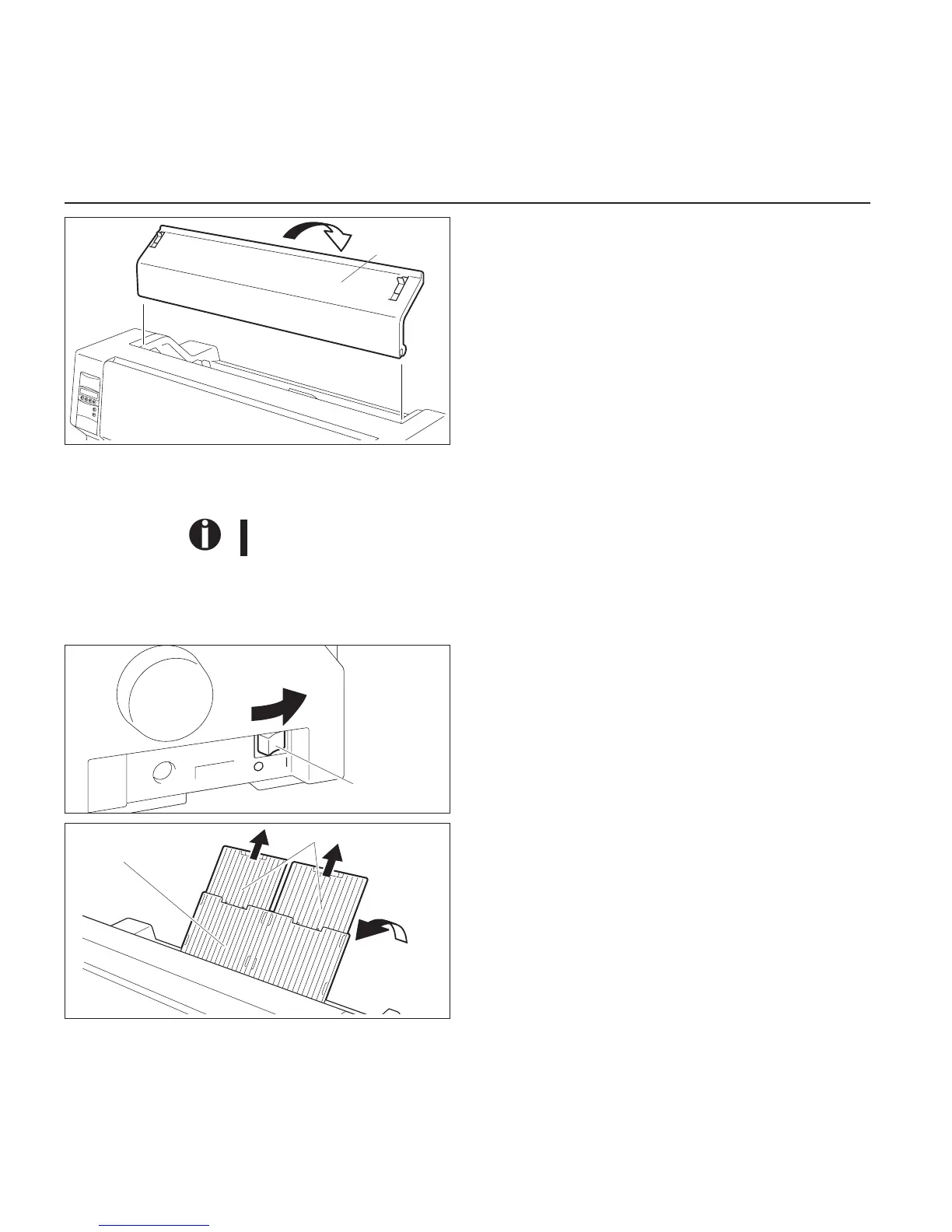
WhentheInk-ribbonCartridgesettingiscomplete,attachthe
AccessCover.
SetthePaperThicknessAdjustmentLeverinaccordancewith
thethicknessofthepapertobeused.Refertopage18(Setting
theprintheadgap).
Loadingpaper
Onlyusepaperwhichissuitableforthisprinter.Formoreinformation,refertotheonline
documentationontheCD-ROM,AppendixC(Specification).
➤CutSheetpaper CutSheetPaperistobeinsertedfromthefrontoftheprinter.Thepost-printpapercanbefedout
fromtherearorthefront.PleaserefertotheonlinedocumentationontheCD-ROM,Chapter1,
Menu description table.
TurnthePowerSwitchoftheprinterON(“|”).
AdjustthePaperThicknessLeveraccordingtothetypeofpaper
tobeused.Refertopage18(Settingtheprintheadgap).
StandthePaperTrayupinthedirectionindicatedbythearrow.
WhileholdingthePaperTray,pullupthePaperExtension
Trays.
Access
Cover
Power Switch
Paper Tray
Paper Extension Trays
Loadingpaper Quickstart-up
10



 To Next Page