General Functional Description
3-2
3.1.4
Data Transfer The main difference between the parallel and the optional serial interface is the form
in which the data bytes are transfered. The serial interface transfers bits in a row, one
after the other. Theoretically you only need three connections for this form of data
transfer. In the parallel interface the data transfer of the 8 bits (1 byte) is completed
simultane-ously through 8 parallel connections. At least 11 connections between the
computer and the printer are necessary for this procedure.
With the parallel Centronics interface data up to 100.000 bytes /seconds theoretically
can be transfered. Actually the printer opperates with a maximum transfer frequency
of approx. 30.000 bytes/second. This “Data Flow”, depending on the adjustment of
the input buffer (0-128 KB) on your printer, can be temporarily stored.
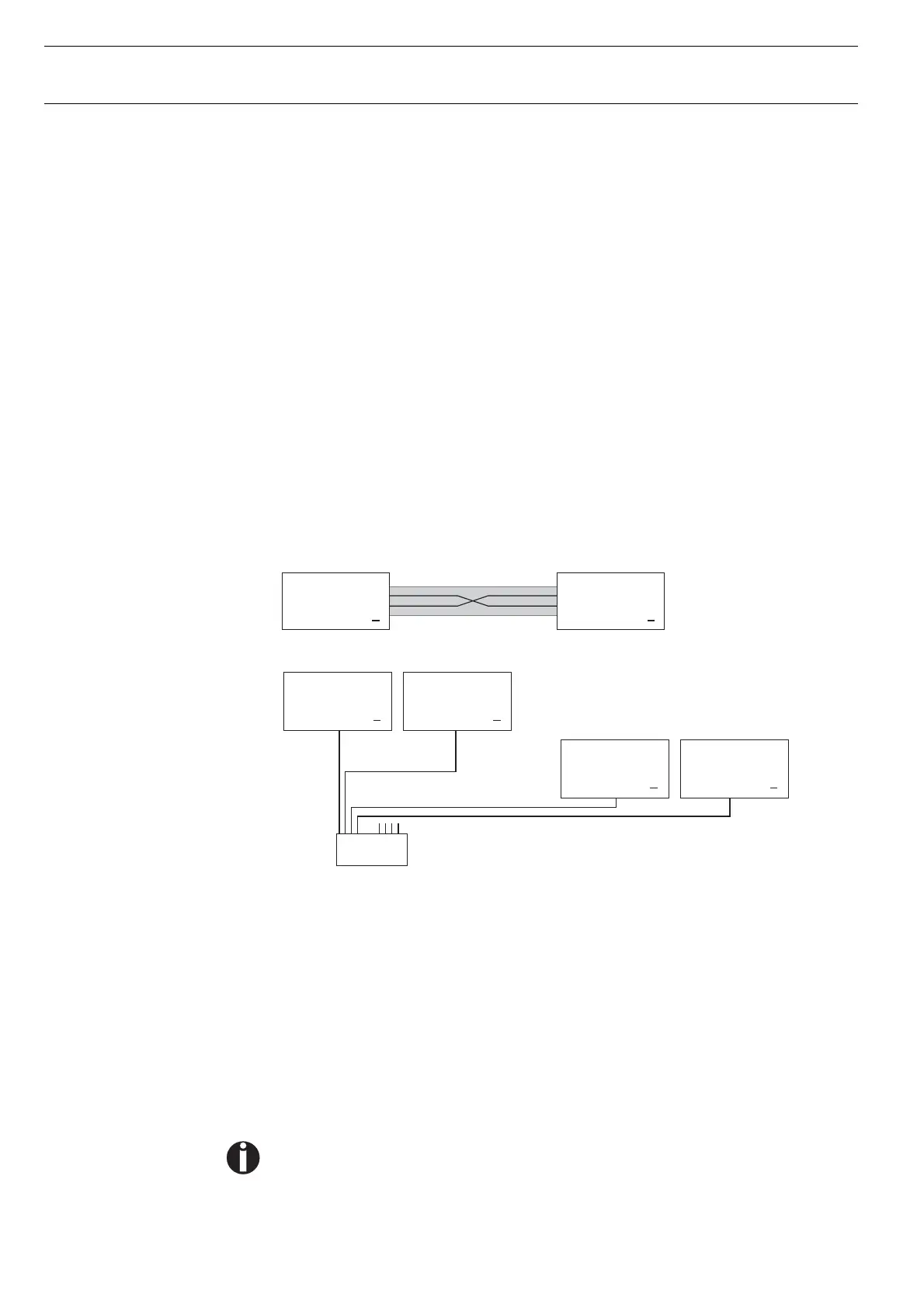
When using your printer in a local network with Ethernet connections and the TCP/IP
protocol, you have to assign several address informations.
The assumed address space corresponds to the TCP/IP adress, class C,
192.168.1.xxx.
The subnet mask to be used is 255.255.255.0.
The address of the router, or gateway, is 0.0.0.0, if not available.
3.1.4.1
Example of a printer
connected to a computer
in an Ethernet
3.1.4.2
Example of several de-
vices in an Ethernet
3.1.5
Monitoring The most important functions are monitored with sensors, microswitches and elec-
trical monitoring circuits. These are constantly checked, processed by an internal
logic and indicated on the display.
To prevent an overheating of the printhead, 12 coils of the 24 electromagnets are
monitored. If the temperature reaches a value above 130 °C the speed of the printer
is automatically slowed down. As soon as the printhead has cooled the printer works
with high speed again.
If a coil becomes defective, this is recognized by the firmware and shown on the
display (Head defect, THS Error, Head Hot permanently).
Obviously a worn out print head may cause “Head Hot” message as well.
For safety reasons the top cover is also monitored. If you should open the top cover
during printing operation, then the printout is momentary stopped (to avoid injuries).
When you close the cover again the printout is continued without loss of data.
Caution: !Twisted-pair cable required
Computer 1
IP: 192.168.1.1
Printer 1
IP: 192.168.1.2
HUB
4-fold or 8-fold
...
Printer 1
IP: 192.168.1.3
Printer 2
IP: 192.168.1.4
...
Computer 2
IP: 192.168.1.2
Computer 1
IP: 192.168.1.1




 To Next Page