Testmodes and Troubleshooting Caring, Lubrication and Maintenance
4-21
4.4
Caring, Lubrication
and Maintenance
The printer needs only very little cleaning maintenance. When cleaning the printer,
observe the following points:
– Before cleaning, turn off the printer and disconnect the power cable. Never
usestrong detergents or alcohol-based cleaners.
– Clean the outside surfaces of the printer with a soft, fluff-free cloth.
– Special printer bar cleaner can be purchased in specialised shops.
– Remove all dust and paper residues from the printer mechanism using a brush.
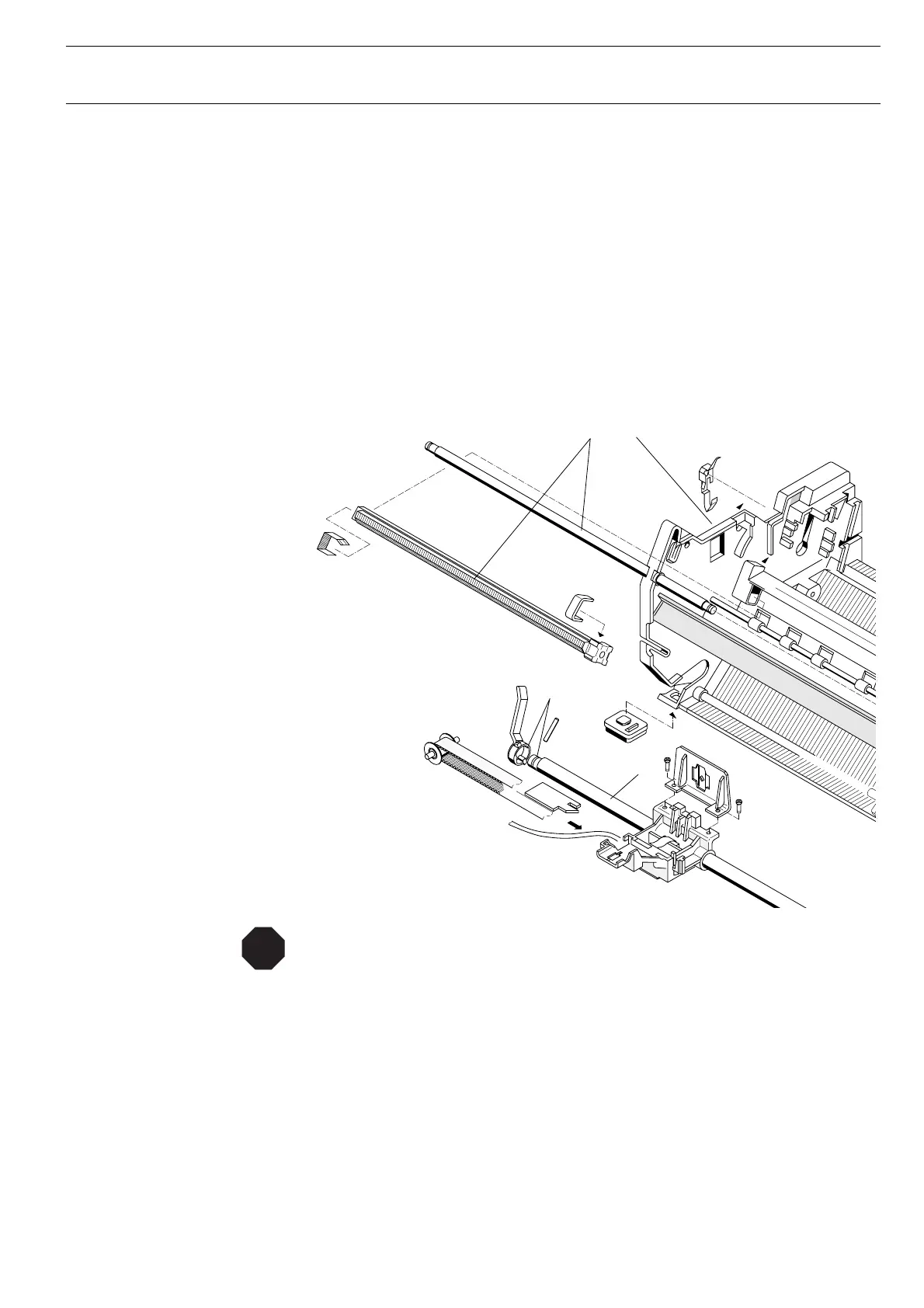
Lubrication
A This points must not be lubricated. In any other case damages or malfunction may
occur
B This point (Lever 053213 and Bearing of axle) may be lubricated* if the printer is
to be maintained.
C Excentric wheels on each side (not visible here) may be lubricated* if the printer is
to be maintained.
* Recommended: Molykote “Longterm W2 Wälzgleitlager Fett/Grease Weiss/white”
A C
A
B
STOP




 To Next Page