Test Functions Testmodes and Troubleshooting
4-2
4.1
Test Functions
In order to test whether your printer is functioning properly, you can choose from a
selection of different test functions. With these tests you can check print quality,
function of the printhead and mechanism as well as data transfer from computer to
printer.
To enter the test mode of the printer, keep the ONLINE button depressed while
turning on the printer. Keep the button depressed until the printer emits a short
acoustic signal.
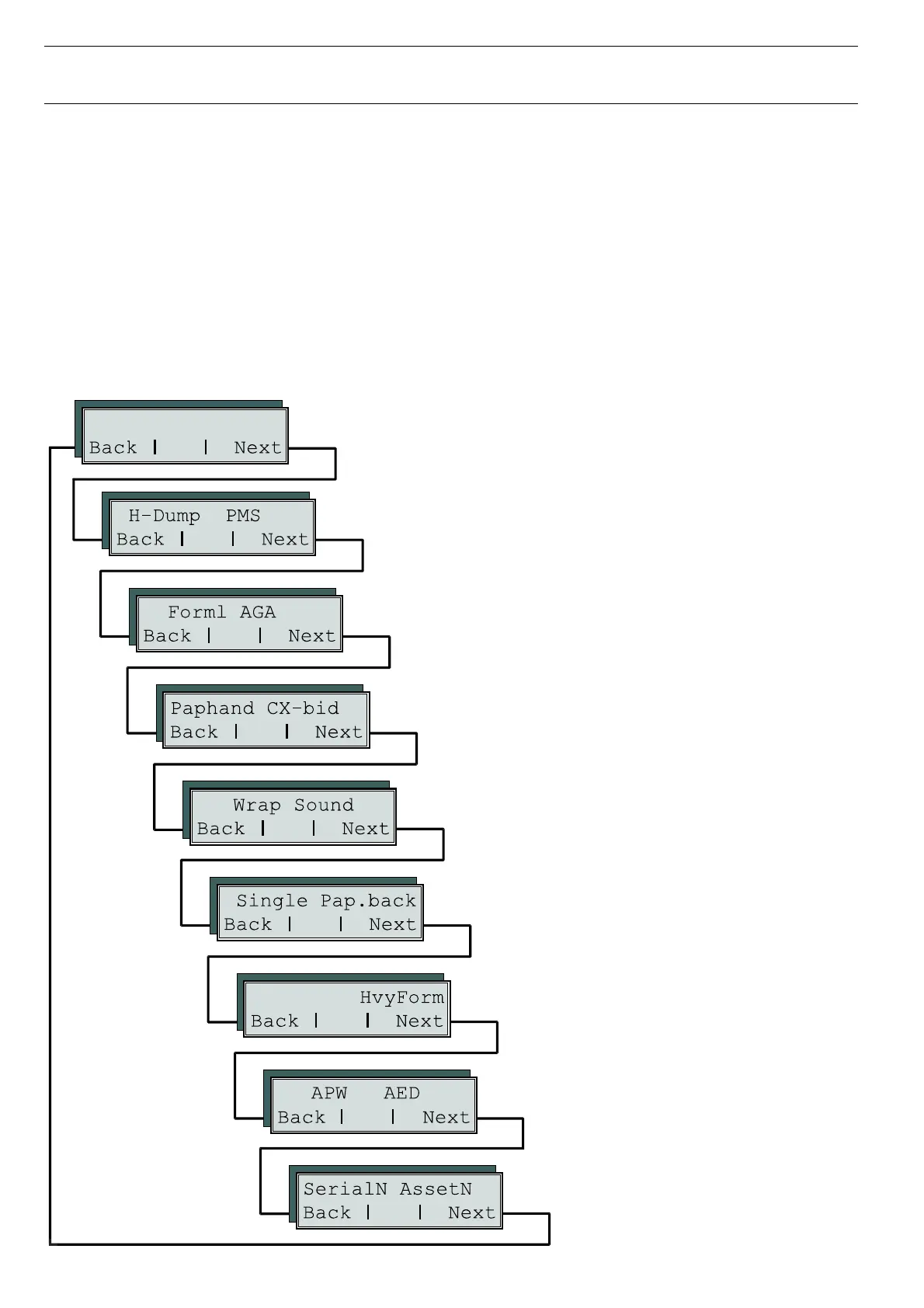
The test menu offers you test functions, adjustment functions and special settings
which are described in the in the User Guide as well.
ASCII80 ASCII136
W Single does not apply to this printer
Setting for printing on paper with dark back
W Setting default form length and the Automatic Gap Adjustment
for the print head
W Setting line wrap and sound when paper empty
W To print copy paper
W Automatic paper width detection and preci-
se positioning of the paper at the tear edge
after cutting action and subsequent change
of the paper path
W Settings to facilitate handling paper of poor quality and the
parallel interface
W Changing serial number and asset
number of the printer
W Interface test and activating the paper motion sensor
W ASCII test with 80 or 136 characters per line.




 To Next Page