5–Song Management
TASCAM DP-004 49
Creating a new song
Follow these procedures to create a new song in the
active partition
1 With the transport stopped and the Home Screen
open, press the MENU key to open the
MENU
screen.
2 Use the DATA wheel to select
SONG
and press F4 (¥)
to open the
SONG
menu screen.
3 Use the DATA wheel to select
CREATE
and press F4 (¥)
to open the
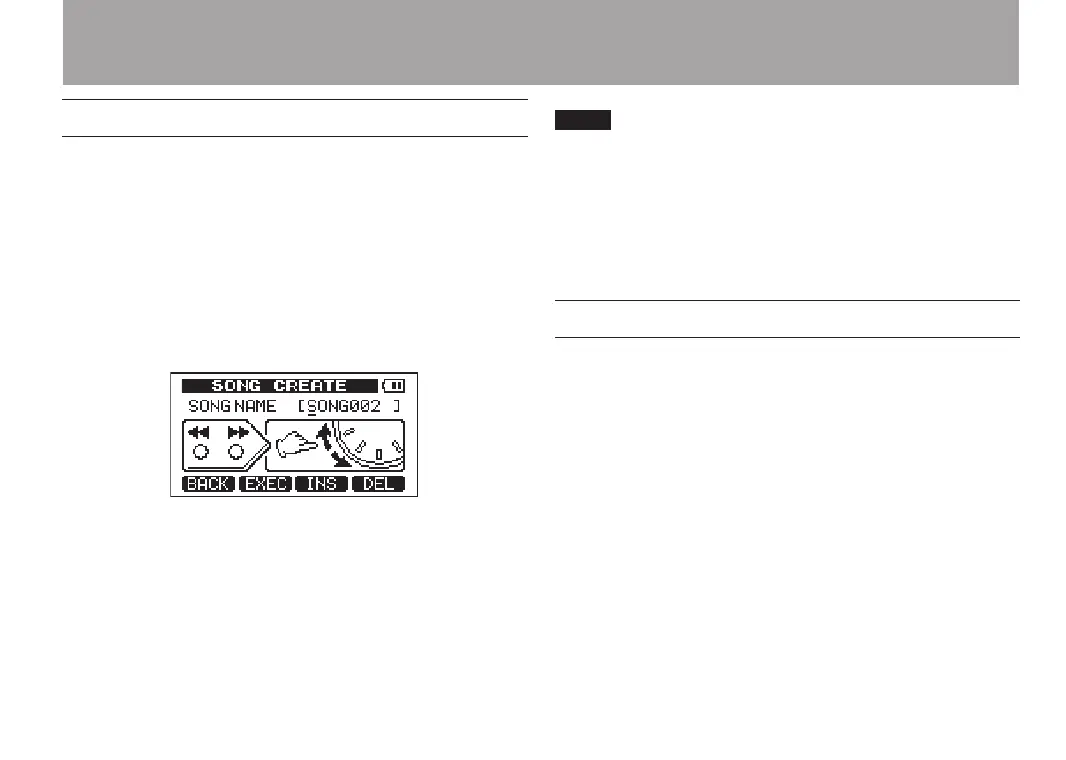
SONG CREATE
screen.
A default song name like
SONG***
is given to the
new song. The asterisks indicate a number. In the
example above the name is
SONG002
.
4 Change the song name as necessary (see “Editing
names” on page 43).
You can rename a song later by selecting NAME EDIT
from the SONG menu. You can also edit the song name
when saving it.
5 Press F2 (
EXEC
) to save the currently loaded song and
create the new song.
Saving a song
This unit automatically saves the current song
during shutdown and when loading another song, for
example. You can also save a song at any time using
the following procedures.
1 When the transport is stopped and the Home
Screen is open, press the MENU key to open the
MENU
screen.
2 Turn the DATA wheel to select
SONG
, and press the
F4 (¥) key to open the
SONG
menu screen.
3 Turn the DATA wheel to select
SAVE
, and press the
F4 (¥) key.


 To Next Page