TASCAM DR-60D
17
2 – Names and functions of parts
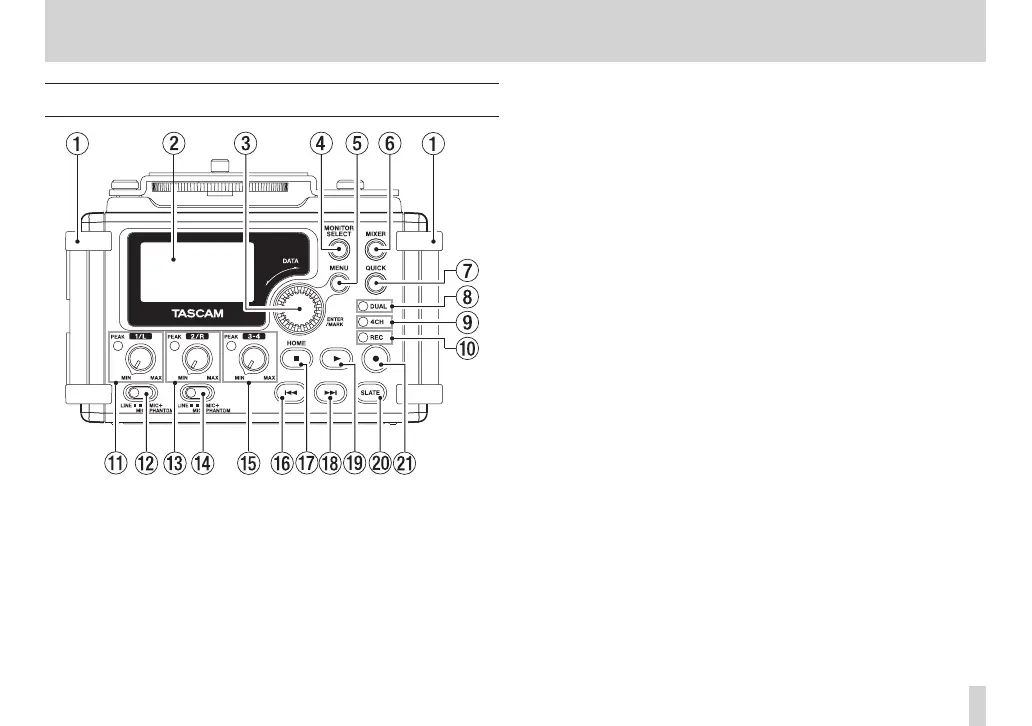
Front panel
1 Handles
Attach a strap, for example, here.
2 Display
Shows a variety of information.
3 DATA dial (ENTER/MARK)
Turn to select items and change values on setting screens.
Use also to change the playback position in a file.
Push to confirm selections on setting screens and to answer “YES”
to confirmation pop-up messages.
Press during recording to add a mark manually. (See“Adding
marks manually to a recording” on page 59.)
Press the . or / button while pressing and holding this
dial to move to the previous or next mark, respectively. (See
“Moving to a mark position” on page 59.)
4 MONITOR SELECT button
When not playing back, press to open the monitoring source
selection pop-up menu.
When playing back dual-recorded files, press to switch between
files.
5 MENU button
When the Home Screen or
MIXER
screen is open, press to open
the
MENU
Screen.
When a setting screen is open, press to move up one level in
the menu. When the
MENU
Screen is open, press to return to the
Home Screen.
6 MIXER button
Press this button to open the
MIXER
screen.
When the
MIXER
screen is open, press this button to return to
the Home Screen.



 To Next Page