24
TASCAM DR-60D
2 – Names and functions of parts
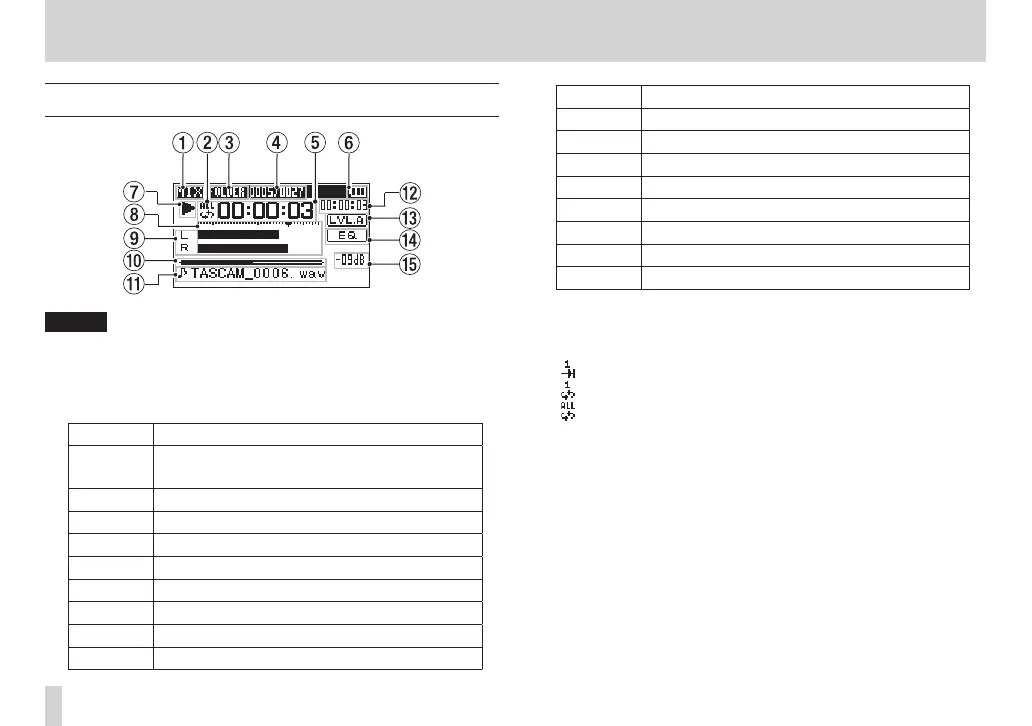
Home Screen
NOTE
When monitoring, some meters, icons and other items will
change to recording screen appearance.
1 Monitoring mode
This shows what audio is now being monitored.
Indicator Meaning
MIX
Mix of channels 1-4,
or dual recording mode main file
SUB Dual recording mode sub file
1+2 Mix of channels 1-2
3+4 Mix of channels 3-4
CAM CAMERA IN jack sound input
CH1 Channel 1 sound input
1-M Left channel of dual recording mode main file
1-S Left channel of dual recording mode sub file
CH2 Channel 2 sound input
Indicator Meaning
2-M Right channel of dual recording mode main file
2-S Right channel of dual recording mode sub file
CH3 Channel 3 sound input
3-M Left channel of dual recording mode main file
3-S Left channel of dual recording mode sub file
CH4 Channel 4 sound input
4-M Right channel of dual recording mode main file
4-S Right channel of dual recording mode sub file
2 Repeat playback setting
One of the following icons appears according to the current
setting.
Single file playback
Single file repeat playback
All file repeat playback
3 Playback area
This shows the current playback file area.
ALL
All files in the MUSIC folder
FOLDER
All files in the selected folder
4 Current playback file number/total number of files
This shows the current file number and total number of files in
the current playback area.
5 Elapsed time
This shows the elapsed time (hours: minutes: seconds) of the
current file.



 To Next Page