TASCAM DR-60D
23
2 – Names and functions of parts
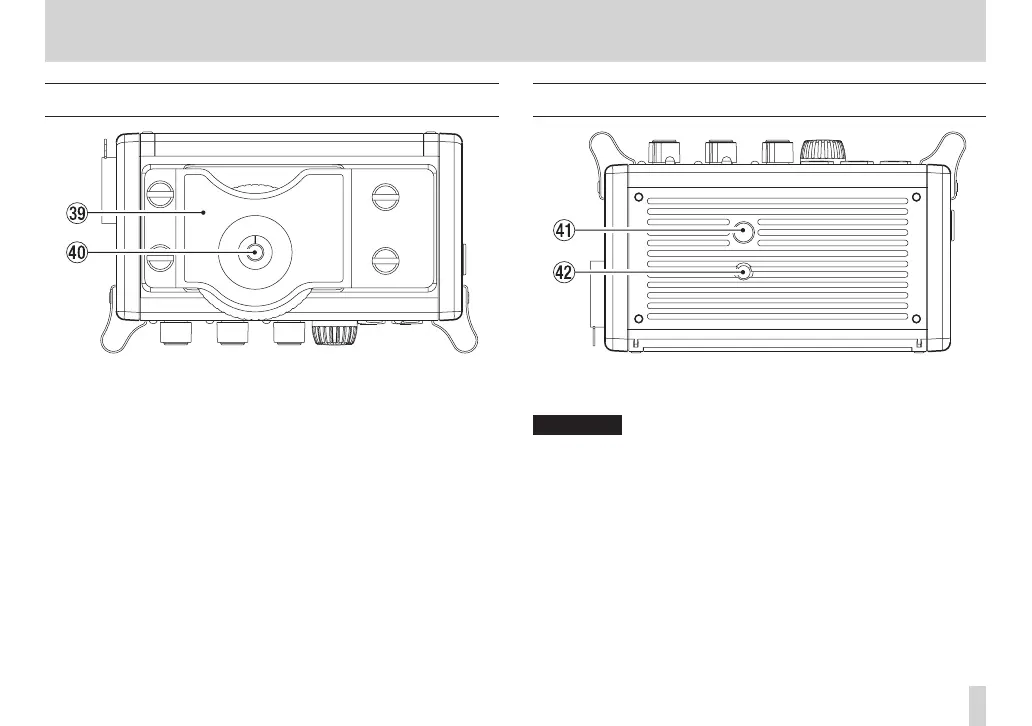
Top panel
. DSLR attachment bracket
Use this bracket, which is preinstalled on the unit, with the DSLR
mounting screw.
If you do not want to use this bracket, use a coin or other tool to
remove the four attachment screws.
/ DSLR mounting screw (1/4-inch)
Use to attach this unit to the bottom of a camera or a rack that
supports camera mounting screws, for example.
Bottom Panel
! Tripod mounting threads (1/4-inch)
Use to attach this unit to a tripod.
CAUTION
•
Tighten the unit securely to the tripod or microphone stand to
prevent it from falling off.
•
Place the tripod or microphone stand on a level surface when
using it with this unit.
•
Some tripods have different screw specifications that make direct
connection impossible. Use a commercially-available adapter
with such tripods.
@ Video camera pin hole
When using a tripod with a pin for video cameras, align this hole
with the pin when attaching the unit to the tripod.



 To Next Page